How to Document Processes and Procedures

There are two very different reasons for writing procedures, and your answer defines the results you will get. Many people document daily tasks so they can train others or comply with a requirement, a kind of “punch card” or “time clock” mentality. Others document a process so they can produce better process results, a business process improvement mentality. Effective documentation must connect both purposes.
Start with the result the process must produce. Map the work from input to output, identify the owner, handoffs, decisions, controls, and feedback, and then write the procedures people need to carry out the work consistently. That is the best way to document processes and procedures without turning the result into paperwork that nobody uses.
Writing Procedures Not Processes
Writing procedures to document daily tasks can help you train new hires and demonstrate that required work was performed. However, a procedure is not the entire process. A process connects suppliers, inputs, activities, decisions, outputs, and customers. A procedure explains how a person performs a defined part of that process.
When users blindly follow checklists without understanding the desired result, you get a ballistic implementation of procedures and blind adherence to tasks. The activity is launched, but nobody checks whether the output reached the right customer, met the objective, or created a problem downstream. Garbage in, garbage out.
You must still ask yourself: Why are you writing a procedure? The goal may be training, consistency, compliance, control, improvement, or several of these at once. The important distinction is whether the work merely accounts for daily production or helps people accomplish something that matters.
Documentation requirements also depend on context. ISO’s current quality-management guidance describes the process approach, documented information, process documentation, metrics, training, audits, and management review as elements of a quality management system. Read ISO quality-management guidance. For U.S. finished pharmaceuticals, 21 CFR 211.100 requires written production and process-control procedures that are approved by the quality control unit and followed during execution. Read 21 CFR 211.100. Sarbanes-Oxley Section 404 applies to covered issuers’ internal control over financial reporting and management’s assessment of those controls. Read the Sarbanes-Oxley Act. None of these sources means every business needs the same document set.
Documenting Processes and Procedures
The alternative to checklist-only documentation is to document the process so you can gain control over each process and improve process results. In practical terms, control means the process has a defined purpose, boundaries, owner, inputs, outputs, measures, decision rules, records, and feedback. NIST explains that process stability makes performance more predictable and supports meaningful capability analysis. Read the NIST process-stability guidance. You can begin improvement before a process is fully stable, but feedback is required to see whether a change helped.
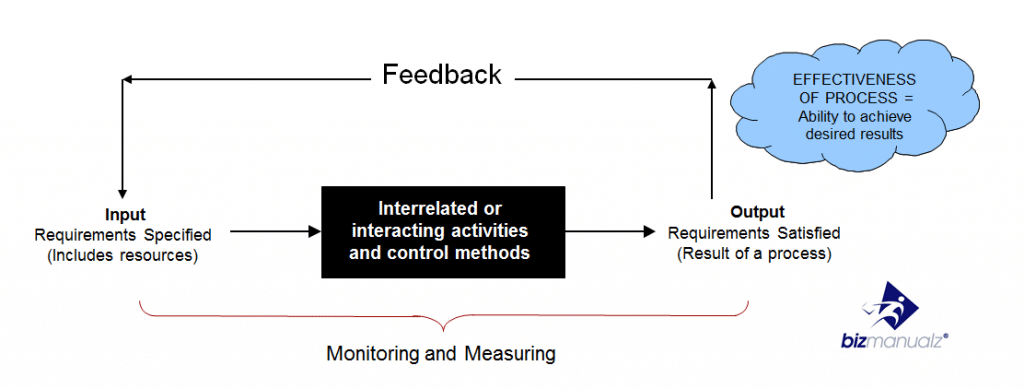
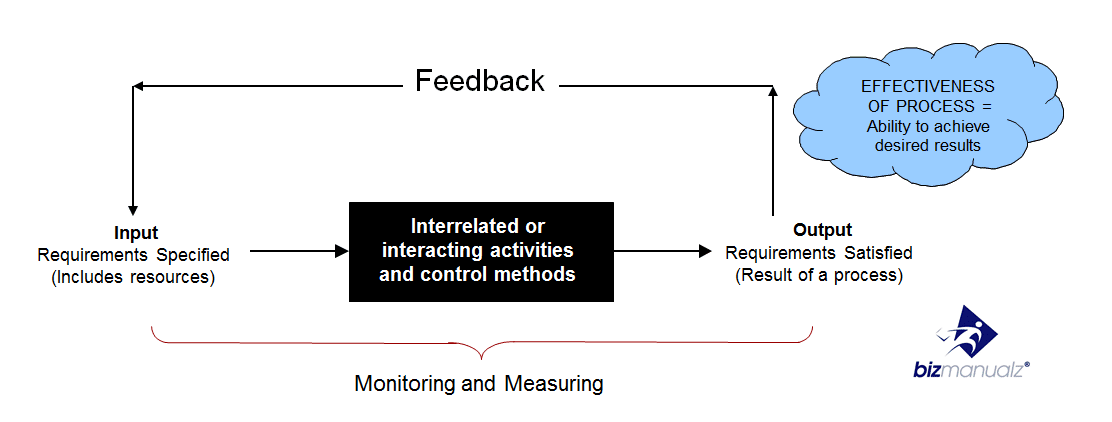
The diagram shows the full control loop: inputs enter interrelated activities, outputs are monitored and measured, and feedback returns to the process. If the labels are small on your device, open the full-size effective process diagram.
How to Document a Process and Its Procedures
1. Define the Purpose, Result, Owner, and Boundaries
Write one sentence that explains why the process exists and what successful output it must produce. Name the process owner, the event that starts the work, and the point where responsibility ends. Clear boundaries prevent one procedure from quietly expanding into several unrelated workflows.
2. Identify Suppliers, Inputs, Outputs, and Customers
A SIPOC view helps you name Suppliers, Inputs, Process steps, Outputs, and Customers before getting lost in detail. A well-defined process can use this view to reveal missing inputs, unclear output requirements, or customers who were never asked what they need.
3. Map the Current Process
Create a simple process map showing the real sequence of work, not the ideal version. Include process steps, decision points, handoffs, waits, rework loops, exceptions, and feedback. Talk with the people who perform the work and the people who receive its output.
4. Write the Procedure at the Right Level of Detail
Turn the relevant part of the map into executable instructions. State the role responsible, prerequisites, ordered actions, decision criteria, required records, controls, and escalation path. Explain what a correct result looks like. Do not bury important exceptions in a note that users will miss.
5. Walk Through the Draft
Ask a person who performs the work to follow the draft while an observer records ambiguity, missing information, unnecessary motion, and unhandled exceptions. Then ask the next customer in the process whether the output is complete and usable.
6. Test and Correct the Documentation
Run representative cases, including a normal case and the most important exception. Correct the process where the design is weak, and correct the procedure where the instructions are unclear. Documenting a broken process more precisely does not improve the process.
7. Approve, Publish, and Train
Have the process owner approve the result and make the current version easy to find. Train people on both the steps and the intended outcome. Define how obsolete versions are withdrawn so users do not choose between conflicting instructions. For more detail, see how to draft, review, and approve procedures.
8. Measure Results and Revise
Choose a small number of measures tied to the desired output, such as turnaround time, defects, rework, completeness, or customer acceptance. CDC defines SMART objectives as Specific, Measurable, Achievable, Relevant, and Time-bound. Read the CDC SMART-objective guidance. Review the documentation when the process, risk, tool, regulation, owner, or expected result changes.
Process Documentation Worksheet
Use this worksheet before drafting detailed instructions. It keeps the process result and control loop visible while you write each procedure.
| Field | Question to Answer | Hypothetical Customer Order Example |
|---|---|---|
| Purpose and result | What must the process accomplish? | Release an accurate order for fulfillment. |
| Owner and boundaries | Who is accountable, and where does the process start and stop? | Sales operations owns the work from submitted order to fulfillment release. |
| Suppliers and inputs | What information or material must arrive, and from whom? | Sales supplies the approved quote, customer details, and purchase order. |
| Steps and decisions | What happens, in what order, and what changes the path? | Check completeness, verify terms, resolve discrepancies, approve or return. |
| Output and customer | What is produced, and who receives it? | Fulfillment receives an approved, complete order packet. |
| Controls and records | What prevents error, and what evidence is retained? | Required-field check, approval record, and exception note. |
| Measure and feedback | How will you know the result is acceptable? | First-pass acceptance rate and correction reasons return to sales operations. |
On a small screen, scroll horizontally to read all three columns.
The hypothetical example shows why a process map and a procedure are complementary. The map communicates the flow and decision points. The procedure tells each role exactly what to do, what evidence to retain, and when to escalate an exception.
Process Maps
Process maps are a graphical tool used to communicate process steps, decision points, handoffs, and what a process does. They help you focus on the process and not just isolated process steps, which helps you evolve away from ballistic procedures. A map does not replace the procedure. It provides the structure that makes the written instructions easier to understand and maintain.
Use the map to ask where information is missing, where work waits, where responsibility changes, and where feedback should return. A well-defined process makes those relationships visible. The procedure can then describe the work without pretending that one checklist contains the whole operating system.
How Do You Keep Process Documentation Current?
When documenting processes and procedures, do not think of it as an event. Your process and procedures journey may start with simple checklists, but you can improve your procedures using process maps, SMART objectives, process control, and feedback. Assign an owner, provide a way for users to report problems, and review the documentation after meaningful changes rather than on an arbitrary rewrite schedule.
Applying these ideas to your core business processes can help teams identify weak handoffs and improve results. You can also download free policies and procedures in editable Microsoft Word templates to create a practical starting point for your own manual.
Frequently Asked Questions
What is the difference between a process and a procedure?
A process is the end-to-end flow that turns inputs into outputs for a customer. A procedure gives a person detailed instructions for completing a defined part of that process.
Should you create a process map before writing a procedure?
Usually, yes. A simple current-state map exposes decisions, handoffs, exceptions, and feedback loops that are easy to miss when you begin with step-by-step instructions.
What information should process documentation include?
Include the purpose, desired result, owner, boundaries, suppliers, inputs, process steps, decisions, outputs, customers, controls, records, measures, exceptions, and feedback path.
Who should review and approve a procedure?
The people who perform the work and receive its output should review the draft. The accountable process owner should approve it, with additional control or subject-matter review where the risk requires it.
How often should processes and procedures be reviewed?
Review them after meaningful changes to the process, risk, tool, requirement, owner, or expected result. A scheduled check can help, but change-triggered feedback keeps the documentation tied to real work.