
How Do You Write a Policies and Procedures Manual Template?

To write a Policies and Procedures Manual Template, start with your process map, choose the business processes that must be performed consistently, assign a process owner to each one, and document the policy, procedure, work instructions, records, reports, and forms that support the work. Use one standard operating procedure template so every procedure follows the same structure.
Your policies and procedures manual, sometimes called a Standard Operating Procedures Manual or SOP manual, should focus on the critical daily tasks that must get done for your business to continue. You do not need to document everything at once. Build the manual around the processes that matter most to safe, consistent, and efficient operations.
Policies and Procedures Manual Template Inputs
Begin your manual preparation by gathering the materials that already explain what the business is trying to achieve and how work currently moves. The amount of documented information should reflect your organization’s size, process complexity, and employee competence. This is consistent with ISO guidance on documented information, which explains that each organization determines the documentation needed for effective planning, operation, and control.
- Business policies, objectives, strategy, mission, and vision documents
- Business Process Maps
- A standard operating procedure template
- Records, reports, and forms used to complete or prove the work
- Schedules, Key Performance Metrics (KPIs), standards, and approval requirements
Use these inputs to define the manual’s scope. A useful scope is specific enough to guide employees but narrow enough to maintain. If a process has a material safety, quality, financial, customer, or compliance consequence, it is a strong candidate for documentation.
Business Policy Deployment
Business metrics show whether a process is meeting its defined requirements. A practical starting point for operations is Quality, Cost, Delivery, and Service or Customer Satisfaction. The actual values you strive for should be derived from your strategy.
Linking your metrics to your processes represents your organizational strategy in action. This is the policy deployment process: strategy informs policy, policy guides process procedures, and procedures and work instructions explain how people carry out the work. Your strategy documents provide context for why a task is performed and create a check for aligning procedures with policies.
Business Process Maps
Your process maps help answer three early questions: what needs to be included, who understands each process, and where the important handoffs occur. A process uses inputs to deliver intended outputs. The ISO process approach guidance recommends examining processes as an integrated system rather than treating each activity in isolation.
Use the map to identify a process owner or subject-matter expert from each core process. Your Policies and Procedures Manual Template should include procedures for the five core areas shown below, plus procedures for support processes such as Management, Accounting, IT, HR, and Quality. If you need a broader starting structure, review the CEO company procedures manual separately from the process-analysis work.
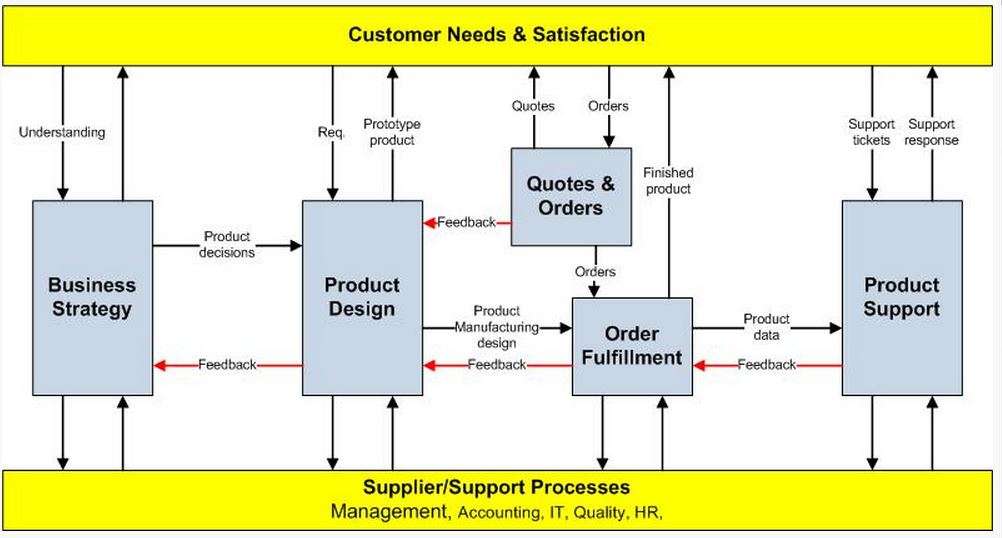
Process Map Arrows
Each process map arrow represents a handoff that your procedures may need to explain. Describe who provides what to whom, when the handoff happens, and how often it occurs. Record the reports and forms used, the schedule to follow, the KPIs to achieve, and any standards that apply.
Product design is a useful example. It receives requirements from the customer, product decisions from strategy, and feedback from quotes and orders and order fulfillment. It also receives support from the support processes. Product design then provides prototype products to customers for testing and product manufacturing designs to manufacturing for engineering, tooling, and setup. Those inputs, outputs, owners, and records give you the substance for the related procedures.
Standard Operating Procedure Template
Standardize your Policies and Procedures Manual Template so each procedure looks similar to the others. A consistent standard operating procedure template communicates the format employees should use and makes missing information easier to spot.
A practical procedure format includes the document title and ID, policy or purpose, scope, responsibilities, definitions, required inputs, numbered steps, controls or decision points, records and forms, approvals, effective date, and revision history. Microsoft Word can save a document as a reusable template. Microsoft Support’s template instructions explain how to create and reuse Word template files.
Build a Policies and Procedures Manual Template
Use the worksheet below for each business process. Copy the headings into a document or spreadsheet, complete one row with the process owner, and use the result as the brief for the related policy, procedure, and work instructions.
| Business process and owner | Policy or objective served | Inputs and providers | Outputs and recipients | Timing and frequency | Records and forms | KPI or standard | Approval and review owner |
|---|---|---|---|---|---|---|---|
| Product design, Product Design Manager | Translate customer requirements and strategy into an approved design | Customer requirements, strategy decisions, quote and order feedback, fulfillment feedback | Prototype for customer testing, manufacturing design for engineering and setup | At project milestones and approved change points | Design brief, review record, approval form, revision record | Approved requirements and internal design standard | Product Design Manager and designated approver |
| Your process: | Complete this cell | Complete this cell | Complete this cell | Complete this cell | Complete this cell | Complete this cell | Complete this cell |
Write a Policies and Procedures Manual Template
Put together your Policies and Procedures Manual using a logical flow or order. Start the operations manual with the process map. Group the procedures that explain each business process, and include references to every record or form needed to complete the work.
- Confirm the manual’s scope and the policies or objectives it supports.
- Map the core and support processes, including their inputs, outputs, and interactions.
- Assign a process owner or subject-matter expert to each procedure.
- Draft every procedure with the same approved template and level of detail.
- Link the procedure to its records, reports, forms, schedules, KPIs, and standards.
- Review the procedure with the people who perform, supervise, and approve the work.
- Publish the approved version, train affected employees, and maintain revision records when the process changes.
A clear manual gives experienced employees and new employees a common reference, but it does not replace training, supervision, or process feedback. Keep the document useful by assigning an owner, controlling revisions, and reviewing it when responsibilities, systems, forms, risks, or requirements change.
If you want to compare your structure with finished examples, review free policies and procedures samples. You can also use this worksheet with guidance on how to organize your policies and procedures manual.














