
Why Should You Publish Policies and Procedures Online?

Publishing policies and procedures online shortens the gap between an approved change and the version employees can find and use. A controlled online library gives your organization one place to publish current instructions, manage access, show revision information, and record required reading instead of asking employees to search through paper binders, email attachments, or an unmanaged shared drive.
If you are using a 20th-century system to handle your policy and procedure documentation, changes may occur faster than you can process and distribute them. Moving policies online does not create control by itself, but it gives you the foundation for faster updates, consistent access, approval, search, and employee acknowledgment.
Why Should You Provide Employees with Online Policies and Procedures?
Employees need the correct policy or procedure when they are doing the work, not after they have searched several folders or asked which attachment is current. Online publication can make an employee handbook, compliance procedure, process map, training aid, or graphical job aid available through one governed location.
The practical benefit is not simply that a file is online. The benefit comes from controlling who owns the document, who can edit it, who approves it, which version is published, who can view it, and when it must be reviewed again. Those controls turn a collection of files into an operating system for policy and procedure information.
Although publishing policies and procedures online is an obvious next step for many organizations, the change is not accomplished at the touch of a button. Collecting electronic documents in folders on a server may be a useful starting point, but files can easily become outdated when ownership, approval, and revision discipline are missing. An effective means of control must cover the document lifecycle, not just document storage.
Policies and Procedures Are Essential to Daily Operations
From your company employee handbook to your latest compliance procedure, policies and procedures guide daily operations. Typical distribution methods become difficult to manage when your organization frequently distributes newly updated information to employees in different departments, groups, or locations.
A controlled procedure does not have to be limited to paper. It could be a Microsoft Word document, an audio file, a video file, a Microsoft Visio flowchart, a process map, or a graphical job aid. ISO guidance for ISO 9001 says documented information may be in any form or type of medium, including paper, electronic media, photographs, and master samples. The applicable requirements still determine how that information must be controlled.
Online Access Reduces the Shared-Drive Search Problem
Perhaps you have experienced the difficulty of searching for a quickly needed policy or procedure on a server. A carefully planned navigation system can deteriorate as departments add their own folders, file names, and personal preferences. The result is a repository that is difficult to navigate and may leave employees uncertain about which document is approved.
An online document management system can improve this situation when it combines search and navigation with document ownership, version history, approval, permissions, and review dates. A shared drive or intranet can also support these controls, but the design and governance matter. SharePoint libraries can require content approval, create versions when a file is edited, limit who can view drafts, and require check-out.
The choice between an intranet, a document management system, and dedicated policies and procedures software should follow your requirements. Consider the number of departments, authors, documents, users, groups, and locations; the need for compliance audit records; your IT department budget and development expertise; and how information must be backed up, retained, and retrieved. No system compensates for unclear ownership or a lack of order and discipline.
Existing processes based on paper or a hierarchical folder system can become inadequate, especially across multiple departments. Managers may recognize that an online management solution is necessary, but integrating information online without ownership and control can result in another difficult-to-navigate repository. The system should facilitate fast access, consistent document formats, and feedback to the owner without claiming that technology alone will minimize compliance risks.
What Controls Should an Online Policy Library Include?
Start with the work employees and managers must complete. A useful policy and procedure library should help people import existing documents, author and edit content, review changes, approve a release, find the current version, complete required reading, and see what needs revision.
Before you choose a system, test the complete path. Can employees find and retrieve the current document? Can authors easily create and edit online content? Can editors review changes and managers approve content? Does the system automatically track the activity you actually need, and can managers evaluate that information? An easy-to-use format is useful only when it supports efficient management over time.
- Allow you to import existing policies and procedures documents instead of recreating approved information.
- Reduce routine dependence on the IT department for back-up, server support, and custom software development.
- Allow authors and managers to create content in Microsoft Word and other common, familiar document editing tools.
- Allow editors and managers to review and approve content before employees see the new version.
- Provide a standardized library of example policies, procedures, forms, process maps, and training aids.
- Simplify search, navigation, and organization with categories, groups, descriptive titles, and metadata.
- Track employee usage and required readings when acknowledgment is appropriate.
- Support applicable document compliance standards with ownership, revision, approval, access, and retention controls.
- Scale access by users, groups, departments, or locations without changing the controlled master document.
Keep Policy and Procedure Documents Updated
Assign an owner and review date to every controlled document. When a change is needed, the owner should be able to create a draft without replacing the approved version employees currently use. Editors and managers can then review and approve the new content before it is published.
Import Existing Policies and Procedures
Your existing Microsoft Word templates and files represent work you should preserve. A migration plan should inventory those documents, identify owners, remove duplicates, confirm the approved version, add metadata, and test how each file renders before publication. Microsoft PowerPoint, Microsoft Excel, and PDF files may also belong in the library when they support the procedure.
Reduce Routine Dependence on the IT Department
A hosted Software as a Service system can reduce the installation, backup, server support, and software development work required for a custom intranet project. IT should still review security, access, identity, retention, integration, and business continuity requirements. Routine policy editing and approval can then remain with the authors, managers, and document owners who understand the content.
This division of responsibility helps non-technical people publish and update policies and procedures while IT maintains the safeguards around the service. It also avoids turning every routine revision into a costly information technology project, while recognizing that deployment and maintenance still need appropriate technical oversight.
During deployment, define who can develop content, who can edit documents, who can approve content, and who can publish it. During maintenance, test backups, access changes, integrations, exports, and recovery. A cloud service may eliminate some local server work, but it does not eliminate the need for security, vendor management, and business continuity decisions.
Use Familiar Editing Tools
Familiar document editing tools can reduce the learning curve for authors. The important question is whether the publishing system can preserve formatting, metadata, permissions, and revision history while separating an editable draft from the approved information employees see.
Well-designed policy and procedure templates provide a common structure and design for information from multiple authors. Employees can add their information without disrupting the look and feel of the entire policy procedure system, provided the template, headings, responsibilities, records, and approval fields are controlled.
Document templates should be easily customizable within defined design standards. That does not mean everyone can change every element. Protect the common structure, required fields, headers, footers, and revision information while allowing authors to adapt the procedure steps, roles, forms, and process details.
How Should You Publish and Maintain Online Policies?
Use a repeatable policy lifecycle rather than uploading finished files one at a time. The workflow below is a recommended operating model, not a screenshot of a particular software product.
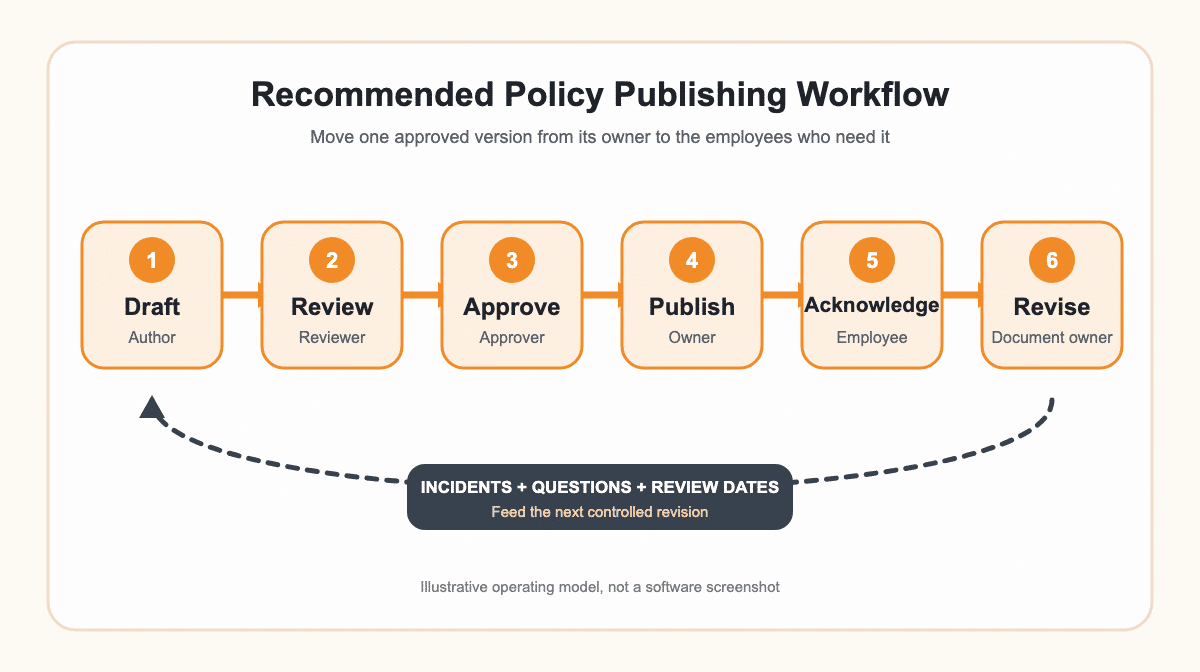
Draft
The author updates the policy or procedure in a controlled working copy. The draft identifies the document owner, purpose, affected roles, related forms, and the reason for the change.
Review and Approve
Reviewers check operational accuracy, compliance implications, related documents, and employee impact. The designated approver confirms that the new version is ready for release. The earlier approved version remains available until the replacement is approved.
Publish and Notify
Publish the approved version to the correct employees, groups, or locations. A release notice should explain what changed, when it takes effect, and whether the employee must read, acknowledge, or complete training on the new procedure.
Acknowledge and Revise
Track required readings or acknowledgments when the risk and policy require them. Usage data can show who received the information and where follow-up is needed, but it does not prove that the policy is effective. Owners should review incidents, audit findings, employee questions, process changes, and scheduled review dates before starting the next revision.
How Do You Standardize Policies and Procedures with a Library?
Employee contributions are necessary, but if every author writes policy and procedure documents from scratch without guidance, your organization will create inconsistent structures and navigation. A controlled template library gives multiple authors a common design for purpose, scope, responsibilities, procedure steps, records, references, approvals, and revision history.
Policy and procedure manuals and templates can provide a starting structure, but each document must still be customized to your organization, risks, systems, and responsibilities. Control the template itself so authors do not begin new documents from an obsolete format.
Use Familiar Search and Navigation
The value of publishing policies and procedures online is a function of your employees’ ability to find what they need when they need it. Useful information systems combine clear categories or groups, descriptive titles, text search, filters, and a common file organization. Multiple data views can help employees browse by department, role, process, owner, or document type.
Natural-language searches can be helpful when the system supports them, but familiar and effective policies and procedures navigation does not depend on one search feature. Hierarchical navigation folder trees, a standardized category structure, clear metadata information, and multiple data views give employees different methods for finding the information they need quickly.
Track Policy and Procedure Usage
Required-reading records, search activity, overdue reviews, and workflow reports provide inputs for managers, audits, and budget decisions. They should be evaluated with incidents, questions, process results, and training outcomes. Tracking activity is useful, but it is not automatic proof of return on investment or policy effectiveness.
Analytical data can provide solid benchmarks for evaluating how online information is used, read, and supported. The numbers may help at audit time, budget time, or a managers meeting, but they must be interpreted with the actual business process, compliance risk, and employee performance rather than presented as automatic benefits.
Regular education can support changing compliance requirements and operational consistency, especially when employees must apply a revised procedure. Measure company-wide efficiency, errors, employee questions, and customer satisfaction separately. A reading record can support analysis, but it cannot establish those results by itself.
Where Does Bizmanualz OnPolicy Fit?
Bizmanualz OnPolicy is one example of a hosted policy and procedure management system. OnPolicy’s current product information describes revision history, workflow approval, required reading, permissions, and compliance reports. Those capabilities map to the draft, review, approve, publish, acknowledge, and revise process described above.
The system can also help organizations leverage existing policy and procedure information rather than recreating every document. OnPolicy’s supported-file guidance lists Microsoft Word, Excel, and PowerPoint formats. Before selecting any policy and procedure software, test your own documents, permissions, approval path, search terms, required-reading process, exports, and reporting needs.
Multiple authors can collaborate on controlled documents, and a multi-file upload can help move an existing library into an online format. Treat import as a controlled migration: confirm file types, ownership, revision status, metadata, formatting, and permissions before publishing the information to a larger audience.
OnPolicy allows multiple authors to collaborate and manage documents remotely within its editing and approval environment. Its help material also describes how users can select one document or multiple documents for upload. A bulk import still needs a sample test, an exception list, and a reconciliation step so existing policies and procedures are not duplicated, omitted, or published without the correct controls.
Compare software costs with the current costs of managing policies and procedures, including authoring, review, distribution, searching, training, audit preparation, and correction of outdated instructions. The result depends on your baseline, number of users, document volume, risk, and implementation quality, so avoid treating software as a guaranteed savings result.
A practical cost analysis can include production and maintenance work, dedicated servers or hosting, software administration, employee search time, training, printing, and the cost of correcting an outdated instruction. Use solid benchmarks before deployment and evaluate products against the same operating requirements. Publishing online may allow faster updates, faster access to a larger audience, and easier navigation, but those benefits depend on implementation and continued management.
Your implementation should contain a short acceptance test for every critical workflow. Confirm that the online business system works from supported devices connected to the internet, that approved content provides the expected employee view, that revisions do not expose unfinished drafts, and that exports can be recovered without costly software development expertise or a permanent dependence on dedicated servers.
Frequently Asked Questions
What changes when policies and procedures move online?
The documents become easier to distribute, search, update, and control from one governed location. The improvement depends on assigning owners, permissions, approval, version history, review dates, and employee communication instead of simply uploading files.
Is a shared drive or intranet enough for policy management?
It can be enough when it provides clear ownership, controlled editing, approval, published-versus-draft separation, search, permissions, review dates, and an understandable navigation system. Without those controls, an online folder can reproduce the same confusion as paper files.
Can existing Microsoft Word policies be published online?
Yes. Inventory the files, confirm the approved version and owner, remove duplicates, add metadata, test formatting, and then import or upload them through the selected system. Keep an original backup until the online versions have been verified.
Should employees acknowledge every policy?
Not necessarily. Use required reading or acknowledgment when the policy’s risk, legal context, role impact, or training plan justifies it. Define what acknowledgment means and do not treat a click as proof that an employee can perform the procedure.
What should you test before choosing policy management software?
Test document import, formatting, permissions, author and approver roles, revision history, search, mobile access, notifications, required reading, reporting, exports, backups, and the complete publication workflow with your own documents and employees.














