
Document Control Audit Findings and How to Eliminate Them

Document control audit findings usually come from simple failures that were visible long before the auditor arrived: an obsolete procedure at the point of use, an approval that was never recorded, or a shared-drive folder where nobody can prove which version is current. The finding may look like a paperwork issue, but the real problem is control.
If your team still relies on memory, file cabinets, email attachments, or a manually maintained spreadsheet to control policies and procedures, you are asking people to remember a system that should be managed for them. A controlled document management process makes approvals, revision history, retention, access, and distribution visible before an audit turns them into documented findings.
What Are Document Control Audit Findings?
Document control audit findings are nonconformities related to how an organization creates, approves, distributes, revises, protects, retains, or retires controlled documents. They often appear during quality audits, compliance reviews, internal control testing, or management system assessments.
In practice, the auditor is asking a basic question: can the organization prove that people are using the right document, at the right time, under the right authority? If the answer depends on a folder name, a person’s memory, or a paper binder that may or may not be current, the risk of a document control audit finding increases.
What Problems Cause Document Control Audit Findings?
Most document control audit findings are not caused by one dramatic failure. They come from small control gaps that compound over time. Procedures are revised without complete approval records, people print copies and keep them at their desks, and old versions remain available after a new version has been released.
Common findings include missing approval evidence, unclear revision status, uncontrolled copies, weak access permissions, poor retention practices, and incomplete master lists. These are the same practical issues behind many document control mistakes.
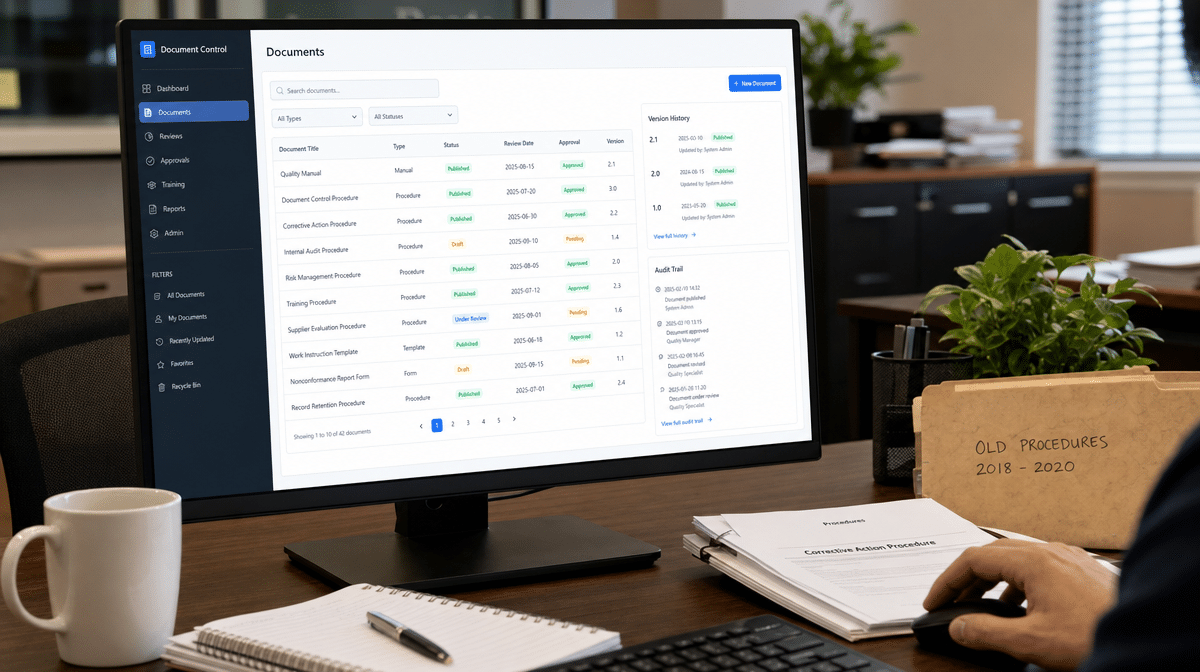
Ask the same questions an auditor will ask. Are quality procedures approved prior to use? Do forms, master lists, and logs show revision numbers, dates, and approval evidence? Can employees find the relevant, up-to-date version at the point of use, and only that version? Can you prove that external documents are controlled and that obsolete documents cannot be used unintentionally?
Uncontrolled Copies
Paper distribution creates a simple but persistent problem: once a copy leaves the central file, the organization has to collect or mark it obsolete when the document changes. If someone makes a copy of a copy, the control trail gets even weaker.
Unclear Revision Status
Shared drives can make documents searchable, but they do not automatically prove that a file is approved, current, or superseded. A folder full of names like “final,” “final revised,” and “final approved” is an audit finding waiting to happen.
Weak Approval Evidence
If approvals live in email threads, handwritten initials, or scattered sign-off sheets, the organization may have done the review but still fail to prove it. Auditors need evidence that the right people approved the right version before use.
Why Is Documented Information Control Critical to Compliance?
Documented information control is central to many compliance programs because policies and procedures are the operating instructions for the business. The ISO 9000 family of quality management standards treats documented information as part of the quality management system, which means the organization needs controls for creating, updating, distributing, accessing, retaining, and protecting those records.
The same principle appears in security, privacy, financial, and operational control environments. Access control, change control, configuration management, and audit records are not just technical disciplines. They are evidence systems. The NIST SP 800-53 control catalog is one example of how access, audit, and change controls support organizational risk management.
For a small business, this does not mean every document needs enterprise software or a dedicated document control specialist. It does mean the business needs a repeatable way to answer who owns the document, who approved it, which version is current, where it is available, who can change it, and what happens when it is retired.
How Do Manual Systems Create Audit Risk?
The manual system usually starts with file cabinets, binders, local folders, and a person who “knows where everything is.” That may work when the business is small, but it does not scale well. As documents multiply, the burden shifts from managing the process to searching for the latest copy.
File cabinets are familiar and inexpensive up front. They are also hard to back up, difficult to secure by role, and awkward to search. Offsite storage adds another layer of retrieval friction, especially when older records are needed during an audit.
Shared drives solve a few problems but create others. They reduce paper, improve search, and support basic permissions. But they still require naming discipline, folder governance, backup procedures, access reviews, and clear ownership. Without those controls, a shared drive becomes a digital filing cabinet with the same old weaknesses.
Everyone is familiar with file cabinets, hard drives, and server based file sharing. They may seem inexpensive up front, paper is easy to use, and many teams have always used it. But retrieval of vital procedure documents and records can become a nightmare as older files are kept offsite, storage space grows, and backups depend on manual attention.
Shared drives have advantages over manual filing systems: they are searchable, take up less space, and can be made somewhat secure by restricting access with file permission schemes. But shared drives require training, can be difficult to index non-text files such as images, and require back-up systems to prevent accidental changes or deletions. As soon as an electronic back-up system is added, the complexity of the solution increases dramatically.
Larger companies sometimes afford a document control specialist, but smaller companies may not have that room in the budget. A policy and procedure management software solution should support document retention, document security, document distribution, filing, record scanning, search, consistency, ease of use, flexibility, scalability, and compliance record control.
How Can Document Management Software Reduce Audit Findings?
Document management software reduces audit findings by turning document control from a memory-based activity into a managed workflow. Instead of chasing signatures or asking which file is current, the system can route approvals, lock approved versions, retain revision history, and make obsolete documents harder to use by accident.
A controlled system should support document owners, reviewers, approvers, and users without requiring everyone to understand the whole compliance framework. It should make the correct behavior easier than the workaround.
- Approval workflow before release
- Version and revision history
- Access control by role or department
- Search and document retrieval
- Backup and disaster recovery
- Retention and record control
- Obsolete-document prevention
- Audit trail visibility
If you are managing procedure workflow with policy and procedure management software, the auditor should see a cleaner control story. The system can show what changed, who reviewed it, who approved it, when it was released, and where it is available.
What Should You Fix Before the Next Audit?
Start with the findings that are easiest for an auditor to verify. Build a current master list, identify document owners, remove obsolete copies, confirm approval evidence, and test whether employees can find the current procedure without asking a manager.
Then review the process itself. A document control procedure should define how documents are created, reviewed, approved, released, changed, distributed, retained, and retired. It should also explain how external documents are controlled and how records stay legible and retrievable.
Finally, decide whether the control work is being done by people or by a system. People should make judgment calls about content, risk, and approval. The system should handle reminders, routing, version control, access, and evidence. That is how a company reduces document control audit findings and stops the wasteful paper hunt.
For more information about automating policy and procedure control, review the OnPolicy procedure software resources.
Frequently Asked Questions
What Are The Most Common Document Control Audit Findings?
The most common findings involve missing approval records, obsolete documents still in use, unclear revision history, uncontrolled copies, weak access control, and incomplete retention evidence.
Why Do Manual Document Control Systems Fail Audits?
Manual systems fail because they depend on people remembering every review, approval, distribution, and retrieval step. As documents multiply, proof of control becomes harder to maintain consistently.
How Does Software Help Reduce Document Control Findings?
Document management software can automate approval routing, preserve version history, restrict access, mark obsolete documents, and create audit trails that show how documents were controlled.
What Evidence Should Be Ready For A Document Control Audit?
Be ready to show the current master list, approved procedures, revision history, approval records, distribution controls, access permissions, retention rules, and evidence that obsolete documents cannot be used unintentionally.
Should Small Businesses Use Document Management Software?
Small businesses should consider software when file cabinets, shared drives, or email approvals no longer provide reliable proof of document ownership, approval, revision status, and point-of-use access.














