
How Do You Use Videos in Your Sales Funnel?

Using the same video at every stage of a sales funnel asks one asset to do too many jobs. A person discovering your brand has a different question from a customer comparing options or preparing to buy.
To use video marketing in your sales funnel, match each video to the viewer’s current question and give that person one clear next action. Use awareness videos at the top of the funnel, demonstrations and customer stories in the middle, decision-support videos at the bottom, and onboarding or thank-you videos after purchase.
How Do You Use Videos for Every Stage of the Sales Funnel?
Start with the job the video must complete. Google’s video-ad guidance recommends tailoring creative to awareness, consideration, action, or a combination of those goals. Although that guidance is written for YouTube advertising, the planning principle also helps organize website, email, and social video content.
Do not begin with camera gear or editing software. First identify the funnel stage, the viewer’s question, the message that answers it, and the next action. Then choose the video format. This keeps a promotional video from carrying technical details too early and keeps an instructional video from appearing before the viewer understands the offer.
The basic stages of the sales funnel provide a simplified formula for organizing content around generating leads, gaining prospects and opportunities, attracting new customers, and maintaining loyalty. Video does not achieve success by itself. The strategy can work only when the content fits the business, complements the other types of content you publish, and helps the viewer take the next useful step.
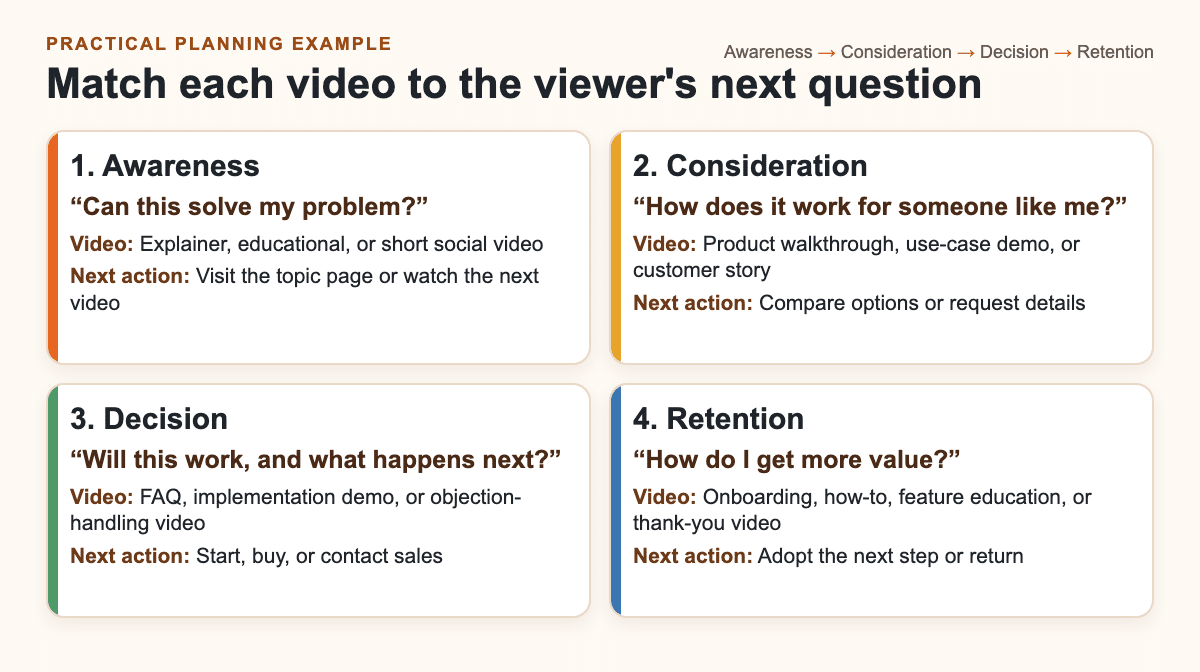
The matrix is a practical planning example. Adapt the video types and next actions to your product, service, sales process, and target customer.
| Funnel stage | Viewer question | Useful video type | Next action |
|---|---|---|---|
| Awareness | Can this solve my problem? | Explainer, educational, promotional, or short social video | Visit the topic page or watch the next video |
| Consideration | How does it work for someone like me? | Product walkthrough, use-case demo, customer story, or company culture video | Compare options or request details |
| Decision | Will this work, and what happens next? | FAQ, implementation demo, instructional video, or objection-handling video | Start, buy, or contact sales |
| Retention | How do I get more value? | Onboarding, how-to, feature education, or thank-you video | Adopt the next step or return |
Top of the Funnel: Build Awareness
People entering the top of the sales funnel often have a problem but may not know your brand or the right solution. At this stage, catch the attention of your target audience by naming the problem clearly and showing why it matters. Keep the next action low commitment, such as reading a related guide, visiting a topic page, or watching the next video.
People searching for products or services often have a problem they want solved. The first step in the sales process is to help target consumers recognize that you understand the problem. This is also your chance to make your values known and connect the message to your customers’ pain points without asking for the purchase too soon.
Promotional videos, how-to videos, documentary-style videos, and explainer videos are useful options. A promotional video can introduce the brand and value proposition. A how-to or explainer video can help the viewer understand the problem. A documentary-style video or company story can communicate values when those values are relevant to the choice.
Keep the focus on one idea. Do not overload an awareness video with installation details, every product feature, and a hard purchase request. Whether you use paid video editing software or a free online video editor, the tool matters less than a clear message, readable captions, and a useful next step. Microsoft Clipchamp provides an online video editor that runs in the browser.
Middle of the Funnel: Build Interest and Engagement
Once you catch the attention of a target customer, help that person evaluate the product or service. A product or service video can show what the offer does. A short clip of a real person using the product can turn an abstract feature into a recognizable use case.
A detailed demonstration gives viewers an idea of how the product is set up, installed, or used. Keep the example close to the target customer’s situation so the video can spark interest and support positive engagement without promising that one format will work for every audience.
People are always looking for recommendations when a purchase feels uncertain. Testimonials are useful when the buyer needs to hear real customers talk about their experience. A company culture video can give viewers an in-depth look at the team that fuels the passion behind the product when the service model or working relationship is part of the decision. Keep each video tied to a specific evaluation question rather than combining a demonstration, testimonial, team profile, and sales pitch into one long asset.
The next action should help the viewer continue evaluating. That may mean comparing options, reading a detailed page, requesting information, or watching a deeper demonstration. Measure whether viewers take that next step, not only whether the video starts playing.
Bottom of the Funnel: Support the Purchase Decision
At the bottom of the sales funnel, consumers or business buyers are almost ready to make a purchase. They may still have remaining questions about setup, implementation, compatibility, service, or what happens after checkout. A focused video on frequently asked questions, or FAQs, can answer those questions, while instructional videos can provide a detailed demonstration of how to set up, install, or use the product.
Once consumers are interested in a product, they want enough information to decide whether it fits their needs and whether they might regret buying it. Clear answers make the decision easier, but the video should support the purchase decision rather than claim it will seal the deal.
Decision-stage video should reduce uncertainty without pretending that every buyer has the same objection. Use questions from sales calls, support requests, and product-page behavior to select the topic. End with a direct action that fits the offer, such as starting, buying, requesting details, or contacting sales.
After Purchase: Support Retention and the Next Step
Checkout does not have to be the end of the customer journey. Going beyond checkout is a crucial element when creating repeat customers is the goal. A thank-you video can confirm the purchase, help customers feel valued and appreciated, and explain what happens next. An onboarding or how-to video can help the customer complete setup, use an important feature, or avoid a common mistake, but do not promise that the video alone will make someone come back.
Post-purchase video should be useful before it is promotional. Send customers to the next relevant action, not to a generic stream of discounts and sales. For example, link to the first setup step, a support resource, or a complementary feature that helps the customer get more value.
Email newsletters can distribute later updates, but use them in a timely manner and give the customer control over frequency. A linked thumbnail is often more reliable than a native email embed. The aim is to continuously send useful information, not to fill every message with products, discounts, sales, and unrelated offers.
How Do You Plan a Video Sales Funnel?
Plan one row for each important viewer question. Record the funnel stage, audience, question, video format, message, channel, next action, owner, and practical measure. A simple planning sheet prevents duplicate videos and makes gaps visible before production begins.
- Name the stage. Decide whether the video serves awareness, consideration, decision, or retention.
- Write the viewer’s question. Use plain language drawn from customer conversations and search behavior.
- Choose one format. Select the shortest useful format that can answer the question clearly.
- Set one next action. Tell the viewer what to do after the video.
- Choose a stage-appropriate measure. Track qualified reach or progression for awareness, deeper evaluation for consideration, completed actions for decision, and adoption for retention.
- Review the sequence. Confirm that every video complements the other content on your website, in email, and on social platforms.
For broader planning guidance, see this video marketing strategy and the original practitioner guide on how to use videos in your sales funnel. The goal is not to produce the most videos. It is to create the right video for the right question and connect it to the next useful step.
High-quality videos still need a practical production process. Plan how you will create and distribute them across email, your website, social media platforms, and other digital platforms. Get needed help when scripting, recording, editing, captioning, or distribution falls outside the team’s skills, budget, or available time.
Frequently Asked Questions
Which Video Should You Use at Each Sales Funnel Stage?
Use an explainer or educational video for awareness, a demonstration or customer story for consideration, an FAQ or implementation video for the decision stage, and onboarding or how-to video after purchase.
Can One Video Be Reused Across Funnel Stages?
Yes, when you edit the message and next action for the new stage. A long demonstration can become a short awareness clip, while a specific setup segment can support a decision or onboarding task.
What Should a Sales-Funnel Video Ask the Viewer to Do Next?
Ask for one action that matches the viewer’s readiness, such as learning more at awareness, comparing options at consideration, starting or buying at decision, or completing an onboarding step after purchase.














