How to Develop Intranet Policies and Procedures for Multiple Departments

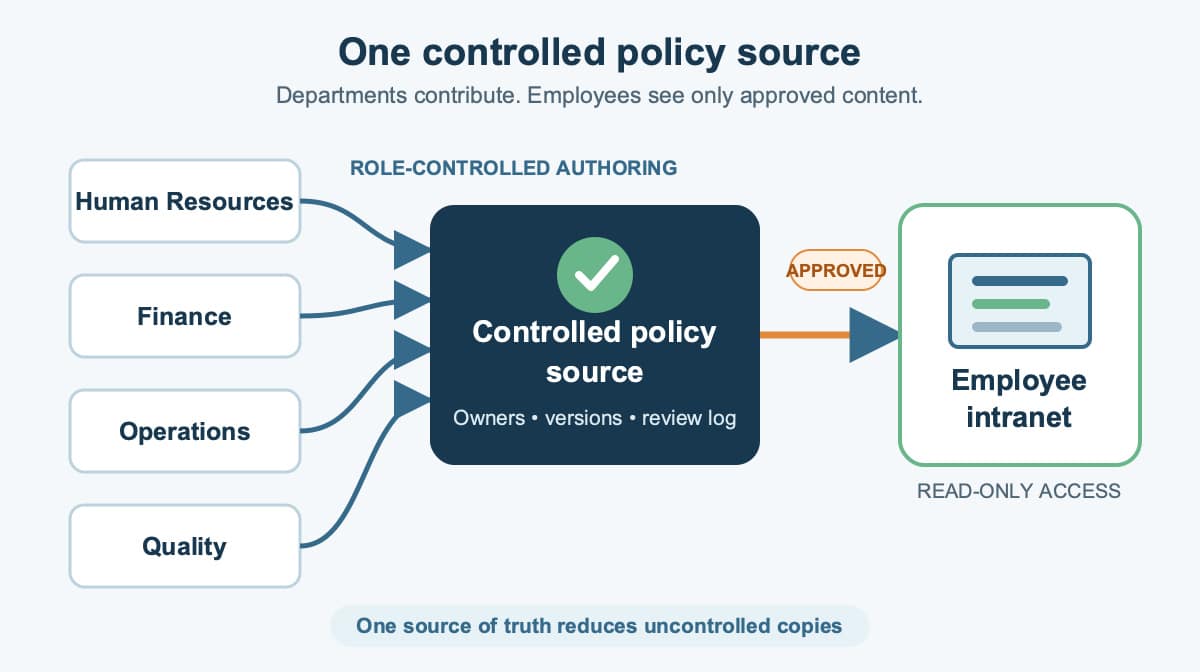
When several departments edit and store their own policy copies, employees can struggle to tell which version is approved. A reliable intranet solves that problem by separating controlled authoring from employee access and by giving every policy an owner, review path, version history, and release point.
The practical model is one restricted Authoring site for working documents and one Published site for approved intranet policies and procedures. Word, PDF, SharePoint, structured-content tools, and SaaS policies and procedures applications can all support parts of this model, but the governance workflow matters more than the software name.
Intranet Policies and Procedures for Multiple Departments
Companies use a wide variety of software solutions to develop intranet policies and procedures for multiple departments. Common approaches include editing in MS Word, publishing in Portable Document Format (PDF), and managing files in SharePoint. The same system can also include help-authoring software, XML-based content, or a dedicated policy and procedure software portal.
Start by deciding where the controlled source lives, who can change it, who must approve it, and where employees find the released version. A wiki can make collaboration easy, but open editing alone does not provide document control. An Access database or another custom database can store documents, but the organization must build and maintain permissions, workflow, version control, search, and audit history around it.
Access or SharePoint Databases
If you have the technical skills, you could build your own document management database solution for intranet policies and procedures. That custom path also means maintaining the database solution, security, search capabilities, administration, and publishing workflow. If you are using SharePoint, evaluate any added workflow layer against the configured SharePoint controls and the approval requirements.
Use One Authoritative Copy
Establish a policy that encourages everyone to link to the approved documents on the portal rather than keeping separate electronic or paper copies. Direct links reduce the likelihood that incorrect or outdated policies will circulate on computers and desks. If a department needs a working copy, label it clearly and keep it outside the employee-facing Published site until approval.
Assign Department Roles
Each policy needs a business owner, author, reviewers, final approver, and publisher. One person may hold more than one role in a small company, but the responsibilities should still be explicit. Department representatives should review content that affects their work, while the final approver confirms that the released document is ready for general use.
How Should You Separate Authoring From Publishing?
Most companies can use an Authoring site with restricted access, where the MS Word versions or other controlled source files are maintained, and a Published site containing the approved PDF or web documents that staff can see. The separation protects working comments and draft changes while keeping the employee experience simple.
All previous versions should be maintained on the Authoring site for review or restoration. A document review log should show all approver comments, revision comments, workflow change dates, and administrative histories for a document. Reviewers’ comments on version changes should be visible only to people with access to the Authoring site. The end users only need to see the approved PDF or web version on the Published site, its effective date, its owner, and a clear way to report a problem.
How Does the Review and Approval Workflow Work?
The document review and approval workflow begins when the author submits a controlled draft. Reviewers comment, the author resolves the comments, and the final approver authorizes release. The publisher then places the approved document on the Published site and records the release date. A configured workflow can notify reviewers and approvers, by email for example, that a document is “awaiting review.” If the notification contains a link to the document, the reviewer can click on that link to retrieve the document for edit and review. You can also designate the final approver and the person responsible for publishing, or releasing, the document for general use.
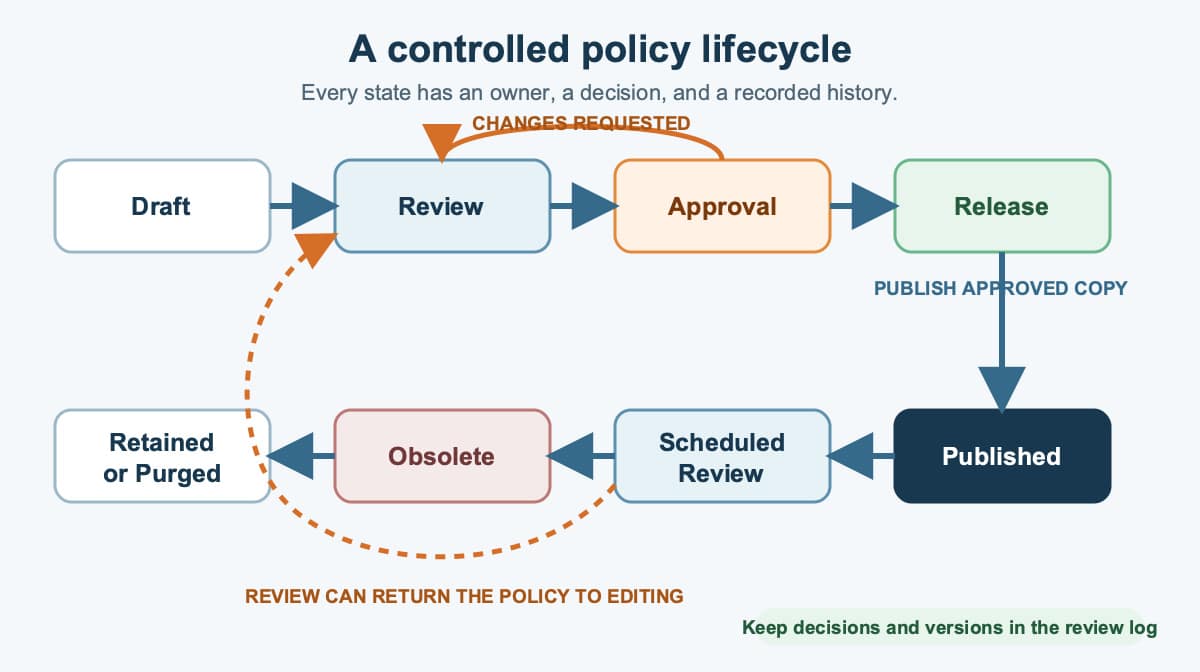
The document workflow moves from draft through review, approval, release, publication, scheduled review, obsolescence, and retention or purge according to the retention rule. A rejected review can return the policy to editing, while the review log preserves decisions and version history.
How Do You Control Versions Across Departments?
Version control is not automatic simply because files are stored on an intranet. Configure the library, permissions, approval states, and editing rules for the way departments actually work. For SharePoint Server, Microsoft documents versioning, content approval, and check-out as configurable SharePoint document-library controls. Requiring check-out can help in some controlled editing models, while co-authoring may be a better fit in others.
Keep a stable policy identifier, revision number, owner, approval status, effective date, and next review date. When a new version is released, archive or obsolete the prior version without deleting the history needed for review and restoration. Test permissions with real author, approver, publisher, and employee accounts before relying on the workflow.
What Are DITA and XML in Policy Publishing?
Darwin Information Typing Architecture (DITA) is an XML architecture for topic-oriented content. OASIS defines a DITA topic as the basic unit of authoring and reuse. A team can maintain a policy statement, procedure, warning, or reference topic once and reuse it in more than one approved output when the surrounding context remains accurate.
DITA and XML are most useful when an organization has substantial reusable content and the people or systems needed to manage structured authoring. Adobe RoboHelp with FrameMaker, MadCap Flare, and other specialized tools can be evaluated for that publishing model. Adobe documents output presets for Responsive HTML5, PDF, and other formats from the same RoboHelp project. A smaller organization with a modest policy library may be better served by a simpler governed document library.
RoboHelp can generate multiple Help systems and output formats from the same project. As an alternative software for intranet policies and procedures, MadCap documents Flare’s single-sourcing approach as reusing content and producing multiple outputs from the same source files. Teams that already use Word or FrameMaker should test import, publishing, revision changes, and distribution to multiple channels, including marketing collateral, with their own content before selecting a structured authoring system.
How Should Employees Find the Current Policy?
Search Capability
A robust search capability is critical, but search should not be the only route. You will also want some form of browsing navigation, perhaps alphabetical or categorical, to give your users options. Add navigation by department, process, category, or title. Use clear policy names, synonyms employees use, owner names, effective dates, and consistent metadata so the same user can find the right document with different goals.
Link directly to the approved record from training, process maps, forms, and departmental pages. The same user may come to the policy and procedure software portal two different times with two different goals, so provide both Google-like search capabilities and browsing navigation. A workgroup collaboration section can help when it supports a real departmental task. A reliable portal gives employees a reason to return because it answers their task quickly, not because it behaves like a social feed.
How Can Multiple Contributors Review PDFs?
Acrobat Professional With Multiple Contributors
PDF review remains useful when contributors do not share the source-authoring software. Adobe documents shared PDF review through a link that lets invited reviewers comment on the document. The editor can evaluate comments, resolve conflicts, and update the controlled Word, FrameMaker, or other source file before the final approver releases a new version.
PDFs are useful for reviewing and sharing documents with multiple contributors. Treat comments and annotations as input to the controlled source so reviewers are not overwriting one another’s accepted changes. The editor can consolidate all comments, answer each point, and manually make the accepted changes in Word. A consolidated version helps reviewers understand multiple comments on the same text and gives the editor a change summary to check before release.
This review technique can support all document types, including Visio process maps, without requiring every reviewer to have the source software. When hyperlinks matter, verify them in the generated PDF before release. The PDF is a review copy or released output, not automatically the controlled source. Keep the source, consolidated comments, approval record, and final published PDF connected through the document record.
Develop Intranet Policies and Procedures for Multiple Departments
Use this implementation checklist as a practical rollout sequence:
- Inventory current policies, owners, locations, duplicates, and known obsolete copies.
- Choose the controlled source and the employee-facing Published site.
- Assign the author, reviewers, final approver, publisher, and backup owner for each policy family.
- Define permissions, version numbering, approval states, effective dates, review dates, and retention rules.
- Configure notifications and links so reviewers open the controlled document rather than an attachment.
- Design search and browsing around department names, processes, categories, and employee language.
- Migrate approved content, archive previous versions, and remove or label uncontrolled duplicates.
- Test the full authoring and publishing workflow with representatives from multiple departments.
The result should be more than a folder of files. It should be a controlled service that moves each policy from draft to review, approval, release, revision, obsolescence, and retention while giving employees one dependable place to find the current answer.
Frequently Asked Questions
What is the difference between an Authoring site and a Published site?
The Authoring site holds controlled source files, drafts, comments, and prior versions for approved contributors. The Published site gives employees access to the current approved policy without exposing unfinished changes.
How do you prevent employees from using outdated policies?
Publish one authoritative copy, link to it from other systems, show its revision and effective date, and archive prior versions outside normal employee access. Remove or clearly label duplicate local and paper copies during rollout.
Should intranet policies be PDF files or web pages?
Either format can work. Choose the format that preserves approval control, accessibility, search, stable links, and reliable revision history. Some organizations maintain a controlled source and publish both web and PDF outputs.
What permissions should departments have?
Give authors and reviewers access only to the policy families they maintain, reserve approval and release rights for designated roles, and give employees read access to approved content. Test each role before launch.
How often should intranet policies be reviewed?
Set a review date based on the policy’s risk, legal obligations, process volatility, and business needs. Also trigger review when the related process, system, owner, or requirement changes.