BPMN Process Mapping: A Plain-English Guide
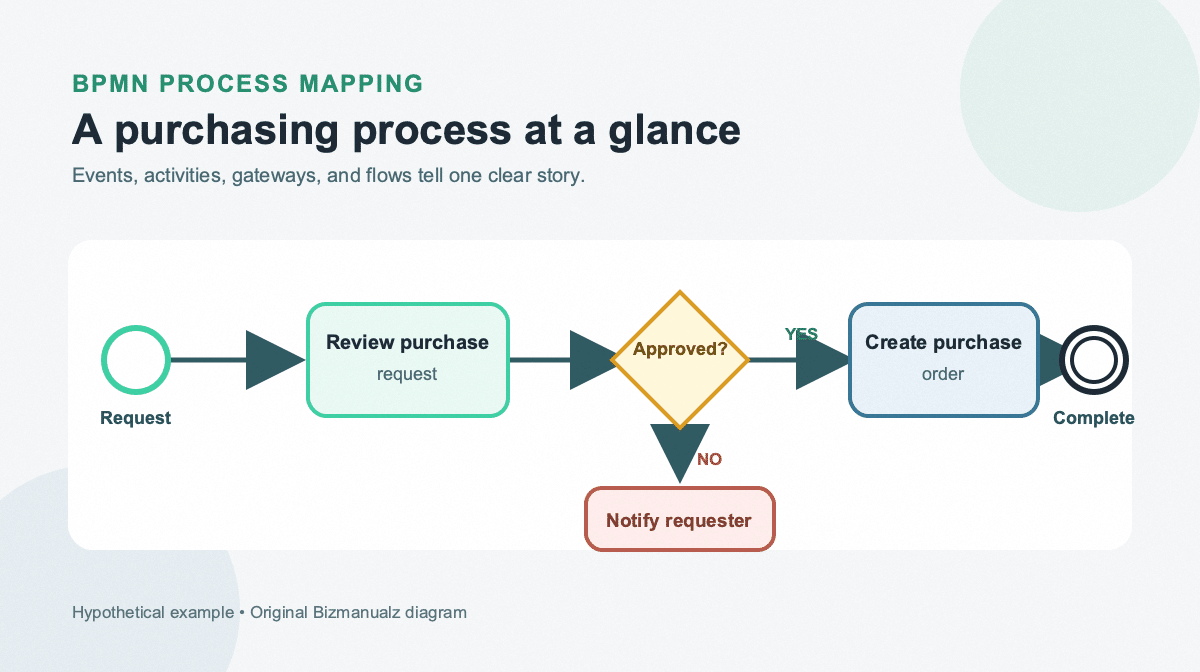
A purchasing process can sound simple until four people draw it four different ways. One person shows the approval, another shows the budget check, and a third leaves out what happens when the request is rejected. The disagreement is often not about the work itself. It is about the language used to describe it.
BPMN process mapping gives that work a shared visual language. BPMN stands for Business Process Model and Notation. It uses consistent symbols for events, activities, decisions, handoffs, and responsibility, so a business team and a technical team can read the same process diagram without guessing what each shape means.
This guide explains the small set of BPMN symbols you need to begin, then applies them to a worked purchasing example. You will also see how to build a useful map, when BPMN earns the extra structure, and which mistakes make a technically correct diagram hard to use.
What Is BPMN Process Mapping?
BPMN process mapping is the practice of drawing a business process with the standardized symbols and connection rules of Business Process Model and Notation. The Object Management Group describes BPMN as a graphical notation for specifying business processes that is intended to be understandable to business users while still representing complex process semantics for technical users.
That shared language is the main difference between a BPMN diagram and an informal process map. An informal map can use any shapes its author likes. A BPMN map gives each important shape and line a defined meaning. The definition reduces ambiguity when a process crosses departments, becomes part of a software project, or must be maintained by people who did not draw the first version.
BPMN does not replace the broader discipline of business process mapping. It is one notation you can use within that discipline. A team still needs to set the scope, interview the people who perform the work, record exceptions, and decide what the map is meant to improve.
The BPMN Symbols You Need To Start
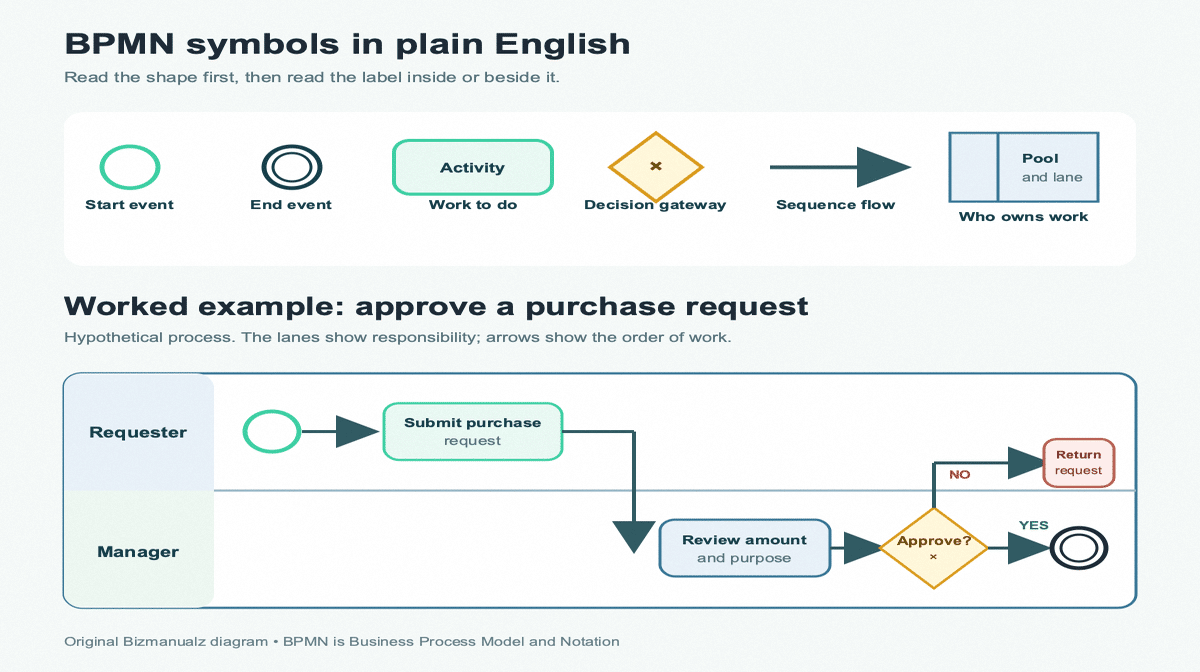
The full standard is detailed, but a first useful business process diagram needs only a compact vocabulary. The BPMN 2.0.2 specification groups its elements into five categories: Flow Objects, Data, Connecting Objects, Swimlanes, and Artifacts. Most first maps can begin with Flow Objects, sequence flows, and swimlanes.
Events: Something Starts, Changes, or Ends
An event is drawn as a circle. A thin single circle usually marks a start event, and a heavier or double circle marks an end event. Intermediate events can show something that happens while the process is underway, such as receiving a message, reaching a timer, or encountering an error.
For a beginner map, label the start with the trigger and the end with the result. “Purchase request submitted” is clearer than “Start,” and “Purchase order issued” is clearer than “End.”
Activities: Work Someone Performs
An activity is shown as a rounded rectangle. It describes work, so write its label as a verb plus an object: “Review request,” “Check budget,” or “Create purchase order.” A task is one unit of work. A subprocess contains a smaller process that can be expanded elsewhere.
Gateways: The Flow Branches or Rejoins
A gateway is shown as a diamond. It controls where the process can go next. The most common beginner case is an exclusive gateway, often marked with an X, where only one outgoing path is taken. Write the gateway as a question, such as “Approved?” and label the outgoing paths “Yes” and “No.”
Flows: The Lines Have Different Jobs
- Sequence flow: a solid arrow that shows the order of activities inside one process.
- Message flow: a dashed connector that shows communication between separate participants or pools.
- Association: a dotted line that connects a note, data object, or other supporting information to the relevant element.
Do not use a message flow merely because one employee emails another inside the same pool. Sequence flow shows the process order inside that participant. Message flow is for communication between different participants.
Pools and Lanes: Who Owns the Work
A pool represents a participant in a collaboration, such as a company, customer, supplier, or external agency. Lanes divide work inside a pool by role, team, system, or another useful responsibility boundary. If your main problem is unclear handoffs, the related guide to swimlane process maps explains why lane crossings deserve attention.
A BPMN Purchasing Process Example
Consider a small business in which an employee requests a purchase and a manager approves or rejects it. The diagram above is intentionally simple. It shows how a few symbols can make the responsibility and decision path explicit.
- The start event occurs when the employee needs to make a purchase.
- The requester submits the purchase request.
- The sequence flow crosses into the manager lane, making the handoff visible.
- The manager reviews the amount and business purpose.
- An exclusive gateway asks whether the request is approved.
- The Yes path ends with approval. The No path returns the request for correction or explanation.
A production version may need more detail. You could add a budget-owner lane, an intermediate message event for missing information, a threshold gateway for high-value purchases, or a subprocess for creating the purchase order. Add that detail only when it supports a real decision, control, or implementation need.
How To Build a BPMN Process Map
1. Define the Trigger, Result, and Boundary
Write one sentence for the trigger and one for the result before drawing any shapes. “An employee identifies a purchasing need” and “The approved purchase order is sent to the supplier” create a much clearer boundary than “purchasing process.” Leave sourcing, receiving, and payment outside the map unless the stated task needs them.
2. List the Activities in Plain Language
Interview the people who perform the work and write each activity as a verb plus an object. Record what happens in practice, including common rework and exception paths. Do not begin by copying an old procedure and assuming it still describes the real flow.
3. Assign Responsibility With Pools and Lanes
Use a lane for each role or team whose ownership needs to be clear. Use a separate pool when the participant is meaningfully outside the process owner’s organization or control. Too many lanes create clutter, so combine roles that perform the same kind of work when the distinction does not affect the task.
4. Add Gateways Only Where the Path Changes
A gateway is not a decorative decision diamond. It should show a real split, merge, fork, or join in the flow. Label outgoing paths so the reader can tell what condition sends work in each direction.
5. Connect the Happy Path Before the Exceptions
Draw the normal path from start to finish first. Then add the exceptions that matter: missing information, rejection, timeout, escalation, cancellation, or an external response. This keeps the first draft readable while preventing common exceptions from disappearing.
6. Walk Through Real Cases
Test the diagram with one routine case and at least one exception. Ask the person who performs each task whether the map shows the work in the right order and in the right lane. A diagram is ready when the intended readers can use it to explain or perform the process, not merely when the modeling tool reports no syntax error.
Once the map is stable, connect it to the written procedure, training material, or improvement project it supports. The broader guide to workflow diagrams explains how rendered maps can support process documentation.
When To Use BPMN Instead of a Basic Flowchart
Use BPMN when the process has enough complexity, collaboration, or implementation risk that a shared formal notation prevents misunderstanding. A basic flowchart may be better when the process is short, the audience is unfamiliar with BPMN, and the map exists only to support a local conversation.
| Situation | Better starting point | Reason |
|---|---|---|
| A short procedure inside one team | Basic flowchart | Faster to draw and easier for an untrained audience. |
| A process crossing roles or organizations | BPMN | Pools, lanes, and message flows clarify responsibility and interaction. |
| A workflow that may be automated | BPMN | The notation can express events, exceptions, and parallel paths precisely. |
| An executive overview with five major stages | Basic flowchart | Extra notation can distract from the main story. |
BPMN also fits naturally inside business process management, where a team models, analyzes, changes, and monitors processes over time. The notation is the map, not the management system. Ownership, measurement, review, and change control still have to exist around it.
Common BPMN Process Mapping Mistakes
- Starting with every symbol: use the smallest vocabulary that describes the process accurately.
- Using vague activity labels: “Review” tells less than “Review purchase amount and purpose.”
- Mixing participants and roles: use pools for participants and lanes for responsibility inside a participant.
- Leaving gateways unlabeled: readers need the question and the conditions on each outgoing path.
- Mapping only the happy path: include exceptions that change responsibility, control, or outcome.
- Adding detail without an audience: a diagram that contains everything can communicate nothing.
- Treating the diagram as permanent: assign an owner and update the map when the process changes.
How To Choose a BPMN Tool
You do not need sophisticated software to learn the notation. A whiteboard or general diagramming tool is enough for a workshop draft. Choose a dedicated BPMN tool when you need validation, reusable subprocesses, version control, shared model libraries, formal exchange files, or connection to a workflow engine.
- Can occasional readers open the diagram without buying or installing the modeling tool?
- Does the tool support the BPMN elements your process actually uses?
- Can reviewers comment, compare versions, and see who changed the model?
- Can the diagram be exported in a useful image or document format for procedures and training?
- If automation is planned, can the model move into the selected workflow environment without being rebuilt from scratch?
The best tool is the simplest one that preserves the meaning of the model and fits the way the team reviews and maintains it. Tool capability does not correct a poorly scoped process or an unlabeled decision.
Frequently Asked Questions
What Does BPMN Stand For?
BPMN stands for Business Process Model and Notation. It is a standard visual language for describing business processes with defined symbols and connection rules.
Is BPMN the Same as a Flowchart?
BPMN is a kind of process diagram, but it is more formal than a basic flowchart. Its events, activities, gateways, pools, lanes, sequence flows, and message flows have defined meanings.
What Are the Three Main BPMN Symbols?
The three main Flow Objects are events, activities, and gateways. Events show something that happens, activities show work, and gateways control how the flow branches or rejoins.
Do You Need a BPMN Tool To Make a Diagram?
No. You can draft a useful BPMN process map on a whiteboard or in a general diagramming application. A dedicated tool becomes valuable when you need model validation, collaboration, version control, exchange files, or workflow implementation.