
ISO 9001 Software: A Buyer Comparison Of QMS Tool Categories
Build the procedures before you automate them.
Use the Bizmanualz ISO 9001 Quality Manual and Quality Procedures Manual as a documentation starting point, then review the material against ISO 9001:2026 and your certification body’s transition guidance.
The best ISO 9001 software is not automatically the largest electronic quality management system. It is the smallest tool category that reliably controls your documented information, operational evidence, audits, corrective actions, and management review without creating more administrative work than it removes.
This buyer comparison of QMS tool categories starts with the work a small or mid-size manufacturer must control. It maps five software categories to the familiar clause families for documented information, operation, performance evaluation, and improvement, and it shows what you may not need to buy.
Which ISO 9001 Software Category Do You Actually Need?
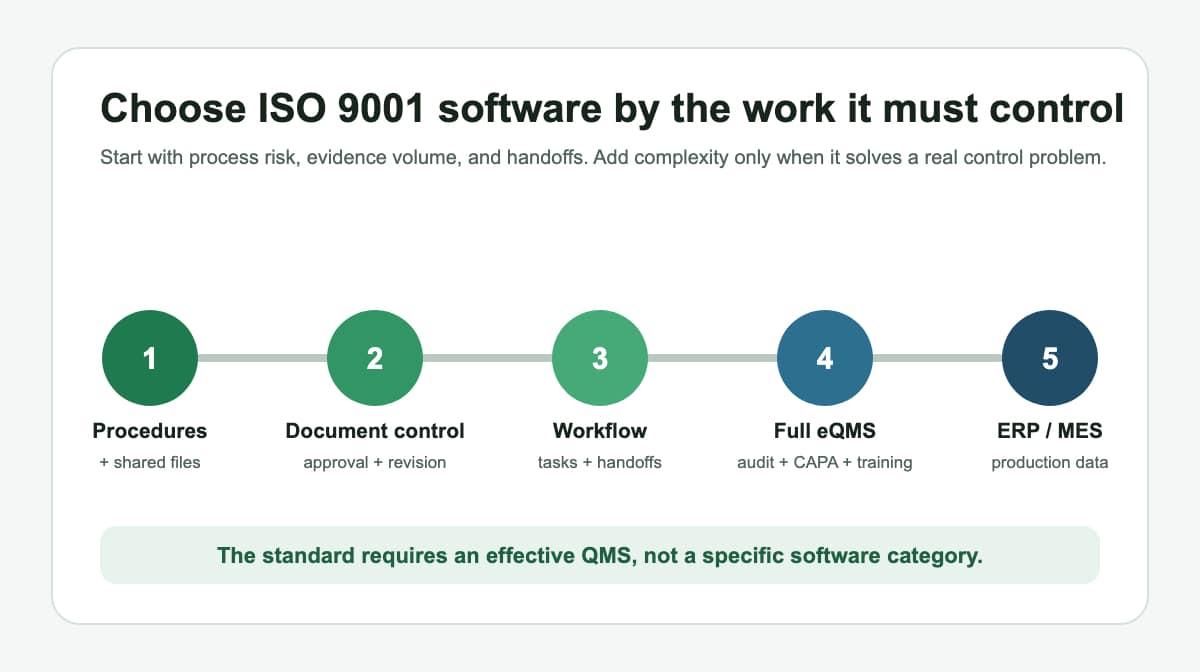
Most buyers can narrow the field to five categories: documented procedures with shared file storage, dedicated document control, workflow or process management, a full electronic QMS, or quality modules inside an ERP or manufacturing execution system. These categories overlap, but they solve different control problems.
- Start with documented procedures and shared files when the process is stable, the team is small, and one owner can maintain control.
- Add document control when approvals, revision history, access, retention, and acknowledgement become difficult to manage.
- Add workflow when work crosses departments and deadlines, escalations, or evidence routinely fall through the cracks.
- Choose a full eQMS when audits, nonconformities, corrective action, training, suppliers, and change control need one connected record.
- Consider ERP or MES quality modules when quality evidence must be tied directly to production orders, lots, equipment, inventory, or traceability.
A digital quality management system can exist at any of these levels. Digital does not necessarily mean a full enterprise suite. The important question is whether the system makes the right process and evidence available to the right person at the right time.
What Changed With ISO 9001:2026?
ISO 9001:2026 is the current edition and replaced ISO 9001:2015. ISO also says the new edition retains the harmonized structure used across its management system standards. That makes the familiar clause-family buying framework useful during transition, but it does not make an old compliance checklist a substitute for the current licensed standard.
Organizations already certified to the 2015 edition should follow their certification body’s transition arrangements. A first-time certification project should establish which edition and transition timing apply before configuring software, rewriting procedures, or buying a content library.
The current ISO overview groups QMS requirements into context, leadership, planning, support, operation, performance evaluation, and improvement. It specifically includes documented information under support and explains that operation covers the processes needed to meet customer requirements. ISO states that certification is voluntary. The standard defines the management system requirements; it does not prescribe a software brand or category.
ISO 9001 Software Clause-Family Scorecard
Use this scorecard to translate clause-family work into software capabilities. The labels follow the familiar 2015 structure requested in this comparison. Confirm detailed 2026 wording, applicable records, sector requirements, and transition dates with the licensed standard and your certification body.
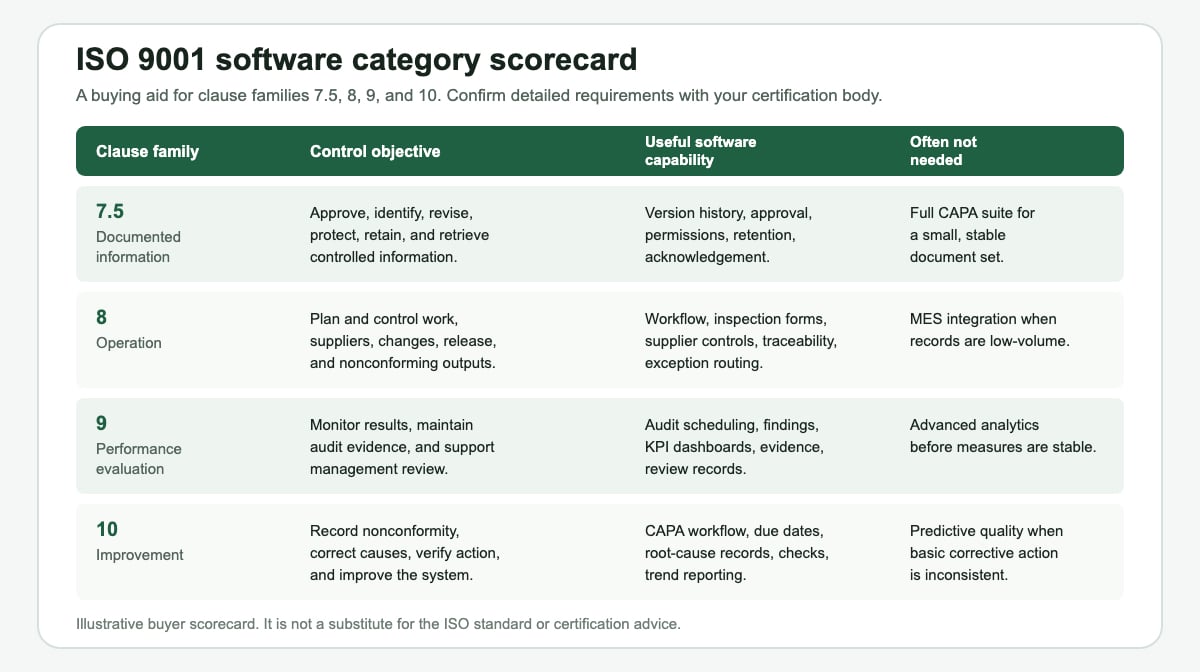
| Clause family | Control objective | Useful capability | Often not needed |
|---|---|---|---|
| 7.5 Documented information | Approve, identify, revise, protect, retain, and retrieve controlled information. | Version history, approvals, permissions, retention, and acknowledgement. | A full CAPA suite for a small, stable document set. |
| 8 Operation | Plan and control work, suppliers, changes, release, and nonconforming outputs. | Workflow, inspection forms, supplier controls, traceability, and exception routing. | MES integration when operational records are low-volume. |
| 9 Performance evaluation | Monitor results, maintain audit evidence, and support management review. | Audit scheduling, findings, KPI dashboards, evidence, and review records. | Advanced analytics before measures and data definitions are stable. |
| 10 Improvement | Record nonconformity, correct causes, verify action, and improve the system. | CAPA workflow, due dates, root-cause records, effectiveness checks, and trend reporting. | Predictive quality tools when basic corrective action is inconsistent. |
Category 1: Documented Procedures And Shared File Storage
This is the lowest-complexity category. It combines documented procedures, forms, spreadsheets, and controlled folders in a platform your employees already use. A small organization can make this work when ownership is clear and the number of documents, contributors, sites, and changes remains manageable.
The system still needs rules. Define who approves a document, how the current version is identified, who can edit it, where obsolete copies go, how long records are retained, and how employees know a revision affects their work. A folder without those controls is storage, not document control.
- Choose it when: one site, a small team, stable processes, and modest evidence volume make manual oversight realistic.
- Watch for: uncontrolled local copies, inconsistent file names, missing approvals, and spreadsheets that only one employee understands.
- Do not buy yet: enterprise CAPA, supplier portals, or production integrations that solve problems you do not have.
If you are starting from a blank page, first implement a quality management system with defined processes, responsibilities, evidence, and review points. Software cannot determine those choices for you.
Category 2: Document Control Software
Document control software concentrates on clause-family 7.5 work. Typical capabilities include approval routing, version history, controlled access, effective dates, read-and-acknowledge tasks, retention, search, and an audit trail. This category is often the first useful upgrade from shared folders.
It is a strong fit when the main pain is not performing the process but proving that employees used the right instruction. It can also reduce the risk of an obsolete work instruction remaining at a workstation after a revision.
- Choose it when: revisions are frequent, many people approve documents, or multiple locations need the same controlled information.
- Watch for: a repository that controls files well but leaves operational tasks, nonconformities, and audit findings in disconnected spreadsheets.
- Do not buy yet: a full eQMS if document lifecycle is the only material control gap.
Use the same buying questions you would apply to policy and procedure management software: what must be approved, who needs access, how changes are communicated, and which evidence must be retained?
Category 3: Workflow And Process Management Software
Workflow software manages the movement of work rather than only the document that describes it. It can assign tasks, enforce required fields, route exceptions, escalate overdue work, capture approvals, and produce a time-stamped record of who did what.
This category becomes useful when clause-family 8 controls depend on handoffs. Examples include supplier approval, incoming inspection, change requests, nonconforming output review, product release, and customer complaint routing. The value comes from making the procedure executable, not from drawing a more attractive flowchart.
- Choose it when: missed handoffs, incomplete forms, overdue tasks, and unclear ownership create repeat defects or audit findings.
- Watch for: workflows built before the underlying procedure, decision rights, or exception rules are agreed.
- Do not buy yet: specialized audit or training modules if the workflow platform can produce the evidence you actually need.
A broader management system software decision should consider integration, reporting, permissions, administration skill, and the cost of changing a workflow after employees depend on it.
Category 4: Full Electronic QMS Software
A full electronic QMS connects several quality records inside one system. Common modules cover controlled documents, training, audits, nonconformities, corrective and preventive action, change control, supplier quality, complaints, equipment, and management reporting.
The category is justified when the relationships between those records matter. An audit finding may open a corrective action, require a procedure revision, trigger training, and need an effectiveness check. A connected system can preserve that chain without manual cross-references.
- Choose it when: quality events are frequent, regulated or customer requirements are demanding, several sites share the QMS, or disconnected evidence is costly to reconcile.
- Watch for: long configuration projects, low adoption, duplicate data entry, and a module list that is much larger than your operating model.
- Do not buy yet: every available module. Start with the controls that have a named owner, a defined process, and a measurable failure mode.
Category 5: ERP Or MES Quality Modules
ERP and MES quality modules connect evidence to transactions and production. They may tie inspection results to a purchase order, lot, routing step, machine, work order, inventory status, or shipment. That connection can be valuable when traceability and release decisions depend on production data.
This category is not automatically more compliant than a dedicated eQMS. It may be excellent at operational records and weaker at controlled documents, training, audit programs, or corrective-action narratives. Some organizations therefore use ERP or MES for production evidence and a separate document or quality system for the rest.
- Choose it when: quality decisions must stop, release, quarantine, or trace material inside the production system.
- Watch for: expensive customization, weak usability for quality staff, and duplicate master data across systems.
- Do not buy yet: production integration when a controlled inspection form and a disciplined release procedure are sufficient.
How Should You Choose A QMS Tool Category?
Do not begin with vendor demonstrations. Begin with the control failures you need to prevent and the evidence you need to retrieve. A short assessment keeps attractive features from becoming requirements without a business reason.
- Run a gap analysis. Use an ISO gap analysis to separate missing processes from missing software controls.
- List required evidence. Identify the documents and records needed to operate processes and demonstrate results.
- Map failure points. Note where obsolete information, missed handoffs, late actions, weak traceability, or unavailable records cause real risk.
- Assign ownership. Name the person who maintains each process, document set, workflow, and report.
- Score the smallest suitable category. Test whether procedures and existing tools can close the gap before adding a dedicated platform.
- Pilot one process. Use a representative process with approvals, evidence, an exception, and a review step.
- Verify retrieval. Ask a person who did not configure the system to find the current instruction and the evidence from a completed case.
During demonstrations, use your own scenario. Ask the supplier to revise a controlled instruction, notify affected employees, execute one operational record, open a nonconformity, route a corrective action, and retrieve the complete history. This reveals more than a checklist of module names.
When Are Documented Procedures Enough?
Documented procedures may be enough when work is stable, responsibilities are clear, employees can find the current information, evidence volume is modest, and reviews consistently detect overdue or ineffective actions. In that setting, software can improve convenience without being the primary control.
Procedures stop being enough when the organization cannot reliably execute them. Warning signs include uncontrolled copies, missing approvals, incomplete records, recurring overdue actions, weak traceability, repeated audit findings, or management reports assembled through emergency spreadsheet work.
The Bizmanualz manual and procedure templates can reduce the blank-page work of defining a QMS. Because the product materials were developed around ISO 9001:2015, use them as editable starting documents and review each applicable requirement against ISO 9001:2026, customer obligations, sector rules, and certification-body guidance. The goal is not to own more documents. The goal is to operate and improve a controlled system.
Frequently Asked Questions
Does ISO 9001 Require QMS Software?
No. ISO 9001 requires an effective quality management system and appropriate documented information, not a particular software product. Your organization can use controlled procedures, existing business tools, dedicated QMS software, or a combination that fits its risks and complexity.
What Is The Difference Between Document Control And eQMS Software?
Document control software focuses on creating, approving, revising, distributing, and retaining controlled information. A full eQMS connects document control with quality processes such as audits, training, nonconformities, corrective action, supplier quality, and management reporting.
Can A Small Manufacturer Run ISO 9001 With Microsoft 365 Or Google Workspace?
Yes, when the organization establishes effective approval, version, access, retention, backup, and retrieval controls around those tools. Shared storage alone is not enough. The system needs documented rules, ownership, and evidence that employees use the current information.
Which Software Features Matter Most For An ISO Audit?
The most useful features make current information and objective evidence easy to retrieve. Depending on your processes, that may include version history, approvals, permissions, audit trails, record retention, training acknowledgement, due-date control, traceability, and corrective-action effectiveness checks.
Does ISO 9001:2026 Make Current QMS Software Obsolete?
Not automatically. ISO says the 2026 edition retains the harmonized structure, so many established controls can continue. Organizations should perform a gap analysis, update procedures and configuration where requirements changed, and confirm transition timing with their certification body.
Continue Your ISO 9001 Planning
Review the ISO 9001 Quality Manual and procedures.
Build the QMS before choosing automation.














