How to Use Business Management Software to Grow Your Beauty Business

Most salon businesses are built by technicians and stylists who are highly passionate and skilled in matters of hair, beauty, and fashion. As the business grows, the owner must also build an effective management system for staffing, inventory management, client retention, and marketing.
Business management software can bring those workflows together, but the software creates value only when it solves a real operational bottleneck. The best starting point is to identify where time, appointments, products, or customer follow-up are being lost, then choose a system your staff can use consistently.
How Can Business Management Software Help a Beauty Business Grow?
Salon management software can connect online booking, staff schedules, client profiles, inventory, point-of-sale records, marketing, and reporting. Information technology improves efficiency when the system removes repeated data entry and gives workers the information they need at the right point in the client journey.
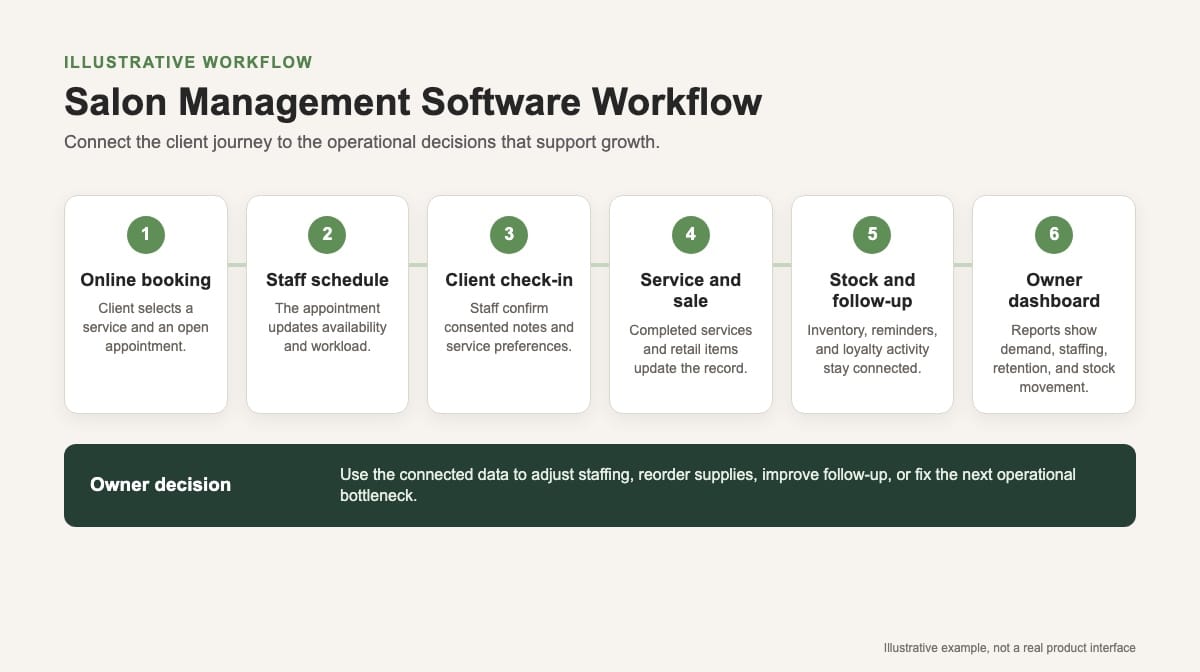
The workflow below shows how one appointment can move through the salon. The example is illustrative, not a screenshot of a particular product. Use it to see whether a product connects the steps that matter to your beauty business.
1. Streamline Booking
Online booking is often the first feature a salon owner considers. It lets clients see open appointments and select an appropriate time without waiting for the front desk to answer the phone. Direct booking links can also give interested social media audiences a shorter path from discovery to an appointment.
Current salon platforms can offer 24-hour booking, real-time availability, notifications, reviews, and rebooking tools, according to the official Fresha features page. Availability varies by platform and plan, so verify the specific booking channels, cancellation rules, deposits, reminders, and calendar controls that your salon needs.
Online booking can also help solo artists who do not have the time or manpower to talk to clients over the phone or respond to every message. If you prefer to rebook clients before they leave, the system can record the next appointment immediately and keep the schedule current.
Clients can see openings in your schedule and book an appointment instantly. They can peruse your calendar in their own free time and pick the most appropriate appointment time for their availability. Same-day appointments are easier to fill when an open time is visible, although the result still depends on demand, service length, and the salon’s cancellation policies.
Potential clients in your neighborhood may still walk in to book appointments at the front desk, and regular walk-in clients may continue to prefer that option. The benefit of an online streamlined booking system is choice: clients who want the convenience of booking appointments from their phones can do so without removing the personal front-desk experience.
2. Improve Employee Management
Your management system can reshape how you manage staff schedules. Online booking can feed the duty roster, show where walk-in clients may fit, support planned days off, and make appointment changes visible to the team. The goal is not to automate every staffing decision. It is to give managers and employees one reliable schedule.
For starters, the management system can help you map out employees’ duty roster for a whole week. You will know where to fit walk-in clients in the appointment schedule, when to give employees off-days, and how to reschedule appointments in case of unavoidable changes in your calendar. Another way a salon management system can assist is by keeping those changes in one place instead of spreading them across paper notes and messages.
Some platforms also support scheduled shifts, commission calculations, timesheets, pay runs, team targets, and performance reports. Use those reports as inputs for coaching, scheduling, and performance conversations rather than as automatic grounds for personnel decisions. If payroll and commission calculations are a recurring problem, document the rules in your payroll policies and procedures before configuring the software.
Accurate and comprehensive reporting can break down the profitability of your beauty business and show which employees have the most sales, bookings, or rebookings. A system may also analyze revenue generation and report on the revenue each staff member brings within a specified period of time. Read these results in context, since the service mix, schedule, location, and assigned clients can all affect the numbers.
3. Improve Inventory Management
Do not spend too much of the day tracking inventory manually across your salon supply chain. A connected inventory management system can update stock when retail products are sold or supplies are used. Depending on the platform and plan, it may also support purchase orders, stock-on-hand reports, stock movement, barcode scanning, and multi-location management.
Some systems can notify you when stock moves above or below the limits you set. An overstock notice gives you time to review the excess inventory, while an under-stocking notice can prompt a reorder in good time. Those alerts are useful only when product quantities, deliveries, and in-house inventory are recorded consistently.
Start with the products that most often cause stockouts or excess inventory. Set reorder points, define who can approve an order, and compare system counts with a physical count. Demand forecasting may be available in some products, but it should be treated as a feature to verify, not a universal capability.
When you compare products, look for the inventory functions that match your operation: demand forecasting based on past purchases, product grouping based on components and specifications, barcode scanning for instant identification and labeling of retail products, sales reports and purchase order generation, and multi-location management if you have multiple salons or points of sale. Confirm each function in the plan you intend to buy.
4. Speed Up Check-ins
A slow check-in creates unnecessary work for the receptionist and delays the client experience. Salon management software can keep appointment details, service history, consented notes, and payment status in an easy-to-access client record. Staff can confirm the appointment, prepare for the service, and spend less time searching for a file.
Faster check-ins can also create an appropriate opportunity to discuss add-on services or retail products. The recommendation should come from the scheduled service and the client’s stated needs, not from collecting unrelated personal details.
When a receptionist no longer “needs a minute” to find a client’s file, the front desk can smile more and search less during check-ins. Apart from saving time, a well-received check-in gives staff a better platform to explain relevant add-on services and retail products without turning the welcome into a sales pitch.
5. Automate Your Marketing
The success of a marketing campaign depends on whether the message is useful and timely. Salon software may help organize appointment history, service preferences, contact permissions, and follow-up activity. You can then use marketing automation for appointment reminders, birthday messages, thank-you messages, appointment follow-ups, and rebooking prompts.
Personalized marketing works best when it is based on a clear client choice or service need. Instead of gathering every available detail, organize the information that helps your team deliver the appointment, send the requested reminder, and make a relevant follow-up offer.
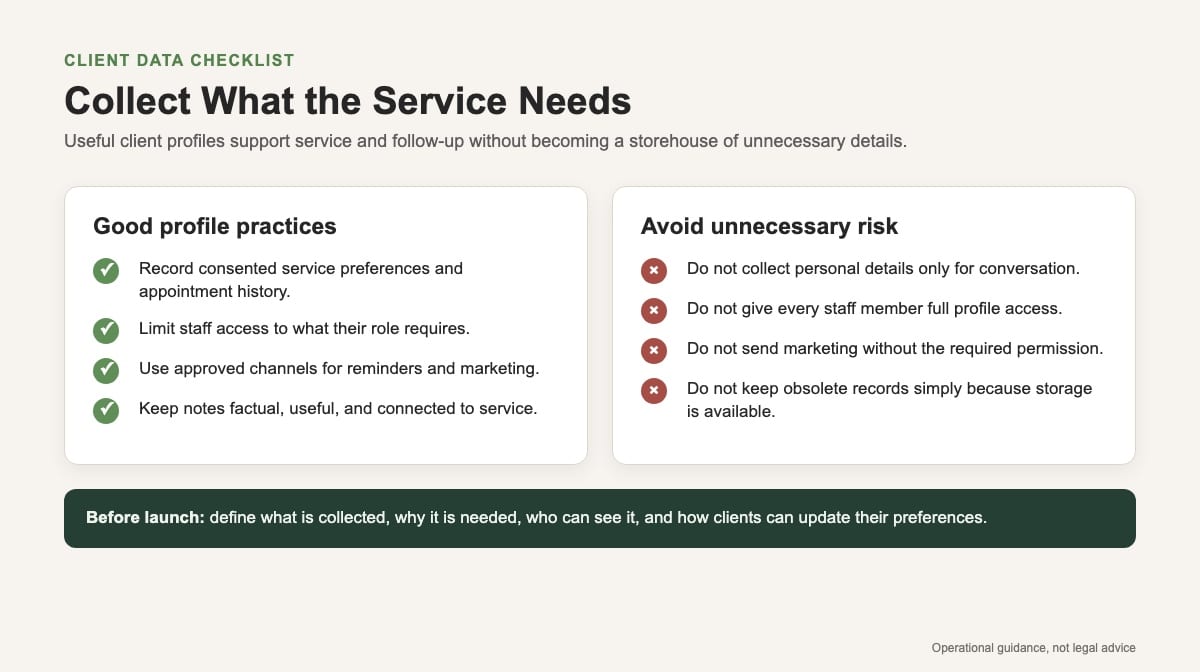
The system may collect, analyze, and organize data such as service preferences, approved photos, securely handled payment methods, and contact information. Decide which details are necessary, explain the purpose, and avoid treating every available field as something employees should fill in.
Collect only the client information needed for service and approved communication. Define who can see it, limit access by role, and give clients a clear way to update their preferences. These client data protection practices reduce unnecessary risk while keeping the profile useful.
6. Improve Your Customer Experience
Beauty businesses are people-based. The more relevant service information your staff can access, the better prepared they can be for an appointment. A useful profile may include service specifics, product sensitivities, consented preferences, and the products used during a prior visit. It does not need a client’s occupation or other personal details simply to create an ice-breaker.
Tracking a client’s service specifics can help staff prepare better for appointments and improve consistency. The same connected record can help ensure that clients have the products they need through automated inventory management. Keep the record focused on service delivery, customer satisfaction, and the improved customer experience you intend to provide.
Reports can also help you see booking patterns, client retention, inventory sales, revenue, wages, and commissions. The official Fresha reporting overview shows that advanced reporting may require an add-on, which is why reporting depth and export access should be checked before purchase.
7. Streamline Loyalty Program Management
Your software can track retail purchases, referral points, loyalty points, tiers, rewards, and incentives. Because the sales and marketing system connects client activity with follow-up, you can organize a loyalty program around clear, consistent rules.
A marketing system can analyze customer data and organize clients by the business activity recorded in the salon. Use that information to understand participation and redemption patterns, not to make assumptions about a person. The loyalty program should explain how points are earned, how rewards are used, and what happens when a membership changes.
For example, you might offer a first-visit incentive, a reward after a defined number of visits, increasing benefits at higher point levels, or a VIP membership with clearly stated services. Review the cost of each reward, how points expire, and whether staff can explain the program without looking up exceptions.
Streamlined loyalty program management should make retail purchases, referral points, and loyalty points easier to track. It can provide discounts to first-time clients, gamify the program with increasing deals as a client earns more referral points, and offer VIP memberships with specific benefits. Keep the rules mutually beneficial and avoid assumptions about how much a group of clients will spend or tip.
A first-time offer can incentivize a client to come back, while a points program can recognize repeat visits or referrals. VIP clients may receive more specialized treatment when the membership clearly includes it. Review each promotion as an operating cost and confirm that employees apply it consistently.
How Should You Choose Salon Management Software?
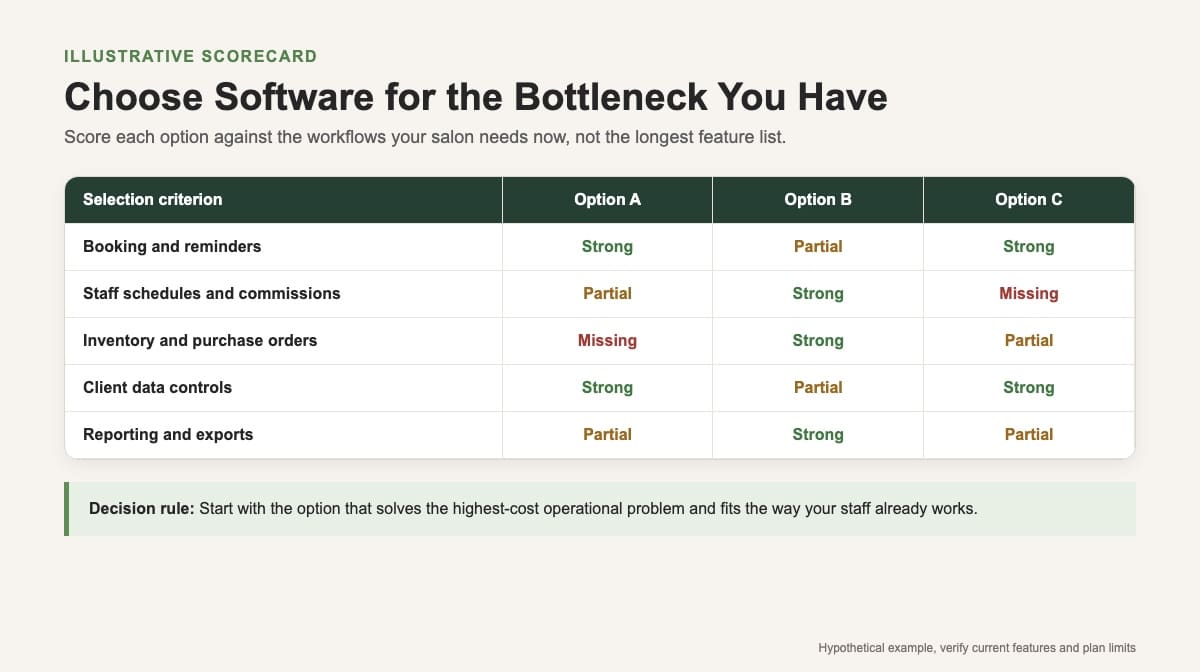
Do not choose software simply because it has the longest list of features. Use a scorecard tied to the operational problem you need to solve. Give extra weight to the workflows used every day, the controls needed for client data, and the reports required to make a decision.
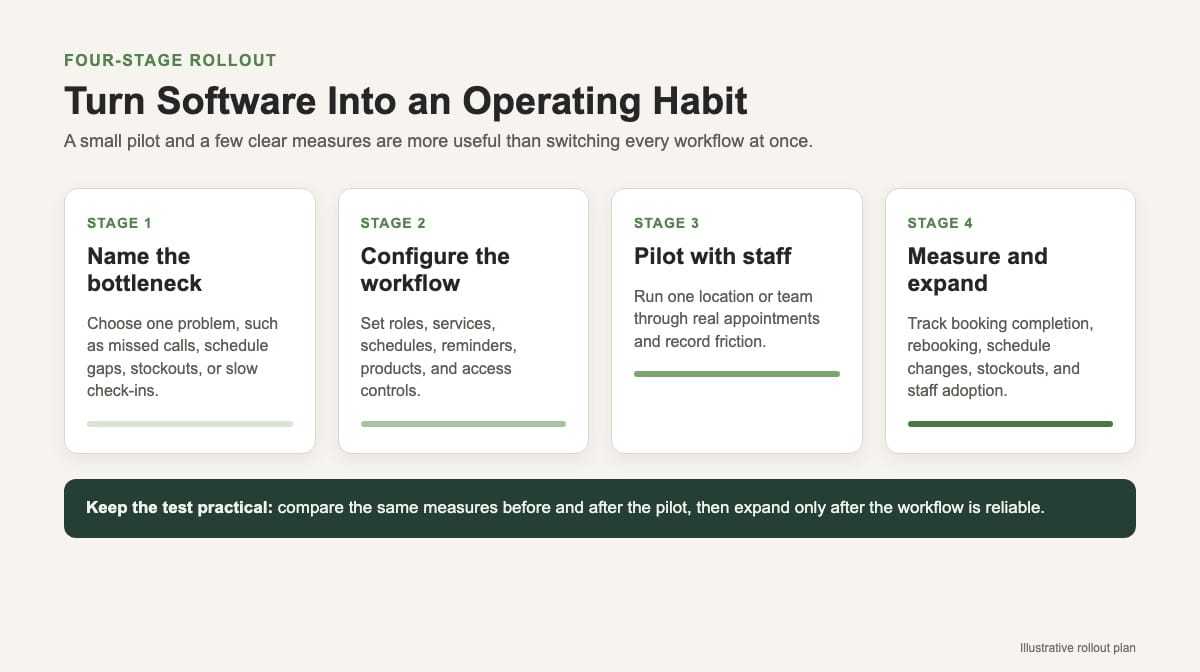
- Name the largest bottleneck in booking, staffing, inventory, check-in, marketing, customer experience, or loyalty.
- Confirm the required integrations, access controls, exports, reporting, support, and plan limits.
- Test the workflow with a small group of employees and real appointments.
- Measure a few outcomes, such as booking completion, rebooking, schedule changes, stockouts, and staff adoption.
- Expand only after the workflow is reliable and employees understand the procedure.
Grow Your Beauty Business with Business Management Software
Reshaping your business is easier when booking, staffing, inventory, check-in, marketing, customer experience, and loyalty share a reliable operating system. Your job is to choose business management software that fits your business needs, document how employees should use it, and measure whether it removes the bottleneck you selected.
The software should support the way you intend to grow your beauty business. Start small, protect client information, and improve one connected workflow at a time.
Beauty clients need convenient booking and an easy-to-access database at check-in, while employees need clear schedules and dependable information. When those pieces work together, the system can boost efficiency, help you exceed client expectations, and support staff more efficiently.
Frequently Asked Questions
Which Salon Operation Should You Automate First?
Automate the operation that creates the most repeated work or lost opportunity. For many salons, that may be booking, reminders, staff scheduling, or inventory, but the right choice depends on your current bottleneck.
What Should a Small Beauty Business Look for in Management Software?
Look for the daily workflows you need, clear access controls, reliable exports, understandable reports, responsive support, and a plan your staff can use consistently. Verify which features require a higher plan or add-on.
How Can a Salon Protect Customer Data?
Collect only information needed for service and approved communication, limit access by role, use secure payment handling, and give clients a way to update their preferences. Document these practices before employees begin using the system.
How Can You Measure Whether Salon Software Is Helping?
Compare a small set of measures before and after the rollout. Useful measures may include booking completion, rebooking, schedule changes, check-in time, stockouts, staff adoption, and the time required to produce reports.
Does Every Salon Need an All-in-One System?
No. A smaller system may be the better choice when it solves the main bottleneck, connects with existing tools, and remains easy for employees to use. Add complexity only when a documented workflow requires it.