
Policies Procedures–Fast

For years, writing policies, procedures and forms meant opening Microsoft Word, printing the final document, and placing it in a binder. If you have ever managed paper based binders, you know that the system is not simple. Tracking revisions, routing sign-offs, filing change pages, proving that employees read the current version, and retrieving old procedures all take more time than the work should require.
The point of policies procedures fast is not speed for its own sake. It is control without friction. A good policy and procedure management system helps people find the right document, use the right version, complete their review tasks, and keep the business moving without turning every revision into a paper chase.
What Is Policy and Procedure Management Automation?
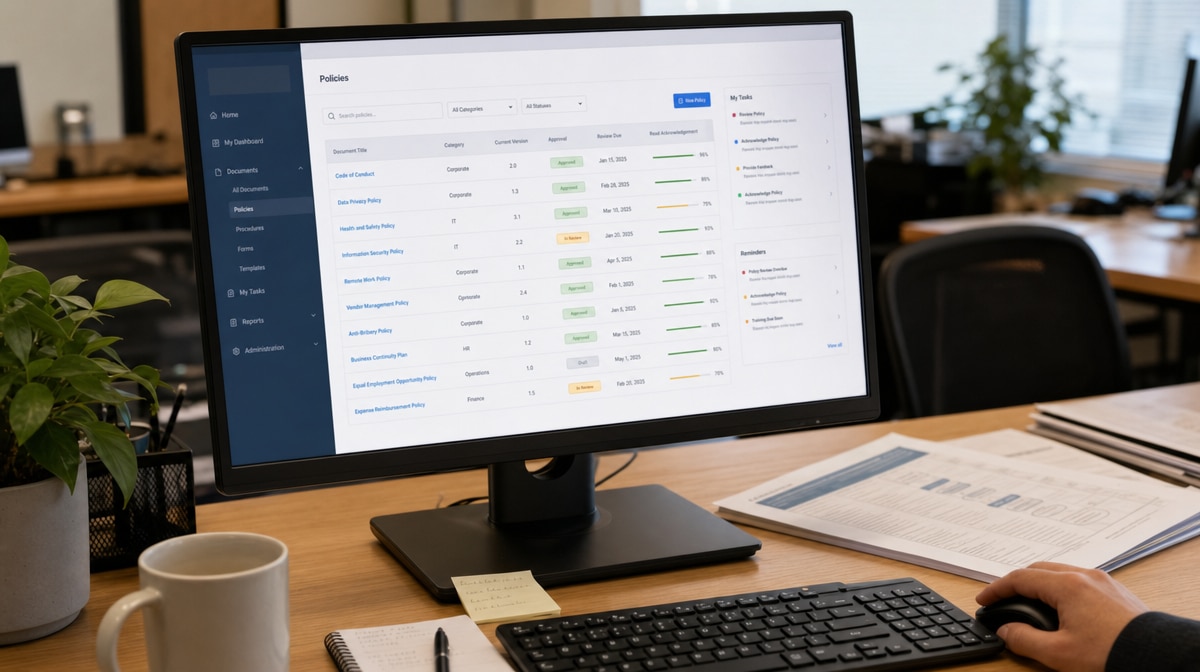
Policy and procedure management automation is the use of an online system to publish, control, review, approve, and track policies, procedures, and forms. Instead of treating documents as loose files on a shared drive, the system treats them as controlled business records with ownership, permissions, version history, review dates, and read acknowledgments.
That matters because procedures are not just documents. They are instructions for how the business works. When the current procedure is hard to find, when two departments use different versions, or when an employee can change a file without review, the document library stops supporting operations and starts creating risk.
The National Archives and Records Administration’s Universal Electronic Records Management Requirements describe electronic records management as a lifecycle problem that includes capture, maintenance, use, transfer, and disposition. Even if your company is not a federal agency, the same practical lesson applies: electronic records need structure, controls, and accountability.
Why Are Paper Based Binders Not Simple?
Paper based binders feel simple because everyone understands paper. The problem appears after the first revision. Someone must print the new page, remove the old page, distribute the change, collect approvals, and confirm that each person is using the current procedure.
That process gets worse as the company grows. A policy binder in one office is easy to update. A binder in every department, location, or branch becomes a manual distribution network. The person managing the documents has to remember who has each binder, which pages changed, who signed off, and whether older copies are still floating around.
Paper also makes retrieval difficult. If you need the previous version of a procedure, the approval history, or proof that employees read the change, the answer depends on how well someone filed the paper. That is not a reliable control system.
What Do Users Need From Policies, Procedures and Forms?
Users do not want a fancy filing cabinet. They want a system that helps them do their work better and more easily. Automated policies, procedures and forms management needs to be seamless, unobtrusive, and practical enough that employees actually use it.
Easy Location
Employees need a simple way to locate the information they need. Search, categories, permissions, and document ownership should make the right procedure obvious, not hidden inside nested folders.
Fast Access
Access should be fast and convenient. If a procedure is needed on the shop floor, in a remote office, or during a customer issue, the employee should not have to ask who owns the binder or where the latest file was saved.
Intuitive Interface
The interface should not require a training program of its own. If the system is difficult to learn, employees will work around it, save local copies, or keep using the old folder structure.
Correct Version
Users need confirmation that they are accessing the correct information. Version control, effective dates, approval status, and document history help prevent the common problem of two teams following two different procedures.
Reminders and Tasks
Reviewers need reminders for outstanding tasks. Approvals, read acknowledgments, periodic reviews, and revision assignments should be visible without a manager chasing each person by email.
How Does Publishing Policies and Procedures Online Help?
Publishing policies and procedures online is simpler and more effective than maintaining a paper policy procedure system. Paper systems do not provide automated tracking of approvals, notifications, reminders, backup, access control, or remote access.
Paper is slow, cumbersome, and expensive to maintain. If you have wondered what it costs to maintain policies and procedures, start with the time spent finding documents, confirming versions, copying pages, and answering questions that a controlled online system can answer automatically.
You could download policies and procedures and load them onto a local computer network. For example, you could place them on a local server. But then the documents are organized in a basic hierarchical format. You still have to build access control, version control, backup, review routing, and permissions around the folders.
Manufacturing Procedures Are On The M Drive
You could send an email to everyone saying, “Manufacturing procedures are on the M drive, in the Procedure folder. Do not change anything without telling me.” That sounds easy until someone edits the wrong file, saves a local copy, deletes a folder, or keeps following an old version.
With an online document management system, you send a link and login information. Procedures, records, and rights to use or edit them are managed inside the web-based system. Deployment and control become easier because access, ownership, and revision history are part of the system, not side agreements in email.

Why Is A Document Management System Better Than A Shared Drive?
Storing and sharing records on your local network is like having an electronic file cabinet. It is easier than paper in some ways because you can access files remotely, search faster, and back up your information. But it is not a great leap forward. You have not improved the process, you have merely replicated it in another form.
As long as you can put your finger on your compliance records, you have one aspect of your business under control. Beyond compliance, are those records helping you manage your business? Can you tabulate information, produce visual charts and graphs, see unusual behavior, and spot trends while there is still time to respond?
Shared-Drive Scenario
In the shared-drive scenario, the best you can do is periodically collect information, dump it into a spreadsheet, and chart it. If you keep your information in an online DMS with reporting capabilities built in, you can generate and view reports as coworkers enter data into the system.
A document management system also lets you decide who has permission to enter data, read reports, approve changes, and publish procedures. You can see trends as they develop while there is still time to affect real-time improvements.
When you revise policies and procedures, the DMS helps organize the development and review processes. It performs version control, preserves history, and minimizes risks such as documents disappearing, duplicate copies circulating, or unapproved changes being treated as official.
Is SharePoint Easy For Policy Procedure Management?
Many companies try to install their own document control system and then discover that tools like SharePoint are not as easy as they sound. SharePoint can store files, but policy procedure management requires more than storage. You need permissions, document ownership, approval workflow, version control, read acknowledgment, review schedules, and reporting.
If those controls are not designed carefully, the system becomes another shared drive with a better interface. Employees may still wonder which document is current, who can approve a change, where the final version lives, and whether anyone has read the update.
Unless you are in the business of automating document control, you will benefit from using a system designed for policy and procedure management. The right system saves you from having to design, build, and manage your own document version control system.
How Can OnPolicy Make Procedures Fast And Easy?
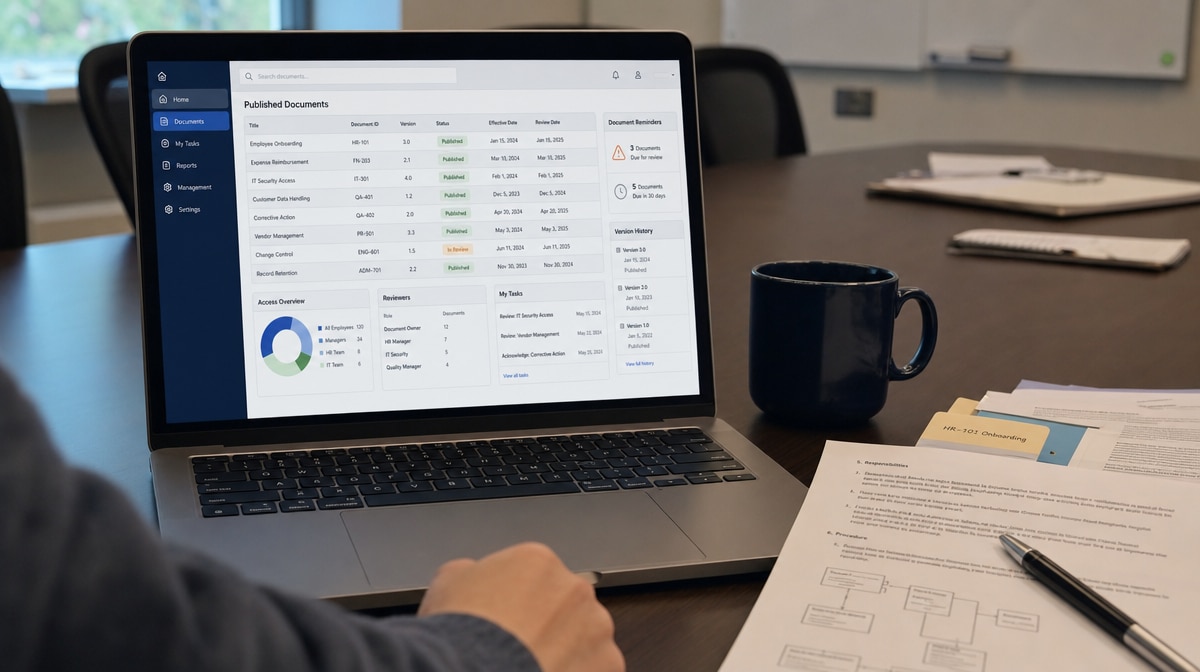
OnPolicy is designed to manage policies, procedures and forms online instead of treating them as loose files. The point is not simply to move a Word document into a browser. The point is to make publishing, access, review, approval, and version control part of the normal operating system for the business.
When information comes pre-loaded, pre-organized, and rights-managed, documents are harder to lose and easier to control. You do not have to pull your hair out sorting through multiple versions, wondering who approved a revision, or chasing employees for acknowledgment.
If you are still using a paper system for your policies, procedures and forms, consider switching to software-as-a-service technology that provides controlled access to your important documents and a simpler way to manage policies, procedures and forms online.
You can also sign up for a free 30-day trial to see how online document control changes the work compared with paper binders, local folders, and manual reminder emails.
Frequently Asked Questions
What Is The Fastest Way To Manage Policies And Procedures?
The fastest way is to use an online policy and procedure management system that controls versions, permissions, approvals, reminders, and read acknowledgments in one place.
Why Are Paper Policy Binders Hard To Maintain?
Paper binders require manual printing, filing, distribution, sign-off, and replacement of old pages. As the company grows, those manual steps make version control and proof of review difficult.
Is A Shared Drive Enough For Procedure Control?
A shared drive can store files, but it usually does not provide workflow, approval routing, read acknowledgment, reporting, or reliable version control without additional governance.
What Should A Policy Management System Track?
It should track document owner, current version, approval status, effective date, review date, access permissions, read acknowledgment, and revision history.
How Does Online Policy Management Help Employees?
Online policy management helps employees find the correct procedure quickly, follow the latest version, complete assigned tasks, and avoid relying on outdated paper or local file copies.














