
Gumloop Alternative: Best Workflow Automation Platforms for Business Operations

Workflow automation tools have multiplied faster than most operations teams can evaluate them. Every platform claims to save time, reduce errors, and connect the tools your business already uses. The distinction that matters is not which platform has the most features in a demo, but which one fits the actual mix of systems, team skill levels, and task types you need to automate. Gumloop entered the space with a visual pipeline builder aimed at non-technical users who want to assemble AI-driven workflows without writing code. It has earned genuine fans in that category.
For operations teams evaluating workflow automation options, Gumloop is worth a serious look. It is also worth comparing against alternatives before committing, because the right platform depends heavily on whether your primary need is building custom AI workflows, automating business process documentation, or deploying a persistent AI employee across your team’s collaboration tools. Those are different use cases, and different platforms serve them better.
What Is Gumloop?
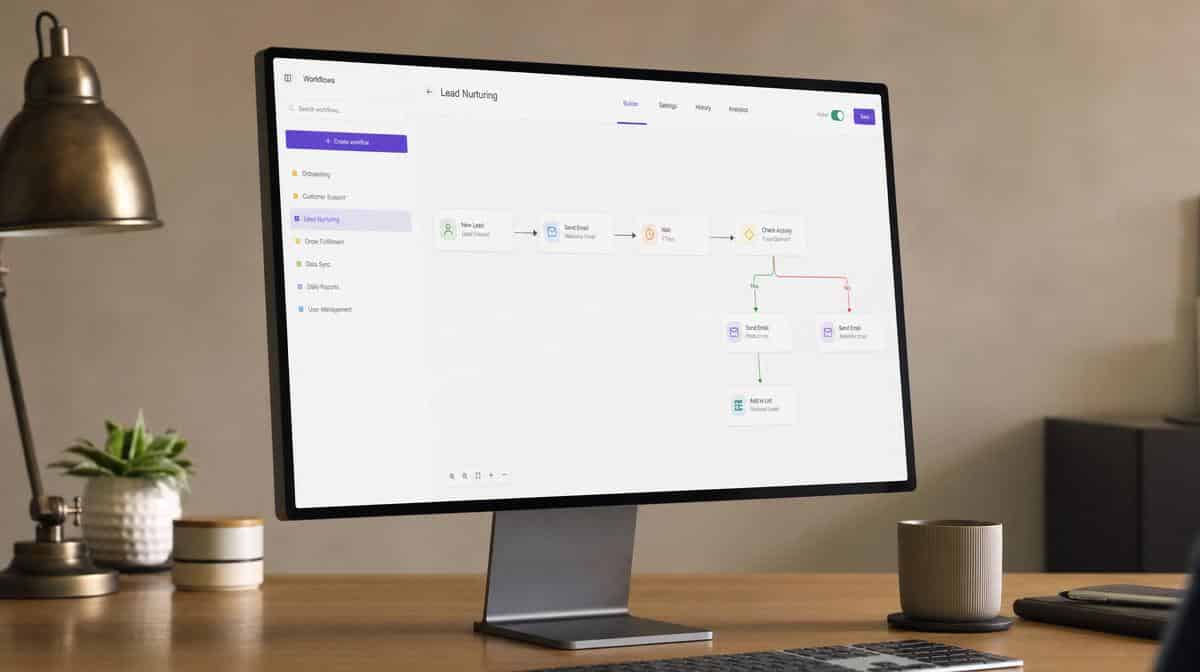
Gumloop is a no-code workflow automation platform that lets users build AI-powered pipelines visually. Users connect input sources, processing steps, and output destinations using a drag-and-drop interface. The platform integrates with common data sources and business tools, and its primary audience is growth teams, content operations, and technical business users who want to build custom automations without writing code.
Gumloop’s visual builder makes it approachable for users who are comfortable designing logic flows but do not want to manage API configurations directly. Its strength is in structured, designed automations where the workflow is defined in advance and runs on a trigger. Teams that need ad-hoc, context-sensitive AI assistance, or that need an AI employee to respond to unstructured requests across business tools, may find the platform’s scope narrower than they need.
What Does Gumloop Do Well?
Gumloop’s visual pipeline builder is genuinely well-designed for users who think in flow diagrams. Non-technical operators can assemble multi-step AI workflows, connect data sources, and configure logic branches without needing developer support. For use cases like automated content research pipelines, structured data extraction workflows, or repeatable AI document generation tasks, Gumloop provides a fast setup path.
The platform also attracts a strong community of users who share workflow templates, which speeds up adoption for common use cases. If your automation needs are well-defined, repeatable, and fit common patterns, Gumloop’s template library and visual builder can get you running quickly.
Where Does Gumloop Have Limitations?
The primary limitation for operations teams is that Gumloop is primarily a workflow builder, not a persistent AI employee. Every automation is a defined pipeline that runs when triggered. It does not maintain company-wide context, respond to ad-hoc requests in Slack or Teams, or act as a collaborative team member that can be tasked conversationally with different work at different times.
For teams that need to automate documentation-heavy processes, compliance tracking, or cross-system coordination involving both structured data and unstructured decision-making, a platform designed as an AI employee tends to fit better than a pipeline builder. Workflow builders require someone to design the pipeline correctly; if a process changes or an edge case appears, someone needs to update the pipeline manually.
Which Gumloop Alternatives Serve Business Operations Teams?
Operations teams have several strong alternatives depending on what “workflow automation” means for their specific context. For a broader survey of the field before narrowing down, our guide to HyperAgent alternatives compares nine AI agent platforms side by side.

Dash
If the operations team’s primary need is a persistent AI employee that works across Slack, Teams, and connected business tools without requiring pipeline design for each task, Dash is a strong alternative to Gumloop for operations-focused AI automation. Dash connects to more than 3,200 tools, maintains company-wide context, and can handle both structured automated workflows and conversational, ad-hoc task requests. It is also model-neutral, which means teams are not locked into a single AI provider’s output quality or pricing. Teams building information technology workflows across multiple business systems will find the broad tool coverage a practical advantage.
Zapier
Zapier is the market-leading workflow automation platform and supports thousands of tool integrations. Its strength is in trigger-based point-to-point automation between specific applications. It is well-established, well-documented, and has a large template library. For teams that need straightforward “when X happens in app A, do Y in app B” automations, Zapier is a mature choice. It is less suited to AI-native workflows or persistent AI employee use cases.
n8n
n8n is an open-source workflow automation platform with a visual node builder similar to Gumloop’s. It is self-hostable, which appeals to teams with strict data sovereignty requirements. The open-source model means higher setup cost but no per-operation pricing. Teams with technical staff who want to build complex multi-step automations with full control over the infrastructure often prefer n8n over cloud-hosted pipeline builders.
Lindy
Lindy focuses on personal AI assistant workflows, particularly scheduling and administrative automation. It is a good fit for individual executive assistants or small teams with scheduling-heavy needs. It is less focused on team-wide process automation, documentation, or compliance-oriented workflows.
How Should Operations Teams Choose Between Workflow Automation and AI Employee Platforms?
The decision comes down to the primary bottleneck. If the team is moving data between specific systems on a schedule or trigger, a workflow automation platform like Zapier or Gumloop is a straightforward fit. If the team’s bottleneck is in documentation-heavy work, cross-tool coordination, or the need for an AI that can respond to different requests from different team members without a pre-defined pipeline for each one, an AI employee platform fits the need better.
Teams that have mature business process improvement practices in place will already have their core processes documented as clear inputs for either type of tool. For teams with less-structured operations, the flexibility of an AI employee platform tends to provide faster time-to-value because it does not require upfront pipeline design for every workflow. Clear policies and procedures documentation also gives an AI employee platform the foundational context it needs to work accurately from day one.
Frequently Asked Questions
What Is a Gumloop Alternative?
A Gumloop alternative is a workflow automation or AI employee platform that serves a similar goal of connecting business tools and automating tasks, but with different architecture, pricing, AI model options, or scope of automation coverage.
What Is the Difference Between a Workflow Automation Tool and an AI Employee?
A workflow automation tool runs predefined pipelines triggered by specific events. An AI employee maintains persistent context and responds to varied, ad-hoc task requests from team members without requiring a pre-built pipeline for each task type. The two models suit different bottlenecks.
Is Gumloop Suitable for Business Operations Teams?
Gumloop works well for operations teams that need to build defined, repeatable AI pipeline automations with a visual builder. It is less suited for teams that need a persistent AI employee handling varied, unstructured requests across Slack or Teams, or maintaining company-wide documentation and compliance context.
How Many Tools Do Leading Workflow Automation Platforms Connect To?
Coverage varies widely. Established platforms like Zapier connect to thousands of applications. Newer AI-native platforms range from dozens to over 3,000 native tool integrations. The relevant number is not the total integration count but how many of the specific tools your operations team depends on are covered natively.
What Should Operations Teams Evaluate Before Selecting a Gumloop Alternative?
Operations teams should evaluate: does the platform connect to their existing tools, does it require pipeline design for each automation or can it handle ad-hoc requests, what AI models does it support and can they be changed, what is the total cost at their expected usage volume, and does it have a free tier or low-commitment pilot option?
Compare more tools on the software alternatives hub, where every Bizmanualz comparison page is grouped by category.














