
The Complete Guide To Automation in Process Improvement

Most improvement programs reach the same moment. The team has mapped the process, removed a few steps, clarified who owns what, and the work still takes longer than it should. Someone points at the screen and says the obvious thing: a computer could do that part. That is where automation process improvement work usually begins, and it is also where a good number of programs quietly go wrong.
Automation is not a substitute for improvement. It is one of several changes an improvement effort can make, and it happens to be the change with the longest payback and the widest blast radius when the underlying process is still a mess. Used well, it removes the repetitive handling that consumes a team’s day and creates the operating data that shows where to look next.
This guide explains what automation in process improvement actually means, how to choose the right candidates, how to prepare a process before you automate any part of it, how to run the implementation, and how to tell afterward whether the change produced a real result. It assumes you are running a business, not a research lab, and that the process has to keep working while you change it.
What Is Automation in Process Improvement?
Automation in process improvement is the use of software or equipment to carry out steps of a recurring business process that people previously performed by hand, applied inside a structured effort to make that process faster, more accurate, more consistent, or better controlled. The distinguishing feature is the framing: the automation exists to serve a defined improvement objective, not to satisfy a technology roadmap.
The distinction matters in practice. A technology project asks which tools the company should buy. An improvement effort asks which problem the process has, what evidence supports that diagnosis, and which change is most likely to fix it. Automation is one answer among several, and it competes with removing the step entirely, simplifying the rule, moving the check earlier, or reassigning the work.
Automation, Improvement, and Transformation Are Not the Same Thing
Vendor material uses these three words interchangeably. They are not interchangeable. Improvement changes how a process operates to produce a better result. Automation changes who or what executes a step. Transformation redesigns the operating model around a different set of capabilities. A company can improve a process without automating anything, and it can automate a great deal without improving a single outcome.
Where Automation Fits in the Improvement Cycle
A conventional improvement cycle observes the work, defines the problem, confirms the cause, designs a change, tests it, measures the result, and standardizes what works. Automation belongs in the design and test phases, after the cause is understood. Introducing it earlier locks in the current design before anyone has established whether that design is worth keeping.
Companies with an established workflow and process management practice have an advantage here, because the process is already documented, owned, and measured. The automation decision becomes a normal management judgement rather than a leap.
Why Does Automation Belong Inside a Process Improvement Program?
Manual handling is expensive in ways that rarely appear on a budget line. It consumes attention, introduces variation, creates delay whenever the person is unavailable, and produces no data about how the work actually performed. Automating the right steps addresses all four at once.
- Consistency: an automated step executes the same way every time, which removes a common source of preventable variation.
- Speed: work moves as soon as the trigger condition is met rather than waiting for the next time someone checks an inbox.
- Capacity: employee time returns to judgement work, exception handling, and customer contact.
- Traceability: automated steps leave timestamped records, which turns process performance from an opinion into a measurement.
- Control: approval thresholds, segregation of duties, and required fields can be enforced by the system rather than by memory.
The last two points compound. McKinsey’s 2019 account of the operations and technology flywheel describes the pattern: operations use technology to codify how work is done, the codified work generates data, and the data reveals the next improvement worth making. Automation is most valuable when it feeds that loop rather than terminating in a one-time efficiency claim.
What Automation Does Not Fix
Automation does not resolve an unclear objective, an undefined owner, a policy that contradicts the customer’s needs, or a process that produces the wrong output correctly. It also does not resolve capacity problems caused by understaffing in judgement-heavy work. If the diagnosis points at any of those, the automation will be an expensive way to avoid the actual decision.
Which Processes Should You Automate First?
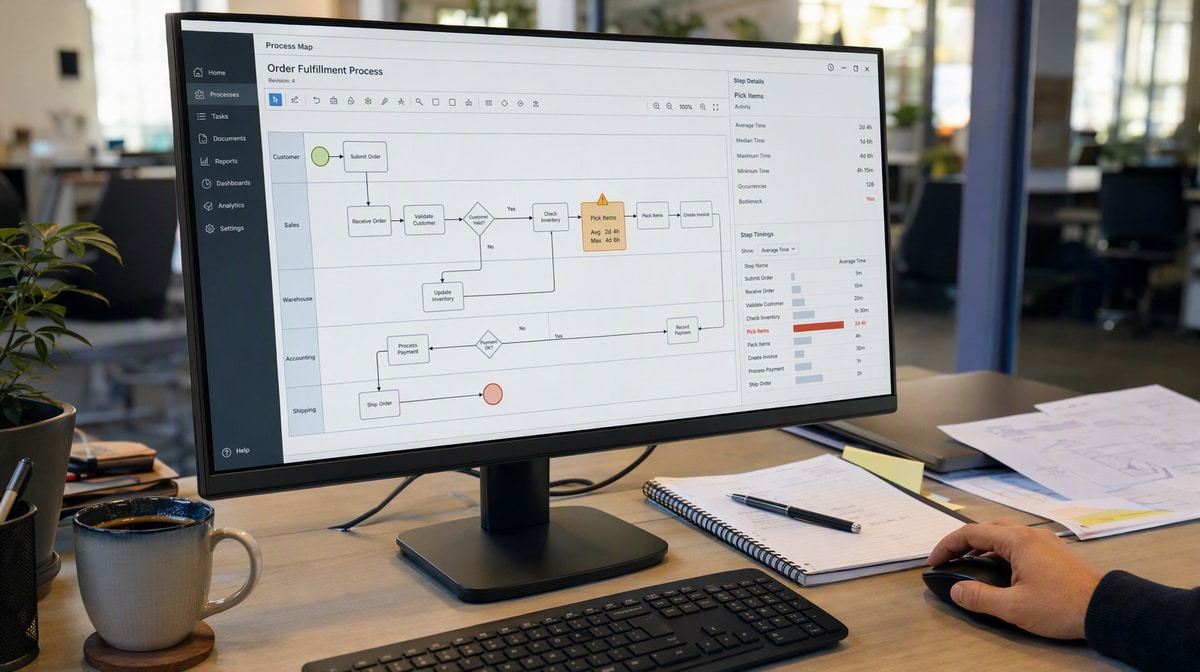
Candidate selection is where most of the value is won or lost. The best first candidates are boring: high volume, rules based, well understood, and low risk if they fail in a visible way. Ambitious first projects tend to combine unclear requirements with high stakes, which is the worst pairing available.
Strong Candidate Characteristics
- Repetitive and frequent: the step runs many times a day or week, so a small saving multiplies.
- Rules based: the correct action can be described with conditions rather than requiring case-by-case judgement.
- Structured input: the data arrives in fields, forms, or system records rather than free-form email.
- Stable requirements: the rule has not changed every quarter and is not about to.
- Clear correct outcome: anyone reviewing the result can tell whether it was right.
- Low reversal cost: a mistake can be detected and corrected without harming a customer or breaching an obligation.
Weak Candidate Characteristics
- Heavy exception traffic, where the documented path covers a minority of real cases.
- Steps requiring negotiation, discretion, or relationship judgement.
- Processes nobody currently owns, because there will be nobody to maintain the automation.
- Work that is about to be restructured by a system migration, reorganization, or regulatory change.
- Steps that exist only to compensate for a defect earlier in the process.
The last item deserves attention. Reconciliations, chasing lists, and correction queues usually exist because something upstream fails. Automating the compensating step makes the underlying defect permanent and invisible. Fix the upstream cause instead. This is the practical form of the warning that runs through lean process improvement: eliminate the waste before you make it efficient.
A Simple Scoring Approach
When several candidates compete, score each on frequency, manual effort per occurrence, error rate, risk if automated incorrectly, data readiness, and implementation effort. The score is not a decision; it makes assumptions visible so the process owner can challenge them before anyone commits budget.
How Do You Prepare a Process Before You Automate It?

Preparation is the step most often skipped and the step that determines the result. The goal is to arrive at the build with a process that is documented, simplified, owned, measured, and agreed. Automating before that point converts an informal process into a hard-coded one, complete with all of its accumulated workarounds.
1. Document How the Work Actually Moves
Map the current process from trigger to result, including the parts nobody wrote down. Record decision points, systems, handoffs, queues, exceptions, rework loops, and the spreadsheets people maintain on the side. The map should describe reality, not the procedure people believe they follow. A typical workflow process often contains steps that exist only because of a system limitation resolved years ago.
2. Remove and Simplify
Challenge every handoff, approval, copy, report, and reconciliation. Ask what decision it supports and what risk it controls. Delete the steps with no current purpose, and reposition or simplify the ones that do control a real risk. Every step removed at this stage is a step you never have to build, test, document, or maintain.
3. Set the Rules Explicitly
An automated step needs a rule that is unambiguous. Define the trigger condition, the required inputs, the decision logic including thresholds, the assignment, the output, and the escalation path. Where the current process relies on someone knowing what to do, that knowledge has to become a written rule before it can become a configured one.
4. Design the Exception Path
Every automated process will meet cases the rule does not cover. Decide in advance what happens: which cases route to a person, who that person is, how they are notified, what information they receive, and how the outcome is recorded. Processes that fail silently on exceptions create a second, invisible manual process that nobody manages.
5. Establish the Baseline
Record current cycle time, error rate, rework volume, labor hours, and exception rate before anything changes. Without a baseline, the team will judge the automation by how modern it feels. Businesses that have thought seriously about their process improvement aspirations tend to have these measures already, which shortens this step considerably.
6. Assign an Owner
Name the person accountable for the process after the automation goes live, not only for the project that delivers it. The owner maintains the rules, reviews the exceptions, approves changes, and answers for the result. An automated process without an owner degrades quietly as the business around it changes.
What Types of Automation Are Available to a Business?
The category has broadened well beyond the manufacturing sense of the word. Most small and mid-sized businesses find their opportunities in the software categories rather than in equipment. Start with the least sophisticated option that solves the problem.
Workflow and Business Process Automation
A workflow engine routes work between people and systems according to defined rules: requests, approvals, assignments, status changes, notifications, and escalations. This is the broadest and most common category, and it is the natural home for the approval and handoff waste that improvement work usually exposes. The wider category is covered in this overview of process automation and its business applications.
Integration and Data Transfer
Duplicate data entry across systems is a common finding in process reviews. Integrations, scheduled imports, and interface files move data from one authoritative source to the systems that need it, removing both the labor and the transcription errors.
Document Generation and Templating
Contracts, quotes, statements, work orders, and compliance records can be produced from structured data and an approved template. This removes formatting effort and, more importantly, removes the risk of an outdated clause surviving in a copied file.
Robotic Process Automation
Robotic process automation drives an existing user interface the way a person would, clicking and typing across applications that have no usable interface for integration. It is useful where a real integration is not available, and it is fragile: a screen change can break it. Treat it as a bridge rather than a destination.
Rules Engines and Decision Automation
Where a decision follows a policy rather than a judgement, the policy can be encoded: credit thresholds, eligibility criteria, pricing rules, routing logic, and risk scoring. The benefit is consistency and auditability. The requirement is a policy that is actually written down and current.
Monitoring, Alerting, and Reporting
Automation does not have to perform the work to improve the process. Automatically tracking queue aging, missed service levels, and exception volume gives managers the visibility to intervene while intervention still helps.
Machine Learning and Intelligent Automation
These tools extract data from unstructured documents, classify requests, draft responses, and increasingly chain several of those steps together on their own. They expand the range of automatable work, and they also introduce probabilistic behavior into processes that previously behaved deterministically. The same step can produce a different answer twice, which breaks the assumption most process controls were built on.
Where the output affects a customer, a payment, or a compliance record, plan for human review and for a record of what the system decided and why. The NIST AI Risk Management Framework is a voluntary reference rather than a compliance requirement, and it is a practical starting point for deciding which automated decisions need a person in the loop and what evidence to retain.
How Do You Implement Process Automation Step by Step?
The implementation should be controlled enough to protect the business and simple enough to repeat on the next process. The following sequence assumes the preparation work above is complete.
Step 1: Define the Objective and Success Criteria
State what the automation is meant to improve, by how much, and by when. Write the criteria that will decide whether to adopt, adjust, or stop. Vague objectives produce projects that cannot fail and cannot be evaluated.
Step 2: Specify the Automated Process
Produce a written specification covering the trigger, inputs, rules, assignments, outputs, exception handling, notifications, permissions, retained records, and the controls the process must preserve. This document becomes the basis for configuration, testing, training, and the updated procedure.
Step 3: Select the Tool Against the Specification
Evaluate options against the written requirement rather than against a demonstration. Consider fit to the rules, integration with existing systems, permissions and audit capability, total cost, the skill required to maintain it, and what happens to the process if the vendor relationship ends.
Step 4: Configure and Test
Build the automation and test it with real cases, including the awkward ones: missing data, out-of-range values, cancelled requests, duplicate submissions, and the exceptions you documented. Verify that controls still operate and that the records the business needs are still produced.
Step 5: Pilot on a Limited Scope
Run the automated process alongside or within one team, location, product line, or transaction type. Define the start date, participants, measures, and the conditions that would stop the pilot. A limited pilot surfaces design problems while they are still cheap to fix.
Step 6: Update Procedures and Train
Revise the written procedure, responsibilities, training material, and management reporting before the wider launch. Explain the problem the change addresses. Employees follow a new method more willingly when they can see which obstacle it removes.
This is the step teams skip, and it is the one that decides whether the automation survives the first staff change. If the written procedure does not already exist, starting from an established process automation policy and procedure template is faster than drafting the documentation from a blank page.
Step 7: Launch, Then Watch the Work
Collect the planned measures after launch, and also watch for the signals that measures miss: new workarounds, confusion, growing exception queues, and requests that bypass the system. Early feedback should improve the design rather than be treated as resistance.
Step 8: Standardize and Hand Over
Once results hold, fold the automated method into the standard procedure, controls, training, and management review. Hand the process to its owner with the rules documented and the review cadence agreed. The project ends; the process does not.
How Do You Measure Automation Results?

Measure the outcome the process exists to create, not the volume of automation delivered. Counting automated steps or hours theoretically saved is an activity measure, and activity measures reward motion rather than result. Use a balanced set and watch upstream and downstream effects, because a faster step can simply relocate a queue.
- Time: end-to-end cycle time, waiting time, and on-time completion against the baseline.
- Quality: error rate, rework, corrections, and customer complaints attributable to the process.
- Effort and cost: labor hours, overtime, transaction cost, and the running cost of the automation itself.
- Flow: queue size, work in progress, aging, and whether the bottleneck moved rather than disappeared.
- Exceptions: volume, categories, resolution time, and the share of cases the automation could not handle.
- Control: missing approvals, policy exceptions, audit findings, and access violations.
- Adoption: the proportion of work that actually runs through the automated path.
The exception and adoption measures are the two most often omitted and the two most diagnostic. Suppose an automation handles most of a queue’s volume while the manual exception pile keeps growing. That automation has not improved the process; it has divided it in two. Public frameworks for operational excellence make the same point about evidence over intent, and the Baldrige Excellence Framework maintained by NIST organizes its criteria around results, process management, and improvement rather than around technology deployed.
Use Leading and Lagging Measures Together
Lagging measures show the final result: complaints, late deliveries, audit findings. Leading measures show whether the new process is being operated as designed: complete intake data, first-pass approval rate, exception rate. Together they distinguish a weak design from weak adoption, which require different remedies.
Review Long Enough to See Whether the Gain Holds
Early gains fade when attention moves on. Check again at three months and at a year. Confirm the automation still matches current policy, the exception rules still reflect reality, and the measured improvement is still present rather than remembered.
What Automation Mistakes Should You Avoid?
The same failure patterns recur across industries and company sizes. Most are avoidable with discipline rather than expertise.
- Automating waste: making an unnecessary step faster instead of removing it.
- Starting with the tool: selecting a platform and then searching the business for something to run on it.
- Skipping the baseline: having no defensible way to demonstrate whether the change helped.
- Ignoring exceptions: designing only the happy path and letting an unmanaged manual process grow beside it.
- Hard-coding an unstable rule: automating a policy that will change next quarter, without a way to change it.
- Removing a control by accident: collapsing an approval or segregation of duty because it slowed the flow.
- Leaving no owner: ending the project without assigning ongoing responsibility for the process.
- Announcing headcount savings first: guaranteeing that the people who understand the process best will not help you improve it.
- Changing too much at once: making the result impossible to attribute and the rollback impossible to scope.
- Treating documentation as optional: leaving the configured rules as the only description of how the business operates.
The last mistake is the quiet one. When the automation is the only record of the rule, the company has outsourced its own policy to a configuration screen. Keep the written procedure current alongside the build.
How Do You Sustain Automated Processes Over Time?
An automated process is not finished. It sits inside a business whose products, systems, policies, and regulations change, and it will drift out of alignment unless somebody maintains it deliberately.
Keep an Inventory
Maintain a register of automated processes recording the owner, purpose, trigger, systems touched, rules, controls, exception path, and review date. Companies that automate steadily without a register eventually reach a point where nobody can explain why a particular notification is sent.
Review on a Schedule
Review each automated process at least annually and whenever an upstream system, policy, or regulation changes. Confirm the rules still match current policy, the exception volume is stable, the controls still operate, and the measured benefit still exists.
Plan for Failure
Decide what happens when the automation is unavailable: whether work queues, routes to people, or stops. Document the manual fallback and make sure at least one person still knows how to execute it. A process that only one integration knows how to run is a single point of failure with a friendly interface.
Keep Improving the Process, Not Just the Tooling
Automation generates data about how the process performs. Use it. Review cycle times, exception categories, and bottleneck movement on a regular cadence, and feed what you find into the next improvement cycle. The point of automating the routine work was to free the attention needed for this.
Handled this way, automation stops being a series of projects and becomes part of how the business manages its processes: observe the work, define the problem, confirm the cause, simplify, automate what remains, measure the result, and standardize what works. The improved method should end up easier to follow than the workaround it replaced, and the evidence that it still performs should be available without anyone having to go and look for it.
Frequently Asked Questions
What Is Automation in Process Improvement?
Automation in process improvement is the use of software or equipment to perform steps of a business process that were previously handled by a person, applied as part of a structured effort to make that process faster, more accurate, or more controlled. The automation serves an improvement objective rather than existing as a technology project on its own.
Should You Improve a Process Before You Automate It?
Yes. Automating an unnecessary or poorly defined step makes the waste faster and harder to see. Remove steps that add no value, clarify ownership and decision rules, and stabilize the current method first, then automate what remains.
Which Processes Are the Best Candidates for Automation?
The strongest candidates are high-volume, rules-based, repetitive processes with structured data, stable requirements, and a clear correct outcome. Examples include routing approvals, transferring data between systems, generating standard documents, and sending status notifications.
How Do You Measure the Results of Process Automation?
Compare post-automation performance against a documented baseline using a balanced set of measures: cycle time, error and rework rates, labor hours, queue aging, exception volume, and control failures. Track adoption and exception handling as well, because an automation that people route around has not improved the process.
What Are the Most Common Process Automation Mistakes?
The most common mistakes are automating waste, skipping the baseline measurement, ignoring exception paths, choosing a tool before defining the problem, and leaving no owner responsible for the automated process after launch. If shared AI agents are part of the proposed design, compare Dust alternatives for approval, procedure fit, and audit visibility using the same representative workflow.
When the improvement plan includes replacing an integration platform, compare Jitterbit alternatives against the human procedure, system connections, exceptions, and evidence the process needs.
For a product-level comparison of simple app triggers, visual routing, Microsoft flows, developer automation, and procedure execution, review IFTTT alternatives against one real process.
When process improvement depends on both human execution and system integration, review Boomi alternatives against one real procedure before selecting a platform.














