How To Run A Network Audit (Step-By-Step)

A network audit is a structured review of the devices, connections, configurations, access rules, and security evidence that make up your network. A useful audit does more than produce a list of technical findings. It shows what exists, what matters to the business, where control gaps create risk, and who will fix each problem.
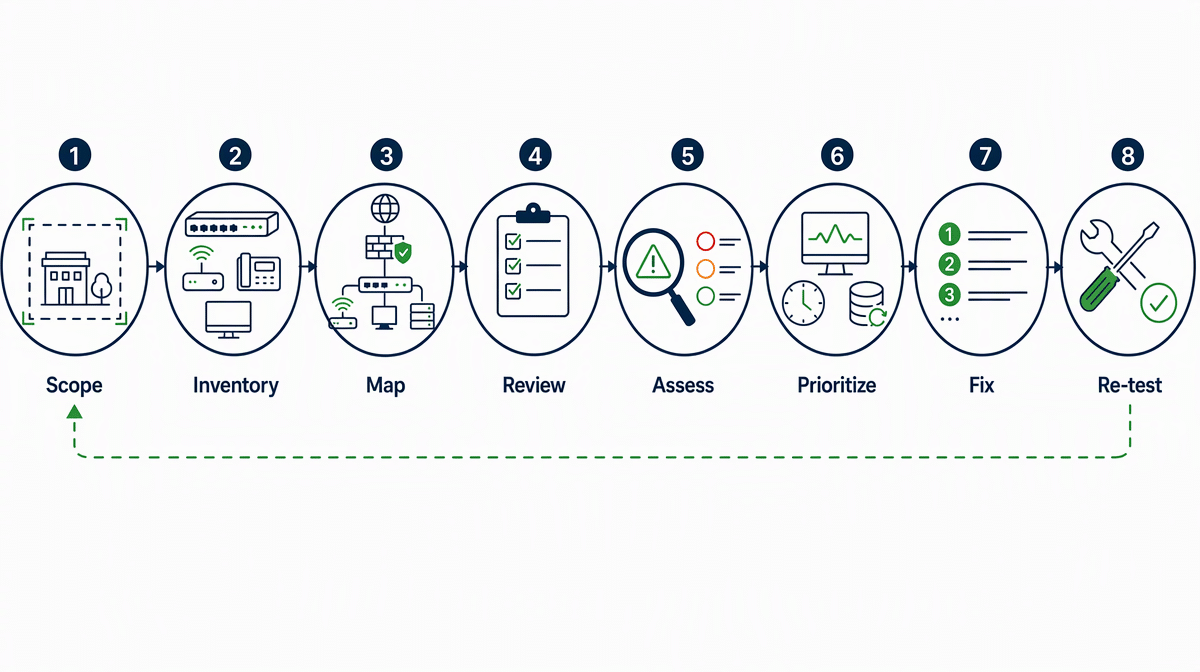
This network audit step-by-step guide takes you through seven practical stages, from defining scope and building an inventory to prioritizing findings and re-testing repairs. It also includes a worked checklist you can copy into a spreadsheet or audit form.
What Should a Network Audit Accomplish?
A network audit should create an evidence-based view of your current environment. By the end, you should be able to identify authorized assets, explain important connections, confirm who has administrative access, locate exposed or unsupported systems, and rank remediation work by business risk.
The audit is broader than a vulnerability scan. Scanning can identify known vulnerabilities and weak configurations, but an audit also evaluates ownership, scope, architecture, access, monitoring, backup dependencies, documented exceptions, and remediation follow-through. NIST SP 800-115 says technical security testing can help find vulnerabilities in a system or network and verify compliance with policy or other requirements.
Audit outcome
A completed audit should leave you with four usable records: an asset inventory, a current network map, a findings register, and an approved remediation plan.
If one of those records is missing, the audit may describe problems without giving the organization a reliable way to control them.
Before You Start: Define Scope and Evidence
Write a short audit charter before running discovery tools or reviewing configurations. Define the business locations, cloud environments, wireless networks, remote-access services, third-party connections, and network segments included in the review. Name any excluded systems and explain why they are excluded.
- Objective: the decisions the audit must support.
- Scope: locations, address ranges, systems, services, and vendors included.
- Authority: the person who approved testing and any limits on intrusive activity.
- Evidence: inventories, diagrams, configuration exports, access lists, logs, tickets, backup reports, and prior findings.
- Timing: review dates, maintenance windows, interviews, and report deadlines.
- Owners: the audit lead, system owners, technical contacts, and person who accepts residual risk.
Agree on safe testing rules with system owners. An authorized audit should not surprise an operations team or interrupt a fragile production service. If you use an outside assessor, document target ranges, approved techniques, emergency contacts, data-handling requirements, and stop conditions.
Step 1: Build the Network Inventory
Start with existing records, then validate them against current observations. Collect asset registers, DHCP and DNS records, switch and firewall inventories, cloud network resources, wireless controllers, endpoint-management records, remote-access services, and vendor connection lists.
For every discovered asset, record a stable identifier, owner, business purpose, location, network address, operating system or firmware, support status, criticality, and the type of confidential information it stores or transmits. Reconcile unknown devices, duplicates, retired assets that still respond, and records with no accountable owner.
Do not treat discovery output as the inventory by itself. A scanner may see an address without knowing the asset’s business purpose, data sensitivity, or approved owner. Those fields determine how urgently a finding should be handled.
Step 2: Map Connections, Trust Boundaries, and Data Flows
Create a current diagram that shows internet connections, firewalls, routers, switches, wireless networks, virtual networks, remote access, major servers, cloud gateways, third-party links, and security monitoring points. Mark where traffic moves between areas with different trust or data sensitivity.
Compare the diagram with firewall rules, route tables, virtual network configuration, wireless settings, and vendor documentation. Investigate undocumented paths, broad trust relationships, direct administrative exposure, and connections that bypass the expected inspection point.
The map should be understandable to an operations manager as well as a network engineer. If the diagram is too detailed to explain a critical business service, create a high-level business view and link it to the technical diagram.
Step 3: Review Configurations and Access
Review representative configurations against your approved standards. Focus on the controls that determine who can connect, what traffic is allowed, how administrative changes are protected, and whether insecure or obsolete services remain enabled.
- Firewall and access-control rules have a business owner, purpose, review date, and limited source and destination.
- Administrative interfaces are restricted to approved management paths and protected authentication.
- Default accounts, unused accounts, shared credentials, and unnecessary services are removed or controlled.
- Wireless networks separate guest, employee, operational, and sensitive-device traffic where appropriate.
- Remote access is approved, logged, limited to required users and systems, and removed when no longer needed.
- Device configuration backups exist, are protected, and can be restored.
Use internal audit testing techniques that match the control. Inspection can confirm a setting, inquiry can clarify ownership, observation can show how an administrator works, and re-performance can verify that a control produces the expected result.
Step 4: Assess Vulnerabilities Safely
Run authorized vulnerability assessment methods that fit the scope and risk. External scanning shows how public assets appear from outside the organization. Internal scanning can identify missing patches, exposed services, configuration weaknesses, and unsupported software that are not visible from the internet.
CISA says its vulnerability scanning service continuously monitors and assesses internet-accessible network assets to evaluate their host and vulnerability status. This illustrates why external visibility matters, but it does not replace authenticated internal assessment, architecture review, or business-context analysis.
Validate important findings before assigning work. Confirm the affected asset, evidence, exposure, probable business consequence, existing safeguards, and whether the issue is reproducible. Record false positives and accepted exceptions so the same item is not repeatedly rediscovered without context.
Step 5: Validate Monitoring, Backups, and Recovery
Check whether important network events are logged and reviewed. Confirm time synchronization, log coverage, retention, alert ownership, escalation paths, and evidence that selected alerts reach the person expected to respond.
Trace the network dependencies of backup and recovery. A backup can exist while remaining unreachable during an outage, exposed to the same administrative account, or dependent on a failed network path. Review device configuration backups, alternate management access, recovery priorities, and recent restore-test evidence.
NIST’s Small Business Cybersecurity Corner organizes practical guidance around cybersecurity risks, securing network connections, and securing data and devices. Use those topics as a prompt to check whether technical controls, people, and recovery procedures support one another.
Step 6: Prioritize Findings and Assign Owners
Do not rank a finding from a scanner score alone. Combine the likelihood of misuse with business impact, asset exposure, data sensitivity, operational criticality, existing controls, and the effort required to correct the issue.
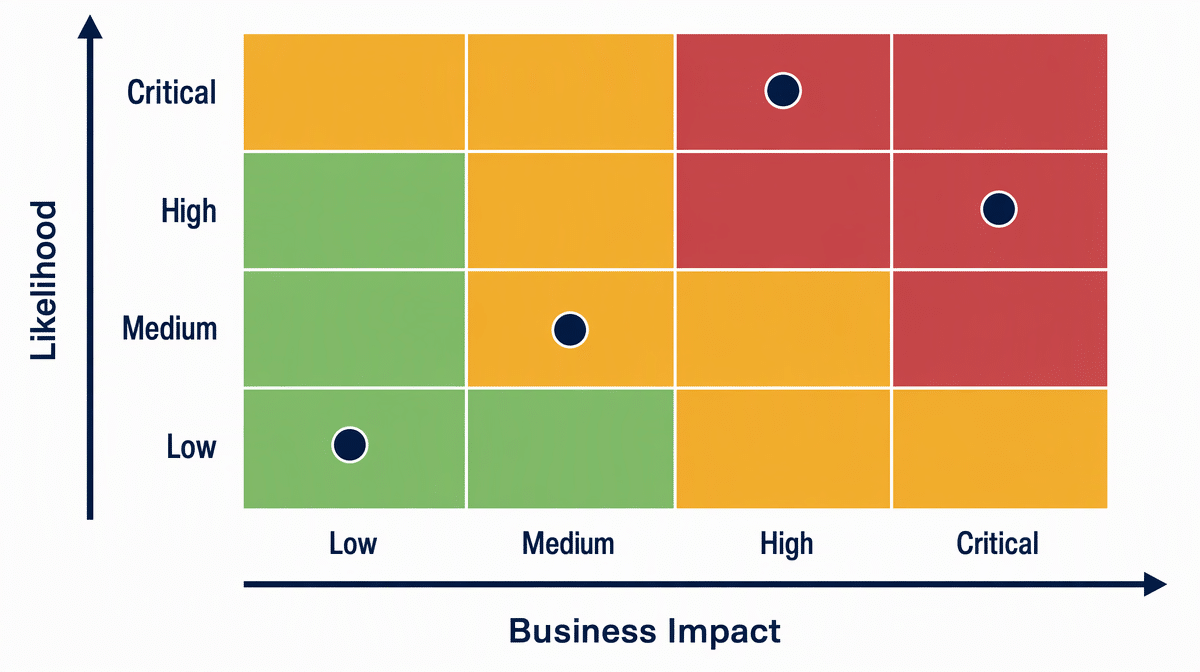
Each finding needs a clear statement, affected assets, evidence, risk explanation, recommended action, accountable owner, target date, and re-test method. If management accepts the risk, record the approver, rationale, compensating controls, expiration date, and next review.
Connect the finding register to your broader IT governance frameworks so significant risks reach the right decision-maker instead of remaining in a technical queue.
Step 7: Report, Remediate, and Re-Test
Write the report for two audiences. The executive summary should describe scope, material risk themes, important business consequences, and decisions required. The technical section should provide enough evidence and detail for owners to reproduce, correct, and re-test each finding.
- Review draft findings with system owners for factual accuracy.
- Approve priorities, owners, target dates, and risk acceptances.
- Track corrective work through completion with evidence attached.
- Re-test the original condition using the documented method.
- Close the finding only when the evidence shows the risk was corrected or formally accepted.
Keep prior evidence and the final closure record. Trend recurring findings, overdue actions, unsupported assets, undocumented connections, and exceptions that repeatedly expire. Those patterns often reveal a process problem that a one-time technical fix will not solve.
Worked Network Audit Checklist
Copy this checklist into a spreadsheet, audit form, or task system. Add one row per test or asset group and attach the evidence used to reach the result. The structure complements a broader internal audit checklist by adding network-specific evidence and re-test fields.
| Area | Audit test | Evidence | Result | Owner and due date | Re-test status |
|---|---|---|---|---|---|
| Scope | Included ranges, sites, cloud networks, wireless, remote access, and vendors are approved. | Audit charter and authorization | Pass / Fail / N/A | Name and date | Open / Verified |
| Inventory | Discovered assets reconcile to an owner, purpose, support status, and criticality. | Asset export and reconciliation notes | Pass / Fail / N/A | Name and date | Open / Verified |
| Architecture | Network map matches important routes, trust boundaries, and third-party connections. | Diagram, routes, firewall and cloud records | Pass / Fail / N/A | Name and date | Open / Verified |
| Access | Administrative and remote access is approved, restricted, protected, reviewed, and logged. | Account lists, settings, approvals, and logs | Pass / Fail / N/A | Name and date | Open / Verified |
| Exposure | Public and internal services were assessed, validated, and tied to affected assets. | Scan report and validation notes | Pass / Fail / N/A | Name and date | Open / Verified |
| Monitoring | Important network events are logged, retained, reviewed, and routed to an owner. | Log settings, alert sample, and response ticket | Pass / Fail / N/A | Name and date | Open / Verified |
| Recovery | Configuration backups and critical network dependencies have recent restore evidence. | Backup report and restore-test record | Pass / Fail / N/A | Name and date | Open / Verified |
| Remediation | Every finding has evidence, risk, action, owner, due date, and re-test method. | Findings register and closure evidence | Pass / Fail / N/A | Name and date | Open / Verified |
Common Network Audit Mistakes
- Scanning before defining scope. The team produces results without clear authority, ownership, or coverage.
- Trusting the existing inventory. Unknown, temporary, cloud, and vendor-managed assets remain outside the review.
- Reporting scores without context. A technical severity is presented without business impact, exposure, or existing safeguards.
- Ignoring control operation. A written rule or configured setting is accepted without evidence that it works.
- Closing findings without re-testing. A ticket says the work is complete, but the original condition still exists.
- Treating the audit as a one-time project. Inventory, access, exposure, and ownership drift immediately after the report.
Frequently Asked Questions
What is included in a network audit checklist?
A network audit checklist should cover scope and authorization, asset inventory, architecture and data flows, configurations, administrative and remote access, vulnerability assessment, logging, backup and recovery dependencies, finding prioritization, remediation ownership, and re-testing.
How often should a network audit be performed?
Set a schedule based on risk, change rate, contractual duties, and prior findings. Also trigger a focused audit after a major network redesign, acquisition, new critical service, significant incident, or material change in remote or third-party access.
What is the difference between a network audit and a vulnerability scan?
A vulnerability scan uses automated checks to identify potential vulnerabilities and configuration weaknesses. A network audit uses scanning as one source of evidence and also reviews inventory, architecture, ownership, access, monitoring, recovery, business impact, and remediation governance.
Who should participate in a network audit?
The audit lead should involve network and security administrators, system and data owners, operations or risk management, relevant cloud and application owners, and a manager authorized to approve remediation priorities and accept residual risk. Use an independent assessor when objectivity, specialized testing, or contractual assurance requires it.