
7 SOP Format Examples (And How To Apply Them)
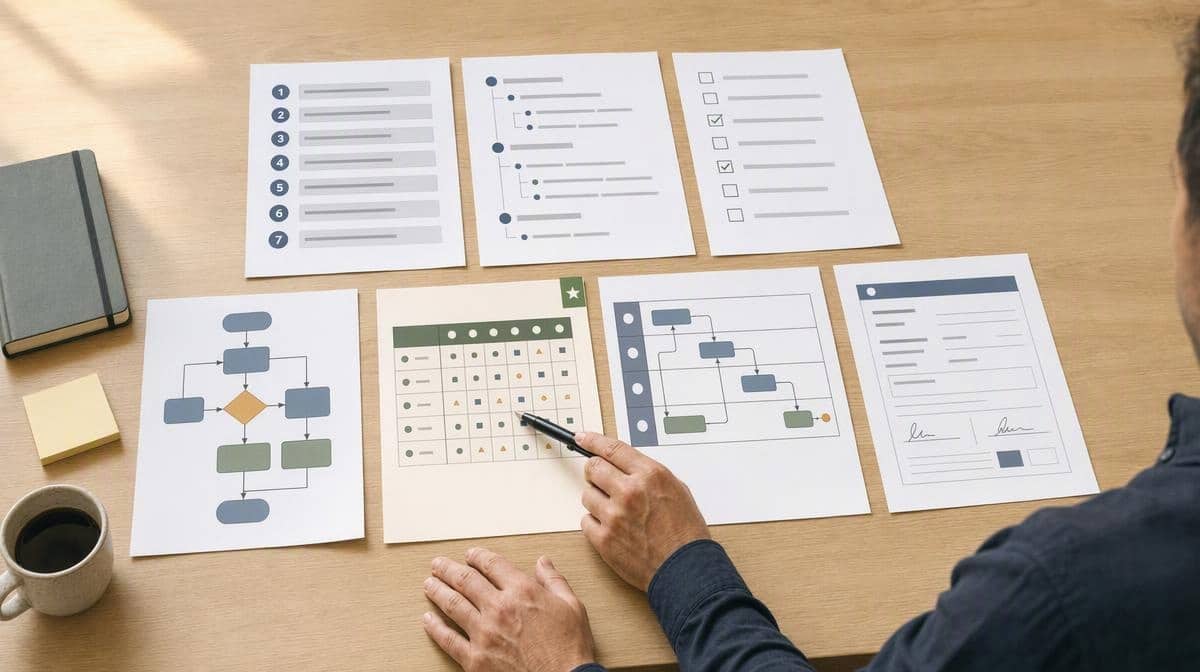
The best SOP format is the one that makes the next correct action obvious. A short, predictable task may need only numbered steps. A process with approvals, exceptions, handoffs, or audit evidence needs a structure that shows those features instead of hiding them in paragraphs.
These seven SOP format examples use the same hypothetical purchase-request procedure, so you can compare the structures rather than seven unrelated topics. Start with the selection matrix, inspect the filled-in examples, and choose the simplest format that represents the real work without losing decisions, responsibilities, or records.
Choose an SOP Format With This Selection Matrix
There is no single officially correct layout for every standard operating procedure. The U.S. Environmental Protection Agency’s guidance on preparing SOPs says format and detail can vary with factors such as process criticality, frequency, number of users, and available training. That is a useful design principle even outside the EPA quality-system context: represent the work your reader must perform.
If you are still deciding whether the document should be an SOP, a broader procedure, or a detailed work instruction, first review the difference between a procedure, SOP, and work instruction. Once the document type is clear, use the matrix below to select its structure.
| Process characteristic | Best starting format | Why it fits |
|---|---|---|
| Few steps, one path, low risk | Linear step-by-step | Keeps a simple task fast to scan and easy to follow |
| Long task with natural phases | Hierarchical | Groups detail beneath major stages without creating one long list |
| Repeated verification or completion evidence | Checklist | Makes omissions visible and records what was completed |
| Several decision points or routes | Flowchart | Shows branching logic more clearly than prose |
| Many combinations of conditions and actions | Decision table | Places rules side by side so gaps and conflicts are easier to spot |
| Multiple roles and handoffs | Swimlane | Shows ownership and the movement of work between people |
| Required data, approvals, signatures, or records | Form-driven | Builds evidence capture into execution |
| High risk, regulated, or audit-sensitive | Hybrid | Combines a clear sequence with limits, warnings, approvals, and records |
A process can match more than one row. That does not mean you need a complicated document. Pick one primary format, then add only the supporting element that resolves the second need. A hierarchical SOP might contain a checklist at the end, while a flowchart might link to a form used at one approval step.
The choice also depends on what the document is expected to accomplish. An SOP that supports onboarding may emphasize explanation and sequence, while one used during an inspection may emphasize controls and evidence. If the organization has not agreed on that purpose, step back and define how the SOP will be used in the business before choosing the page layout.
The Worked Example Used in All Seven Formats
The hypothetical procedure is Approve a Purchase Request. An employee requests an item, the manager checks the business need and budget, Finance handles higher-value requests, Purchasing places the order, and the records are retained. The example uses three rules:
- Requests at or below $500 need the requester’s manager.
- Requests above $500 need the manager and Finance.
- Any request without an approved budget code returns to the requester for correction.
Those thresholds are illustrative, not a recommended control policy. The useful comparison is how each SOP format expresses the same sequence, branching rule, handoff, and record.
1. Linear Step-by-Step SOP Format
A linear SOP is a numbered list that moves from one action to the next. Use it when the task has one main route, few exceptions, and steps that should be completed in a fixed order. It is usually the fastest format to write, train, and update.
Procedure: Approve a Purchase Request
1. Requester completes the purchase request form.
2. Requester enters the item, supplier, amount, reason, and budget code.
3. Requester sends the form to the manager.
4. Manager confirms the business need and available budget.
5. If the amount is above $500, manager sends the approved form to Finance.
6. Finance approves or rejects the request.
7. Purchasing places the approved order.
8. Purchasing stores the request and order confirmation in the purchase file.
Apply it when: the main route is more important than the occasional exception. Keep each step action-led and give one action to one owner. If branches begin to multiply, move to a flowchart or decision table rather than adding several nested “if” clauses.
2. Hierarchical SOP Format
A hierarchical SOP divides the procedure into major stages, then places detailed actions beneath each stage. It is suitable when a flat numbered list would be long or when readers need to understand the phases before they learn every step.
1. Prepare the request
   1.1 Describe the item and business need.
   1.2 Record the supplier, estimated amount, and budget code.
   1.3 Attach the quote when required.
2. Review the request
   2.1 Manager checks need and budget.
   2.2 Manager returns incomplete requests for correction.
   2.3 Manager approves complete requests.
3. Obtain additional approval
   3.1 Send requests above $500 to Finance.
   3.2 Finance approves or rejects the request.
4. Order and file
   4.1 Purchasing places the approved order.
   4.2 Purchasing files the approvals and order confirmation.
Apply it when: the procedure has clear stages, such as prepare, review, approve, execute, and close. Limit the nesting depth. If readers must trace 3.2.4.1 before acting, the document may need separate work instructions or a different structure.
3. Checklist SOP Format
A checklist turns required actions or conditions into items that can be marked complete. It is useful for recurring work where omission is the main risk. The EPA guidance notes that checklists can help keep actions in order and document completion, while also cautioning in its context that a checklist may be part of the SOP rather than the entire SOP.
Purchase Request Checklist
[ ] Business reason is stated.
[ ] Item, supplier, and estimated amount are recorded.
[ ] Valid budget code is entered.
[ ] Required quote is attached.
[ ] Manager approval is recorded.
[ ] Finance approval is recorded when amount exceeds $500.
[ ] Purchase order number is recorded.
[ ] Request, approvals, and order confirmation are filed.

Exception: Return the request to the requester if any required item is missing.
Completed by: __________  Date: __________
Apply it when: trained users already understand how to perform the task but need a reliable verification aid. Surround the checklist with purpose, responsibility, exception, and record-retention instructions. A bare checklist can confirm that a box was ticked without explaining how the decision was made.
4. Flowchart SOP Format
A flowchart SOP represents actions as boxes and decisions as branches. Use it when readers repeatedly ask “what happens if?” or when two cases follow meaningfully different routes. EPA guidance also recognizes diagrams and flowcharts as a way to summarize long sequences, without prescribing a specific notation.
[Start]
   |
[Complete purchase request]
   |
<Budget code valid?> -- No --> [Return for correction] --> [End]
   |
  Yes
   |
[Manager reviews need and budget]
   |
<Approved?> -- No --> [Notify requester] --> [End]
   |
  Yes
   |
<Amount above $500?> -- Yes --> [Finance review]
   |                                  |
  No                              <Approved?>
   |                                  |
   +--------------------------- Yes --+
   |
[Purchasing places order]
   |
[File records]
   |
[End]
Apply it when: branching is the central difficulty. Use consistent symbols, label both outcomes of every decision, and make sure every branch reaches a defined result. For a regulated manufacturing example, FDA’s nonbinding process-validation guidance recommends process-flow diagrams that show unit operations, monitoring or control points, inputs, and outputs. That does not make a flowchart mandatory for ordinary office SOPs, but it shows why flow is valuable when control points matter.
5. Decision-Table SOP Format
A decision table places conditions across rows and the required action beside each combination. It works better than a flowchart when there are several independent conditions, because the writer can see whether every combination has an answer.
| Budget code | Amount | Manager decision | Required action |
|---|---|---|---|
| Invalid or missing | Any | Any | Return to requester for correction |
| Valid | $500 or less | Approve | Send to Purchasing |
| Valid | Above $500 | Approve | Send to Finance |
| Valid | Any | Reject | Notify requester and close |
| Valid | Above $500 | Approve, Finance rejects | Notify requester and close |
Apply it when: policy rules determine the path. Test the table for overlaps, missing combinations, and vague terms. A rule such as “large purchase” belongs in a decision table only after “large” has a defined threshold.
6. Swimlane SOP Format
A swimlane SOP organizes actions by role. The sequence moves across lanes as responsibility changes. It is the most revealing format for handoff problems, because a task cannot quietly float between departments without an owner.
| Stage | Requester | Manager | Finance | Purchasing |
|---|---|---|---|---|
| Prepare | Complete request and attach quote | |||
| Initial review | Correct missing information | Check need, budget, and completeness | ||
| Additional review | Forward requests above $500 | Approve or reject higher-value request | ||
| Order | Place approved order | |||
| Record | Receive status | Store request, approvals, and confirmation |
Apply it when: delays occur between roles, people disagree about ownership, or one team’s output is another team’s input. Name roles rather than individual employees so the SOP survives staffing changes. Then define the handoff package, not just the handoff destination.
7. Form-Driven SOP Format
A form-driven SOP makes required data, decisions, signatures, and evidence part of the execution record. It is useful when completion cannot be separated from documentation. The procedure explains how the form moves, while the form prevents required fields from disappearing into email.
PURCHASE REQUEST
Requester: __________  Department: __________  Date: __________
Item or service: _____________________________________________
Supplier: __________________  Estimated amount: $____________
Business reason: _____________________________________________
Budget code: ______________  Quote attached: [ ] Yes [ ] No

MANAGER REVIEW
[ ] Business need confirmed  [ ] Budget available
Decision: [ ] Approve [ ] Reject [ ] Return for correction
Manager name/signature: __________________  Date: __________

FINANCE REVIEW, REQUIRED ABOVE $500
Decision: [ ] Approve [ ] Reject
Finance name/signature: __________________  Date: __________

PURCHASING
Purchase order number: ______________  Order date: __________
Record location: _____________________________________________
Apply it when: the organization must capture inputs, approvals, or completion evidence consistently. Mark conditional fields clearly, control who may approve, and specify where the final record is stored. A form should support judgment, not replace it with a signature box.
What Every SOP Format Still Needs
The layout changes, but the control information does not disappear. A usable SOP identifies why the procedure exists, where it starts and ends, who owns each action, what inputs are required, how exceptions are handled, and what records prove completion. It also needs a title, owner, effective date, version, and approval appropriate to the organization’s document-control method.
- Purpose and scope: the result, trigger, endpoint, and exclusions.
- Responsibilities: the role accountable for each action and decision.
- Inputs and prerequisites: information, tools, training, and authorization required before work begins.
- Ordered actions: instructions written at the level of detail the intended user needs.
- Decision rules and exceptions: what changes the route and what to do when normal conditions are absent.
- Records: what is retained, where, by whom, and for how long under the applicable policy.
- Document control: owner, version, effective date, review history, and approval.
Risk changes the depth of this information. OSHA’s discussion of procedures for Process Safety Management-covered operations describes operating phases, limits, consequences of deviation, corrective steps, safety precautions, and safety-system functions. Those requirements apply to covered high-hazard processes, not ordinary purchasing, but they demonstrate why a high-risk procedure needs more than a short task list.
Good structure cannot rescue unclear instructions. Use active verbs, state the responsible role, define ambiguous terms, and test the procedure with a representative user. These practices are part of how you write clearer, more usable SOPs regardless of the layout.
How To Apply the SOP Format You Choose
1. Observe the Real Process
Follow a real instance from trigger to record. Capture workarounds, rework, waiting, informal approvals, and exceptions. If you document only the ideal route, the SOP will fail the first time reality differs from the meeting-room version.
2. Mark the Structural Signals
Count meaningful decisions, roles, handoffs, required fields, risk controls, and phases. Those signals point to the matrix row. The choice should follow the process, not the template you happen to have open.
3. Draft the Simplest Complete Version
Start with the primary structure and add one supporting device only when necessary. If you need a reusable shell, begin with a standard operating procedure template, then adapt its fields and body to the format you selected.
4. Run a Walkthrough With a User
Ask someone who performs the work to follow the draft using a realistic case. Do not explain missing information while they test. Every explanation you supply verbally is a candidate clarification for the document, training, or supporting work instruction.
5. Approve, Release, and Maintain It
Assign the owner, obtain the required approval, publish the controlled version, train affected users, and set the review trigger. A process change, control failure, system replacement, or recurring exception can justify review before the calendar date arrives. For the broader drafting sequence, use the guide to begin writing standard operating procedures.
The practical rule is simple: use linear steps for a straight path, hierarchy for depth, a checklist for omission control, a flowchart for branches, a decision table for rule combinations, swimlanes for handoffs, and a form-driven format for required evidence. Combine them only when the process genuinely needs more than one view.
For a company-wide documentation project, standardize the control fields and writing conventions while allowing the action section to change format. That balance gives employees a familiar document shell without forcing purchasing, equipment checks, incident response, and executive approvals into the same shape. Bizmanualz procedure manuals and SOP templates provide a controlled starting structure that teams can adapt to these different process patterns.
Whichever format you choose, keep the source file editable, publish one controlled version, and name an owner for future changes. A beautiful example is useful only if the team can maintain it after a rule, role, system, or risk changes.
Frequently Asked Questions
What Is a Good Format for an SOP?
A good SOP format represents the process with the least complexity that still shows its steps, decisions, owners, exceptions, and records. Use linear steps for a short predictable task, a flowchart for branching, swimlanes for handoffs, and a form-driven structure when approvals or evidence must be captured.
What Is the Basic Format of an SOP?
A basic SOP includes a title, purpose, scope, responsibilities, prerequisites or inputs, ordered actions, exceptions, records, document owner, version, effective date, and approval. The action section can be a numbered list, hierarchy, checklist, flowchart, table, swimlane, form, or a controlled combination.
Can a Checklist Be an SOP?
A checklist can serve as the action section of an SOP when trained users already know how to perform the work. It should still sit within controlled instructions that define purpose, responsibility, exceptions, required evidence, and record retention. For complex or unfamiliar work, a checklist alone is usually not enough.
When Should an SOP Use a Flowchart?
Use a flowchart when decisions send work down different routes, when readers need to see loops or escalation paths, or when a long written sequence is hard to scan. Label every decision outcome and make sure each branch reaches a defined endpoint.
Can One SOP Combine Formats?
Yes. A hybrid SOP might use hierarchical steps as the primary document, a flowchart for one branching section, and a checklist or form for completion evidence. Give each element a specific job and avoid repeating the same instructions in several places, because duplicate instructions drift apart during updates.














