
What are The Best Project Planning Tools?

Finding good project management software can take you a long way in your project management journey. The difficult part is not finding a tool, it is finding a project planning tool that suits your business needs, your team’s habits, and the way your projects actually move from idea to completion.
This is why the best project planning tools are not all the same. Some are lightweight boards for getting tasks out of email, while others are full planning systems for schedules, resources, budgets, risks, and reporting. The list below preserves the practical seven-tool structure of the original guide and updates the parts that have changed most: pricing assumptions, tool positioning, and the planning problems each tool is best suited to solve.
The 7 Best Project Management Tools
So, what are you waiting for? Let’s dive in and get that project started with the seven best project planning tools that can help you execute your project successfully. The right choice depends on whether you need a simple task board, a structured schedule, resource management, client communication, or a reporting system that leadership can trust.
One useful way to compare tools is to separate planning from activity tracking. A planning tool should help you define the work, assign ownership, understand dependencies, and notice when the schedule is slipping. Harvard Business Review’s project management coverage makes the same broader point: projects need structure, communication, and a way to move from planning through execution, not just a shared list of tasks.
1. Trello
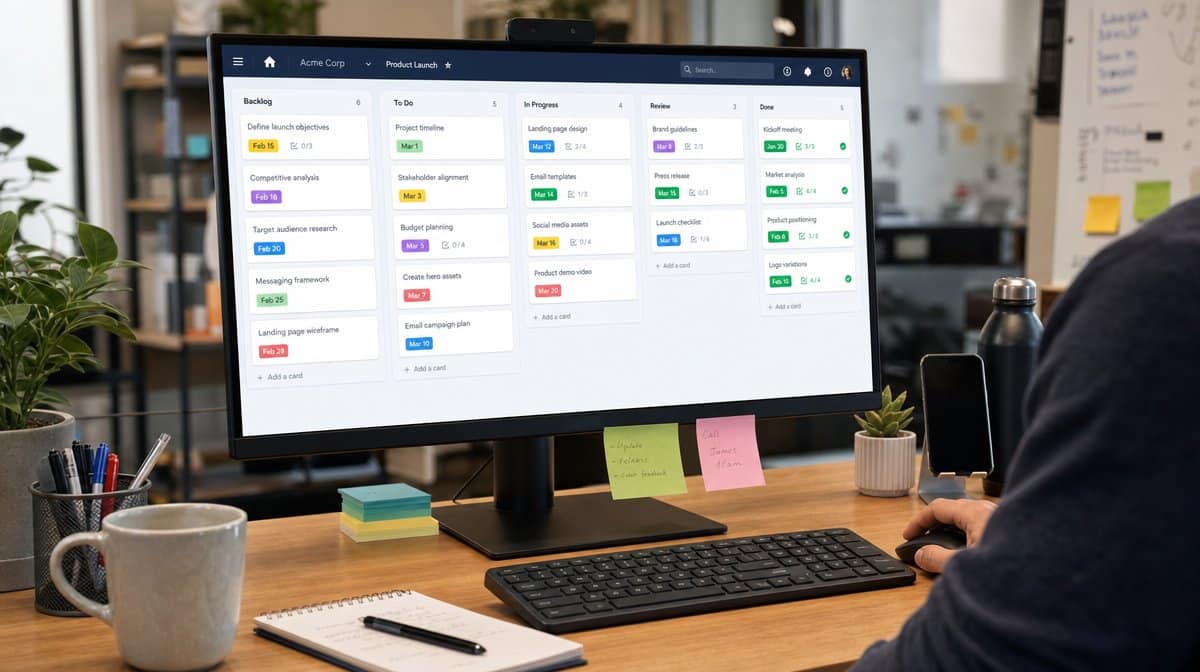
If you are just starting and you do not entirely trust yourself with technology, Trello can still be a good option. Trello works around the famous Kanban system, which uses cards to list tasks, move work through stages, and show a team what is waiting, what is in progress, and what is done.
The simple card metaphor is Trello’s biggest advantage. You can create a board for a team-based project or an individual one, drag cards between columns, attach images and files, add checklist items, and give each task an owner. For a small project team, that can be enough structure to make work visible without turning the tool itself into a second project.
Trello is not the strongest choice when you need detailed reporting, resource forecasting, or complex dependency management. The free plan remains useful for basic access to boards and cards, and paid plans can offer more flexibility, but file size limits, multiple integrations, and reporting depth still deserve attention. One major drawback is that, without the right extension or plan, detailed reporting can become an issue for your project.
2. LiquidPlanner
LiquidPlanner has historically been positioned as an online project management system for teams that need more than a basic task board. Its value has been in predictive scheduling, resource awareness, and helping managers understand how changing priorities affect project timing.
This is also the tool on the list that most needs a current-state check before purchase. LiquidPlanner is now part of the Tempo product ecosystem, and Tempo has announced retirement timelines for LiquidPlanner Classic and Portfolio Manager. That does not mean the planning concept is obsolete, but it does mean buyers should confirm the current product path, migration options, and support timeline before building a new process around it.
For companies running funded, complex projects, the LiquidPlanner style of planning can still be attractive because it treats uncertainty as part of the schedule. The platform has long been associated with mobile devices, iPads, iPhones, and Android systems alike, but the current product path should be verified before rollout. With such a high level of customization and additional features, the user interface can feel slightly tricky, and you might need a whole lot of learning before you master the working of the tool entirely. Due to the complexity and potentially costly side of advanced planning, LiquidPlanner suits large organizations better than very small projects.
3. Teamwork Projects

Since we are already talking about bigger projects, Teamwork Projects deserves attention. Now commonly branded as Teamwork.com, the platform is well-suited for client work, agency-style delivery, and larger projects with many subdivisions. Unlike heavier planning systems, it can provide a broad feature set without forcing every user to become a scheduling specialist.
Teamwork supports views such as list, board, table, and Gantt-style planning, which makes it easier to match the view to the audience. A project manager may want timelines and dependencies, while a contributor may only need a task list and due dates. The tool also fits teams that need time tracking, budget visibility, and client-facing project communication in one system.
Initially, it may take a couple of days to get the hang of the tool. Once the structure is set, Teamwork can become a practical middle ground between a simple Kanban board and a heavyweight enterprise planning system. The straightforward user-interface, large range of features, and menu option layout make it an obvious choice for teams that do not want to go through several screens to find the one they need. It is a good candidate when a business has outgrown scattered task lists but does not want every project to feel like an MS Project implementation.
4. MS Project
Among all these newer names, how can we forget the good old MS Project? Microsoft Project has been around for decades, and that longevity still matters for organizations that need detailed scheduling, baselines, milestones, critical path analysis, cost tracking, and resource planning.
The biggest strength of MS Project is also the reason many smaller teams avoid it: depth. The tool pays a great deal of attention to detail, which is why it is preferred by skilled project management professionals running complicated projects. You may need training to become adept at the software, but once you understand it, lighter tools can feel too basic.
Microsoft’s current project-management ecosystem includes desktop Project editions and subscription paths tied to Planner and Project plans. That means the buyer question is no longer simply “Do we need MS Project?” It is also “Do we need desktop scheduling depth, cloud collaboration, portfolio reporting, or a simpler Microsoft Planner workflow?” For teams already standardized on Microsoft 365, that ecosystem fit can be a major advantage.
5. Basecamp

Basecamp has been around for more than a decade and has managed to leave its mark in the project management world by focusing on communication and simplicity. It brings together message boards, to-dos, scheduling, real-time chats, private chats, email integrations, extra storage, file storage, group chat, and automatic check-ins so teams can keep project conversation out of scattered email threads.
Basecamp is useful when the planning problem is less about complex dependency math and more about keeping people aligned. If your team loses decisions in chat, misses updates in email, or needs one place for project notes and files, Basecamp can help create a shared project home.
The tradeoff is reporting depth. Basecamp is intentionally simpler than systems built around Gantt charts, portfolio dashboards, and resource utilization. That can be a strength for small teams and client projects, and the tool gives you different options to customize the software according to your needs. It may frustrate managers who need detailed roll-up reports. Choose Basecamp when communication is the bottleneck. Choose a heavier tool when schedule modeling and resource planning are the bottleneck.
6. Wrike
Are you looking for something more structured than a basic board but less specialized than MS Project? Wrike is often a good fit for that middle ground. It covers basic features such as Gantt charts and a stable reporting system, while also supporting tasks, dashboards, request forms, approvals, calendars, and reporting views that help teams manage both recurring work and one-off projects.
Wrike can work well for marketing, operations, professional services, and cross-functional teams that need repeatable workflows. Its strength is not only that it holds tasks, but that it can turn requests into work, route approvals, and give managers a better view of status. That makes it useful for teams trying to reduce manual coordination and overcome barriers to project implementation.
The caution is configuration. Wrike can be simple, but it can also become complex if every team builds its own workflow. If you choose it, define naming conventions, statuses, intake forms, and reporting expectations early. The tool is available for iOS and Android users and also comes with a standardized web view, but it is strongest when the process around it is also clear.
7. Zoho Projects
Zoho Projects is one tool in the wider Zoho software suite. It is often attractive to smaller businesses because the features are quite similar to larger planning tools, but they are available at an affordable price. It combines task management, milestones, time tracking, documents, charts, and integrations at a price point that is usually more approachable than many enterprise project platforms.
The tool uses familiar planning patterns, including task lists, milestones, Kanban-style boards, Gantt charts, and a built-in time tracking tool. With so many built-in features, you do not have to look for external features to fulfill basic project management requirements. It is especially appealing if your company already uses Zoho CRM, Zoho Books, or other Zoho apps.
The main question is ecosystem fit. If your business runs on Zoho, Zoho Projects can be a natural extension. If your team is already deep in Microsoft, Google, Slack, or another work-management suite, compare integrations carefully before moving the team into a new planning environment.
The Best Project Planning Tools
Whether you are managing a project as an individual or as a small business, it is essential to have a project management tool that helps you manage the different tasks that are part of your project. The good news is you do not have to do a degree in project management to execute a project successfully. You need a clear planning habit, a realistic view of the work, and a tool that fits the way your team communicates.
For a simple visual workflow, Trello may be enough. For client delivery and budget visibility, Teamwork or Basecamp may be stronger. For detailed scheduling, MS Project remains difficult to ignore. For configurable workflow management, Wrike deserves a look. For a budget-conscious business already using Zoho, Zoho Projects can be a practical option. LiquidPlanner belongs in the conversation for advanced planning, but it requires an extra vendor-roadmap check before adoption.
The best project planning tools are the ones your team will actually use. Pick the lightest tool that gives you the control you need, then standardize the process around it so the software supports the project instead of becoming the project.
When the planning method also needs to support repeatable operating work, this comparison of Wrike alternatives explains which platforms favor procedures, portfolios, technical delivery, client work, or lightweight visual boards.
Frequently Asked Questions
What Are Project Planning Tools?
Project planning tools are software systems that help teams define tasks, assign owners, set deadlines, track progress, and manage project communication. Some focus on simple task boards, while others support schedules, dependencies, budgets, resources, and reporting.
Which Project Planning Tool Is Best For Small Teams?
Small teams often do best with a simple visual tool such as Trello, Basecamp, or Zoho Projects because these tools are easier to adopt and maintain. The best choice depends on whether the team needs a task board, a communication hub, or a more structured project workspace.
When Should A Business Use MS Project?
A business should consider MS Project when projects require detailed scheduling, dependencies, milestones, resource management, and formal reporting. It is usually a better fit for trained project managers and complex projects than for small informal teams.
Do Project Planning Tools Replace Project Management Skills?
Project planning tools do not replace project management skills. They make work visible and easier to coordinate, but teams still need clear goals, realistic schedules, accountable owners, communication habits, and follow-through.
How Should You Choose A Project Planning Tool?
Choose a project planning tool by matching it to the work you manage most often. Compare ease of use, planning depth, reporting needs, integrations, pricing, and whether the team will actually keep the system updated.














