Build safer finance and HR processes with no-code workflow features
The no-code workflow features for finance teams and HR teams that matter most are conditional approvals, role-based access, protected audit trails, validated forms, reliable integrations, deadlines and escalations, document generation, secure self-service, and operational reporting. If a platform cannot preserve authority, evidence, privacy, and exception handling across those nine areas, its visual builder is not enough.
Did you know that a workflow can become faster and less controlled at the same time? Automation removes manual handoffs, but it can also let the wrong person approve a request, copy incomplete data into a system of record, or hide a failed integration. Finance and HR therefore need no-code software that encodes the control as part of the work, not as a reminder beside it.
This guide explains the nine features to test, where each one helps finance and HR, what to choose and skip, and the bottom-line question to ask during a product evaluation.

How we picked these no-code workflow features. We started with the work finance and HR actually need to control: requests, approvals, records, confidential data, deadlines, documents, system updates, and management review. We then tested each feature against four criteria: whether it prevents a material failure, whether a non-technical owner can configure it, whether it leaves evidence a reviewer can understand, and whether it has an honest failure and recovery path. Decorative builder options and generic collaboration features did not make the list.
Why we can speak to this. Bizmanualz has published policy and procedure content for decades. Our parent company runs HubSpot for its own marketing and CRM, Google Workspace across Gmail, Sheets, and Drive, Slack plus a stack of Slack apps, a documented workflow layer, and an AI multi-agent setup built on Claude and Codex. We also publish this blog and post on social. That gives us practical experience with the handoffs, permissions, evidence, and completion checks a workflow must survive. We do not claim to use a product that is not on that grounded list.
E-E-A-T. Reviewed by Dr. Chris Anderson, Managing Director of Bizmanualz. This guide is editorially maintained by the Bizmanualz team and grounded in primary guidance from NIST, GAO, the IRS, the Department of Labor, and the EEOC. It is educational, not legal or tax advice. Confirm the rules that apply to your organization and jurisdiction.
Published August 28, 2026. Last updated August 28, 2026.
What is no-code workflow software?
No-code workflow software lets a process owner build forms, rules, assignments, approvals, integrations, deadlines, and reports through a visual interface instead of custom application code. The purpose is not to remove technical governance. It is to let finance and HR own process logic while security and IT retain appropriate control over identity, data, and integrations.
A workflow coordinates work across people and systems. A system of record stores the authoritative employee, ledger, vendor, tax, or identity record. Strong implementations keep that boundary clear.
A workflow coordinates work across people and systems. A system of record stores the authoritative employee, ledger, vendor, tax, or identity record. Strong implementations keep that boundary clear.
No-code workflow software benefits
- Faster changes when policy or responsibility changes
- Consistent approvals and evidence across every run
- Less duplicate entry between forms and systems of record
- Visible deadlines, exceptions, and failed handoffs
- Better self-service without broad workspace access
- Operational data that supports process improvement
The four features to test first
Start with the controls that determine whether the platform is safe enough for real finance and HR work:
- Conditional approvals, for matching authority to risk.
- Role-based access, for privacy and segregation of duties.
- Audit trails, for reconstructing the decision and the version in force.
- Validated forms, for stopping incomplete or contradictory data at intake.
Then evaluate integrations, escalations, document controls, self-service, and reporting against the systems and risks your process actually has.
No-code workflow features compared
| Feature | Control objective | Strong signal | Warning sign |
|---|---|---|---|
| 1. Conditional approval routing | Purchase requests | You have tiered approval policies, frequent exceptions, or requests that change route based on the information submitted. | Every request genuinely follows one fixed path and a simple shared checklist already gives you enough control. |
| 2. Role-based access and segregation of duties | Protecting payroll | The workflow handles confidential records, creates payments or access, or needs a clear maker-checker split. | The tool only offers workspace-wide access and cannot hide sensitive fields, attachments, or admin actions from ordinary participants. |
| 3. Tamper-resistant audit trails and version history | Proving who did what | You face audits, disputes, sensitive exceptions, or recurring questions about why a decision was made. | The history can be edited by ordinary admins, omits field changes, or exports only the final status without the underlying evidence. |
| 4. Validated forms and conditional fields | Collecting complete | Reviewers frequently return requests because information, documentation, or the reason for an exception is missing. | The form builder supports only basic text fields and cannot express dependencies, calculations, or controlled choices. |
| 5. Reliable integrations and two-way data sync | Connecting workflow decisions to HR | Approvals routinely trigger work in several systems or staff re-key approved data into a system of record. | The connector cannot show failed runs, scopes more access than it needs, or has no way to prevent duplicate record creation. |
| 6. Deadlines, reminders, and escalation rules | Payroll cutoffs | Missed handoffs, cutoffs, and unavailable approvers are a recurring cause of exceptions or last-minute work. | The tool can send reminders but cannot calculate relative deadlines, reassign ownership, or stop stale notifications after completion. |
| 7. Document generation, acknowledgements, and electronic approval | Offers | Teams repeatedly assemble the same document from approved request data or struggle to connect signed records back to the decision process. | The feature creates files but cannot preserve template versions, completion evidence, or the link to the underlying workflow run. |
| 8. Secure employee and manager self-service | Giving employees | A large share of work begins with employees, managers, candidates, or vendors who should not enter the internal workflow workspace. | The form is public when it should be authenticated, exposes internal comments, or provides no safe way for a requester to resume and track a sensitive case. |
| 9. Operational reporting and control dashboards | Finding bottlenecks | Leaders need to improve cycle time, control quality, staffing, or exception handling across many workflow runs. | The dashboard shows only total completed items and cannot expose wait time, rework, failure, owner, or the underlying records. |
Best no-code workflow feature: Conditional approval routing

Conditional approval routing is the feature that turns a digital form into a controlled finance or HR process. The workflow evaluates the request, sends it to the right role, adds another reviewer when risk rises, and records each decision without asking an administrator to move the work manually.
Best for: Purchase requests, payroll changes, compensation decisions, leave exceptions, and any process where the approver depends on risk or value
Best for: Purchase requests, payroll changes, compensation decisions, leave exceptions, and any process where the approver depends on risk or value
Features
- Rules based on amount, department, request type, location, or employee class
- Sequential and parallel approval paths
- Delegation and substitute approvers
- Rejection, revision, and resubmission loops
- Recorded comments and decision timestamps
Pros
- Keeps routine requests moving without weakening review
- Applies approval policy consistently
- Makes bottlenecks visible by stage
Cons
- Poorly designed rules can reproduce a bad policy faster
- Exception paths need explicit owners
Finance needs approval logic because not every transaction carries the same exposure. A small, budgeted purchase may need one manager. A new vendor, unusual payment destination, or larger commitment may need procurement, finance, and an executive. HR has the same shape: routine leave can follow one route, while compensation changes, accommodations, or sensitive employee relations cases need narrower access and additional review.
The control value is not the visual builder by itself. It is the ability to encode authority, checkpoints, and exceptions in a way that matches policy. The GAO Green Book treats authorization, accurate recording, access restrictions, and documentation as core control activities. A useful no-code tool should let the process owner express those controls without writing software, while still preventing an employee from editing the rules that govern their own request.
Our parent company runs documented workflows alongside Google Workspace and Slack. In that kind of stack, the practical test is whether an approver can act from a notification while the authoritative decision, reason, and supporting evidence remain attached to the workflow record, not trapped in a chat thread or inbox.
Choose it if: You have tiered approval policies, frequent exceptions, or requests that change route based on the information submitted.
Skip it if: Every request genuinely follows one fixed path and a simple shared checklist already gives you enough control.
Bottom line: Conditional routing is the best first feature to test because it proves whether a no-code tool can model your real authority structure instead of merely moving forms around.
2. Role-based access and segregation of duties

Role-based access determines who can start, see, edit, approve, export, and administer a workflow. Finance and HR need permissions at the workflow, field, document, and action level because the same process often mixes ordinary operational data with highly sensitive records.
Best for: Protecting payroll, bank, tax, compensation, employee relations, medical, and identity data while keeping requesters and reviewers in the same workflow
Best for: Protecting payroll, bank, tax, compensation, employee relations, medical, and identity data while keeping requesters and reviewers in the same workflow
Features
- Permissions by role rather than person
- Field-level and attachment-level visibility
- Separate requester, preparer, approver, and administrator rights
- Temporary delegation with an end date
- Fast access removal when roles change
Pros
- Reduces unnecessary exposure of sensitive records
- Supports segregation of duties
- Makes access reviews easier to perform
Cons
- Coarse permissions can expose too much
- Complex role models require periodic review
A no-code tool should help enforce the same separation described in strong financial internal controls: the person who prepares a payment should not be the only person who can approve and release it. HR needs similar separation around offers, pay changes, terminations, and access provisioning. If one administrator can design the workflow, approve their own request, and erase the evidence, the automation has removed the check you needed most.
The NIST guidance on least privilege and audit accountability calls for limiting access to what a role needs, logging privileged actions, and protecting audit information from unauthorized change. Translate that into buying criteria: permissions should follow roles, sensitive fields should be hideable, admin actions should be logged, and access should be easy to revoke when somebody changes jobs or leaves.
We use Google Workspace, Slack, HubSpot, and a documented workflow layer. The operator lesson is that permissions must stay understandable across the whole chain. A workflow can be locked down correctly and still leak data if its notification posts the full employee or payment record into a broad channel.
Choose it if: The workflow handles confidential records, creates payments or access, or needs a clear maker-checker split.
Skip it if: The tool only offers workspace-wide access and cannot hide sensitive fields, attachments, or admin actions from ordinary participants.
Bottom line: No-code is safe for finance and HR only when permissions are granular enough to preserve least privilege and segregation of duties.
3. Tamper-resistant audit trails and version history
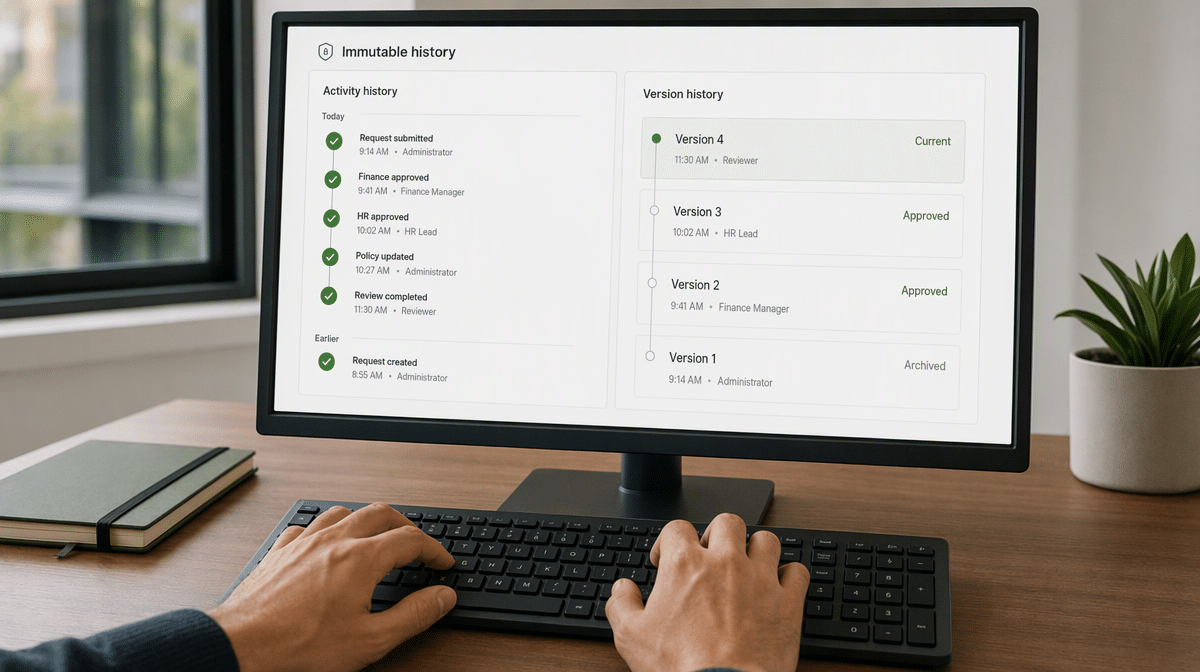
An audit trail records the workflow as it actually ran: submissions, edits, assignments, approvals, rejections, comments, attachments, escalations, exports, and administrative changes. Version history adds the equally important answer to which workflow design and policy applied at the time.
Best for: Proving who did what, when they did it, which policy or form was in force, and how an exception was resolved
Best for: Proving who did what, when they did it, which policy or form was in force, and how an exception was resolved
Features
- Timestamped activity history tied to named users
- Immutable or tightly protected decision records
- Workflow and form version history
- Exportable run history with attachments
- Retention controls and deletion logs
Pros
- Creates evidence as a by-product of work
- Shortens investigations and audit preparation
- Supports consistent exception review
Cons
- A noisy log can hide the events that matter
- Export quality varies widely between tools
Finance and HR teams do not only need proof that a final status changed to approved. They need the chain behind it: who supplied the data, who changed it, which checks ran, what the approver saw, whether the record was reopened, and which documents supported the decision. A screenshot of the final screen is weaker than a system-generated history that can be exported with the record.
Versioning matters because policies and workflows change. If an employee was onboarded under one access package and the workflow was later edited, you should still be able to reconstruct the earlier run. The same applies to an expense threshold, vendor review rule, payroll checklist, or records-retention instruction. A good tool preserves old runs against the version that governed them.
Our parent company publishes content and runs multi-step reviews through a documented workflow layer. That experience makes one test especially useful: export a completed run, then ask a person who was not involved whether the file alone explains the decision. If it depends on private messages or tribal knowledge, the audit trail is incomplete.
Choose it if: You face audits, disputes, sensitive exceptions, or recurring questions about why a decision was made.
Skip it if: The history can be edited by ordinary admins, omits field changes, or exports only the final status without the underlying evidence.
Bottom line: The audit trail should make a completed workflow self-explanatory to a reviewer who was not in the room.
4. Validated forms and conditional fields

Validated forms control the quality of information entering a workflow. Required fields, conditional questions, approved value lists, calculations, file checks, and cross-field rules prevent incomplete or contradictory requests from reaching an approver.
Best for: Collecting complete, accurate requests before finance or HR spends time reviewing them
Best for: Collecting complete, accurate requests before finance or HR spends time reviewing them
Features
- Required fields and format validation
- Conditional questions that appear only when relevant
- Approved lists for vendors, departments, locations, or employee types
- Cross-field rules and calculated values
- Save-and-return support for longer requests
Pros
- Reduces back-and-forth before review
- Standardizes evidence at the point of capture
- Makes downstream reporting more reliable
Cons
- Long forms can push users into low-quality answers
- Rigid validation can block legitimate exceptions
A workflow cannot fix data it never collected. Accounts payable cannot validate a new vendor without banking and tax information. Payroll cannot process a change without an effective date and authorization. HR cannot run onboarding without identity, location, manager, start date, and access needs. Conditional fields keep the form short for ordinary cases while opening the extra questions only when the answer changes the process.
This matters for records as well as convenience. The Department of Labor recordkeeping overview identifies employee and wage information employers may need to maintain, while the IRS employment tax recordkeeping guidance lists the records needed to support employment tax administration. Your exact obligations depend on jurisdiction and circumstance, but the workflow feature question is stable: can the form collect, validate, protect, and retain the required evidence without relying on free-text memory?
We use Google Workspace for files and structured documents, so we would test whether a form can validate what it collects before sending a record to Sheets or Drive. Syncing incomplete data faster is not automation. It is faster rework.
Choose it if: Reviewers frequently return requests because information, documentation, or the reason for an exception is missing.
Skip it if: The form builder supports only basic text fields and cannot express dependencies, calculations, or controlled choices.
Bottom line: Validated forms move quality control to the front door, where fixing an omission is cheapest.
5. Reliable integrations and two-way data sync

Integrations let the workflow read the information it needs, create or update records after approval, attach files to the system of record, and notify people where they already work. Finance and HR should judge integrations by reliability, permissions, and recovery behavior, not by the size of a logo gallery.
Best for: Connecting workflow decisions to HR, accounting, identity, document, CRM, communication, and reporting systems without duplicate entry
Best for: Connecting workflow decisions to HR, accounting, identity, document, CRM, communication, and reporting systems without duplicate entry
Features
- Authenticated connectors with scoped permissions
- Two-way field mapping and unique record identifiers
- Webhooks or API access for unsupported systems
- Retry queues and visible error states
- Test environments or safe draft modes
Pros
- Reduces duplicate entry and reconciliation work
- Keeps the system of record current
- Lets the workflow coordinate several specialist tools
Cons
- Connector failures can create silent drift
- Broad integration permissions increase risk
The workflow is usually not the accounting ledger, HR information system, identity provider, or document archive. It is the orchestration layer between them. A new-hire workflow may begin from an approved candidate, create an employee record, provision access, prepare documents, and notify the manager. A vendor workflow may validate a request, obtain approvals, create the vendor, and return the authoritative identifier to the workflow.
The failure path decides whether the integration is trustworthy. Ask what happens when an API is unavailable, a field is rejected, a record already exists, or the workflow loses permission. You need a visible error, a retry or repair path, and a stable identifier that prevents the same employee, vendor, or payment from being created twice.
Our parent company runs HubSpot, Google Workspace, Slack, and a documented workflow layer. The practical lesson is to keep one system authoritative for each record and use the workflow to coordinate changes. If two systems can both overwrite the same field without a clear owner, the integration creates reconciliation work instead of removing it.
Choose it if: Approvals routinely trigger work in several systems or staff re-key approved data into a system of record.
Skip it if: The connector cannot show failed runs, scopes more access than it needs, or has no way to prevent duplicate record creation.
Bottom line: A useful integration closes the loop from request to authoritative record and makes every failed handoff visible.
6. Deadlines, reminders, and escalation rules

Deadline controls give each workflow step a due time, remind the owner before it is late, escalate after a defined threshold, and reassign work when the owner is unavailable. The goal is not more notifications. It is a predictable response when time-sensitive work stalls.
Best for: Payroll cutoffs, close tasks, offer approvals, onboarding dependencies, leave decisions, access reviews, and other work where delay creates risk
Best for: Payroll cutoffs, close tasks, offer approvals, onboarding dependencies, leave decisions, access reviews, and other work where delay creates risk
Features
- Due dates relative to a start date or prior step
- Business-day and holiday-aware calculations
- Reminder schedules by role and risk
- Escalation, reassignment, and substitute-owner rules
- SLA reporting by process and stage
Pros
- Surfaces bottlenecks before a cutoff is missed
- Reduces manual chasing
- Creates accountability without private follow-up lists
Cons
- Too many alerts train people to ignore all of them
- Calendar logic can break across regions and teams
Finance and HR deadlines are often dependent rather than fixed. Payroll approval must happen before a processing cutoff. A laptop must be ordered early enough for a new employee’s first day. A termination task may require immediate access removal while other steps can wait. The tool should calculate due dates from the event that matters and support different urgency by step.
Escalation should follow ownership, not blast a broad group. A good design reminds the assigned person, then notifies a named backup or manager with the context needed to act. It also handles absence and delegation explicitly. Otherwise, the workflow still depends on someone remembering who is on leave and forwarding the request manually.
We run work through Slack plus a stack of Slack apps, so notification discipline matters to us. We would test whether an alert links back to the authoritative workflow, exposes only the minimum sensitive detail, and stops once the item is resolved. A reminder that continues after completion destroys trust in the system.
Choose it if: Missed handoffs, cutoffs, and unavailable approvers are a recurring cause of exceptions or last-minute work.
Skip it if: The tool can send reminders but cannot calculate relative deadlines, reassign ownership, or stop stale notifications after completion.
Bottom line: Good escalation rules turn delay into a managed exception instead of a surprise discovered at the cutoff.
7. Document generation, acknowledgements, and electronic approval

Document automation converts approved workflow data into a controlled record, routes it for acknowledgement or signature, and stores the completed copy with the process. Finance and HR need template control, field mapping, completion evidence, and a clear boundary between an internal approval and a legal signature.
Best for: Offers, policy acknowledgements, change letters, payment support, vendor packages, review forms, and standardized records produced from approved data
Best for: Offers, policy acknowledgements, change letters, payment support, vendor packages, review forms, and standardized records produced from approved data
Features
- Controlled templates with mapped workflow fields
- Document preview before release
- Acknowledgement and electronic signature options
- Completed-document storage with the workflow record
- Template version history and renewal triggers
Pros
- Reduces copy-and-paste errors
- Keeps the final document tied to its approval
- Standardizes recurring employee and finance records
Cons
- Not every electronic approval has the same legal effect
- Template sprawl can undermine standardization
The highest-value document generation starts only after the workflow has validated and approved the source data. That reduces the risk of producing an offer, change letter, vendor form, or payment instruction from an unreviewed submission. The completed file should remain connected to the workflow run so a reviewer can see the inputs, decision, document version, and final acknowledgement together.
Do not treat a clicked approve button, a policy acknowledgement, and an electronic signature as interchangeable. The tool should clearly label what action occurred, authenticate the actor appropriately, and retain the evidence required for that record. If a formal signature is needed, confirm the workflow’s signing method and jurisdictional fit with counsel rather than assuming any digital action is enough.
Our parent company uses Google Workspace for documents and a documented workflow layer for reviews. We would test template ownership and field mapping first. A no-code builder is useful only if HR or finance can update an approved template without creating several uncontrolled copies in Drive.
Choose it if: Teams repeatedly assemble the same document from approved request data or struggle to connect signed records back to the decision process.
Skip it if: The feature creates files but cannot preserve template versions, completion evidence, or the link to the underlying workflow run.
Bottom line: Document generation is valuable when it produces a controlled final record, not merely a faster draft.
8. Secure employee and manager self-service

Self-service gives the requester a focused form, status view, and action list while hiding internal notes, unrelated records, and administrative controls. For HR and finance, the portal must be easy enough to use without support and strict enough to protect sensitive information.
Best for: Giving employees, managers, vendors, or candidates a simple way to submit and track requests without granting access to the full workflow workspace
Best for: Giving employees, managers, vendors, or candidates a simple way to submit and track requests without granting access to the full workflow workspace
Features
- External or limited-access request forms
- Mobile-friendly submission and approvals
- Identity verification appropriate to the request
- Status tracking without internal comments
- Accessible, plain-language guidance and save-and-return
Pros
- Reduces status-chasing and email intake
- Improves data quality at submission
- Extends workflows to people outside the core workspace
Cons
- Weak identity checks can expose personal data
- A poor mobile experience sends users back to email
HR self-service often covers onboarding, leave, accommodations, policy questions, changes to personal data, and manager actions. Finance self-service may cover expenses, purchasing, invoices, vendor requests, and budget exceptions. The employee onboarding process shows why a simple front door matters: one event can trigger coordinated work across HR, the manager, finance, IT, and the employee.
The portal should reveal only what the requester needs. That is particularly important because the EEOC recordkeeping summary includes personnel and employment records that covered employers may need to preserve. Retention duties vary, but the product requirement is clear: identity, access, retention, and deletion controls must be designed around the sensitivity of the record, not around the convenience of the workspace owner.
We have not grounded a claim that our parent company uses any specific no-code portal product. We do run Google Workspace, Slack, HubSpot, and documented workflows, so our operator test would be whether a requester can finish the task from a phone without exposing internal discussion or forcing an administrator to create a full account.
Choose it if: A large share of work begins with employees, managers, candidates, or vendors who should not enter the internal workflow workspace.
Skip it if: The form is public when it should be authenticated, exposes internal comments, or provides no safe way for a requester to resume and track a sensitive case.
Bottom line: Self-service succeeds when it lowers support effort while revealing less data, not more.
9. Operational reporting and control dashboards

Workflow reporting turns individual runs into operational evidence. Finance and HR need both a live queue for intervention and trend reporting that shows volume, cycle time, rework, exceptions, approvals, overdue steps, and control performance by process and owner.
Best for: Finding bottlenecks, overdue work, exception patterns, control failures, workload imbalances, and processes that need redesign
Best for: Finding bottlenecks, overdue work, exception patterns, control failures, workload imbalances, and processes that need redesign
Features
- Live work queue with owner, stage, and due status
- Cycle-time and wait-time reporting
- Exception, rejection, and rework analysis
- Control evidence and completion rates
- Export or API access for broader analysis
Pros
- Shows where work is actually getting stuck
- Supports staffing and process redesign decisions
- Makes recurring control failure visible
Cons
- Dashboards can reward speed while hiding quality
- Badly defined fields produce misleading metrics
Start with decisions, not charts. A finance manager may need to know which approvals threaten the close, where invoices are waiting, or which vendor requests repeatedly fail validation. HR may need to see onboarding readiness, case aging, overdue manager actions, or where employees abandon a form. Each measure should lead to a named intervention or design change.
Reporting also closes the process-improvement loop. Understanding the difference between workflow management and process management helps here: workflow management keeps cases moving, while process management uses patterns across many cases to improve the design itself. A useful no-code platform should support both without forcing analysts to reconstruct the data from email.
Our parent company publishes this blog, posts on social, and runs an AI multi-agent setup alongside documented workflows. We would evaluate reporting by whether it distinguishes completed work from QA-passed work and whether a stale obligation stops surfacing once the end asset proves it is done. Counts without state accuracy create confident but false management information.
Choose it if: Leaders need to improve cycle time, control quality, staffing, or exception handling across many workflow runs.
Skip it if: The dashboard shows only total completed items and cannot expose wait time, rework, failure, owner, or the underlying records.
Bottom line: A useful workflow dashboard tells a manager where to intervene and a process owner what to redesign.
Finance and HR weighting guide
Both teams need all nine features, but the risk weighting changes by process. Use this table to decide what deserves the hardest proof during a product evaluation.
| Feature | Finance test | HR test |
|---|---|---|
| Approvals and access | Maker-checker separation, authority thresholds, bank and vendor changes | Compensation, employee relations, accommodation, and termination confidentiality |
| Records and documents | Transaction support, reconciliation evidence, policy version | Personnel records, acknowledgements, identity and retention boundaries |
| Integrations and timing | Ledger, procurement, banking, payroll, close cutoffs | HR system, identity, documents, onboarding start dates |
| Reporting | Exceptions, aging, control completion, close readiness | Case aging, manager action, onboarding readiness, privacy-safe trends |
How to test a no-code workflow tool
Do not evaluate the platform from a polished demo alone. Build one finance workflow and one HR workflow with real exception paths, then score the evidence below.
| Test | Pass condition | Failure to reject |
|---|---|---|
| Permission test | Requester, preparer, approver, auditor, and admin each see only what they need | Broad workspace access or hidden admin activity |
| Exception test | Rejected, corrected, delegated, late, and duplicated cases remain understandable | The happy path works but exceptions leave the system |
| Integration test | A failed handoff is visible, retryable, and duplicate-safe | Silent failure or no stable record identifier |
| Evidence test | An exported run explains inputs, changes, decisions, attachments, and the version in force | Only the final status is exportable |
| Mobile test | A requester and approver can finish safely at 390px without horizontal scrolling | Sensitive details leak into notifications or controls overflow the screen |
The no-code feature decision
Buy for control depth
A visual builder is easy to demonstrate. Permissions, protected history, exception recovery, versioning, and export quality are harder to fake. Make those features carry the decision.
Start with one bounded process
Choose a workflow with real value and manageable risk, such as a purchase request or onboarding readiness check. Include an exception, an unavailable approver, and a failed integration in the pilot.
Keep systems of record authoritative
Use the workflow to coordinate decisions and handoffs. Keep the ledger, HR system, identity platform, and controlled document repository authoritative for the records they own.
Review the design after launch
A no-code process is easy to change, which is an advantage only when changes are owned, versioned, tested, and reviewed. Use workflow reporting and operator feedback to improve the design without weakening the controls.
No-code workflow features: frequently asked questions
What features should no-code workflow tools have?
No-code workflow tools for finance and HR should have conditional approvals, role-based access, protected audit trails, validated forms, reliable integrations, deadline escalation, controlled documents, secure self-service, and operational reporting. The feature set should preserve authority, evidence, privacy, and recovery when an automated step fails.
What are the most important no-code workflow features for finance teams?
Finance teams should prioritize segregation of duties, tiered approvals, complete audit history, data validation, system-of-record integrations, exception handling, and deadline controls. These features help prevent one person from controlling a transaction end to end and make every payment, vendor, close, or budget decision reviewable.
What should no-code workflow software for HR include?
No-code workflow software for HR should include granular permissions, conditional forms, secure employee self-service, document and acknowledgement workflows, retention controls, mobile access, escalation rules, and reporting. HR should test whether sensitive fields and internal notes stay hidden from requesters and unrelated participants.
Can finance and HR use the same no-code workflow platform?
Yes, if the platform separates permissions, records, templates, and administrators cleanly. A shared platform can reduce integration and governance work, but finance and HR should not share broad access without an explicit need. Each process still needs its own owners, roles, retention rules, and sensitive-data boundaries.
Are free no-code workflow tools suitable for finance and HR?
Sometimes, for low-risk internal requests and prototypes. A free tool is usually a poor fit when the process handles payroll, bank details, tax records, employee relations, medical information, or formal approvals unless it provides the necessary access, audit, retention, security, export, and support controls.
Is open-source no-code workflow software a good choice for HR or finance?
Open-source software can be a good choice when your team can securely host, patch, monitor, back up, and govern it. Source availability does not create controls by itself. Evaluate identity, permissions, audit-log protection, upgrade discipline, data residency, connector security, and operational ownership before using it for sensitive records.
How do you compare no-code workflow software for finance versus HR?
Use the same control baseline, then weight the risks differently. Finance usually emphasizes transaction authority, segregation of duties, reconciliations, and close deadlines. HR usually emphasizes privacy, identity, employee experience, document retention, and case confidentiality. Both need trustworthy integrations, audit history, and visible exception handling.
How do you migrate finance or HR workflows from email and spreadsheets?
Document the current process, name the system of record, define roles and exception paths, then move one bounded workflow first. Run old and new methods together long enough to test approvals, permissions, integrations, exports, and failure recovery. Migrate evidence deliberately and stop accepting new requests through the old channel.
Teams deciding whether these controls belong in a service desk, a procedure layer, or a Microsoft workflow can use the ServiceNow alternatives pilot scorecard against one real request.