
Choose BPM software features that make compliance easier
The BPM software features compliance teams need most are tamper-evident audit trails, role-based access, controlled process versions, configurable approvals, evidence capture, deadline and exception monitoring, and audit-ready reporting with integrations. Together, these seven capabilities turn a workflow from a convenient task list into a defensible compliance system.
Did you know that a completed task is not automatically usable evidence? Compliance teams must also show who performed it, which approved process version governed it, what evidence was collected, who reviewed the exception, and whether the record remained protected afterward. BPM software for compliance should create that proof while the work happens, not force your team to reconstruct it before an audit.
This guide explains the seven BPM software features that matter most, how each feature helps, where it can fail, and the practical tests to run before you choose a platform.
Did you know that a completed task is not automatically usable evidence? Compliance teams must also show who performed it, which approved process version governed it, what evidence was collected, who reviewed the exception, and whether the record remained protected afterward. BPM software for compliance should create that proof while the work happens, not force your team to reconstruct it before an audit.
This guide explains the seven BPM software features that matter most, how each feature helps, where it can fail, and the practical tests to run before you choose a platform.

These capabilities should also reinforce one another. An approval has limited value when its supporting evidence can be replaced silently. A report is less trustworthy when integration failures are invisible. Access controls cannot protect a process definition that changes without review. Strong BPM controls operate as a connected evidence system, so evaluate both each feature and the quality of the links between them.
How we picked these BPM software features. We started with the evidence a compliance team must be able to produce, then worked backward to the software capabilities that create, protect, route, monitor, and export that evidence. We weighted seven criteria: auditability, access control, change control, approval integrity, evidence quality, exception visibility, and portability. A feature made the list only if its absence could create a material control gap even when the underlying work was completed.
The evaluation script behind the list. We use a scenario-based test rather than a feature-name checklist. Define one representative control with a requester, performer, reviewer, approver, due date, required evidence, exception path, and retention need. Run a normal case and confirm that the platform creates a complete record without extra administrative work. Then run an adverse case: change a material field, reject an approval, miss a deadline, replace evidence, reassign the owner, and trigger an integration failure. Finally, export the population and trace every summary row back to its source record.
This method matters because vendors often use the same feature labels for very different levels of control. Two products may both advertise an audit trail, while one records only task completion and the other records field history, prior values, automated actions, process versions, and administrative changes. Two products may both advertise permissions, while one offers broad workspaces and the other can enforce record-level segregation. The label tells you what to test, not whether the control is strong.
We also evaluate failure behavior. Compliance risk often appears when an approver is unavailable, an employee leaves, an integration breaks, evidence is replaced, or a process changes while work remains open. A platform that looks clean during a happy-path demonstration may fail exactly where accountability matters most. Ask the vendor to create these conditions live and show the resulting logs, alerts, ownership changes, and exports.
Finally, we separate configuration capability from operating discipline. Software can enforce an approval route, but it cannot decide whether the right roles were assigned. It can retain evidence, but it cannot determine whether the evidence actually proves the control. It can flag an exception, but it cannot supply a thoughtful remediation plan. We favor capabilities that make good governance easier to operate and weak governance easier to see, without pretending that a platform replaces accountable owners.
Why we can speak to this. Our parent company runs HubSpot for marketing and CRM, Google Workspace for Gmail, Sheets, and Drive, Slack plus a stack of Slack apps, a documented workflow layer, and an AI multi-agent setup built on widely used foundation-model platforms. We also publish this blog and post on social. That operating stack gives us a practical view of where workflow evidence fragments, how approval context gets lost, and why a documented process must connect to the systems where people already work. We do not claim to run every BPM platform. We evaluate the controls the software must make possible.
Published 27 August 2026. Last updated 27 August 2026. Editorially maintained by the Bizmanualz team.
The evaluation script behind the list. We use a scenario-based test rather than a feature-name checklist. Define one representative control with a requester, performer, reviewer, approver, due date, required evidence, exception path, and retention need. Run a normal case and confirm that the platform creates a complete record without extra administrative work. Then run an adverse case: change a material field, reject an approval, miss a deadline, replace evidence, reassign the owner, and trigger an integration failure. Finally, export the population and trace every summary row back to its source record.
This method matters because vendors often use the same feature labels for very different levels of control. Two products may both advertise an audit trail, while one records only task completion and the other records field history, prior values, automated actions, process versions, and administrative changes. Two products may both advertise permissions, while one offers broad workspaces and the other can enforce record-level segregation. The label tells you what to test, not whether the control is strong.
We also evaluate failure behavior. Compliance risk often appears when an approver is unavailable, an employee leaves, an integration breaks, evidence is replaced, or a process changes while work remains open. A platform that looks clean during a happy-path demonstration may fail exactly where accountability matters most. Ask the vendor to create these conditions live and show the resulting logs, alerts, ownership changes, and exports.
Finally, we separate configuration capability from operating discipline. Software can enforce an approval route, but it cannot decide whether the right roles were assigned. It can retain evidence, but it cannot determine whether the evidence actually proves the control. It can flag an exception, but it cannot supply a thoughtful remediation plan. We favor capabilities that make good governance easier to operate and weak governance easier to see, without pretending that a platform replaces accountable owners.
Why we can speak to this. Our parent company runs HubSpot for marketing and CRM, Google Workspace for Gmail, Sheets, and Drive, Slack plus a stack of Slack apps, a documented workflow layer, and an AI multi-agent setup built on widely used foundation-model platforms. We also publish this blog and post on social. That operating stack gives us a practical view of where workflow evidence fragments, how approval context gets lost, and why a documented process must connect to the systems where people already work. We do not claim to run every BPM platform. We evaluate the controls the software must make possible.
Published 27 August 2026. Last updated 27 August 2026. Editorially maintained by the Bizmanualz team.
What is BPM software for compliance?
BPM software for compliance is business process management software configured to execute regulated or policy-controlled work. It assigns responsibilities, applies rules, routes approvals, records evidence, monitors deadlines, and preserves the history of each process instance.
The difference between ordinary workflow automation and compliance-ready BPM is the quality of the record. A normal workflow may show that a task is complete. A compliance workflow should show who completed it, under which approved version, with what evidence, after which approvals, and with what exceptions. If you are separating these categories internally, this guide to workflow management versus process management gives you the broader operating context.
The difference between ordinary workflow automation and compliance-ready BPM is the quality of the record. A normal workflow may show that a task is complete. A compliance workflow should show who completed it, under which approved version, with what evidence, after which approvals, and with what exceptions. If you are separating these categories internally, this guide to workflow management versus process management gives you the broader operating context.
BPM software benefits for compliance teams
- Controls are embedded in the process instead of added after the work
- Every run produces a consistent evidence package
- Access and approval rules follow roles rather than memory
- Overdue work and exceptions become visible early
- Process changes remain traceable to an approved version
- Audit preparation becomes a controlled export, not an inbox search
Seven BPM software features compared
The short answer is that audit trails and access controls protect accountability, version control and approvals protect the process, evidence capture protects the record, monitoring protects timeliness, and reporting plus integrations protect retrieval. The table shows the proof each capability should produce and the fastest question to use in a vendor demonstration. Score the demonstrated behavior, not the sales label. A feature passes only when your team can reproduce the result, inspect the underlying record, and understand the failure path without relying on a custom explanation from the vendor.
| BPM feature | Compliance job | Proof produced | Best demo question | Failure signal |
|---|---|---|---|---|
| Tamper-evident audit trails | Accountability | Actor, action, time, prior value, new value | Show one field changing twice, then export its full history | History can be edited or only shows the final state |
| Role-based access and segregation | Authorization | Role assignment and enforced permission boundary | Can one person request, approve, and close the same case? | Permissions depend on shared accounts or manual reminders |
| Controlled process versions | Change control | Approved version, effective date, and run linkage | Which version governed a completed run after the template changes? | Edits silently alter open or historical records |
| Configurable approvals and exceptions | Decision integrity | Decision, approver, rationale, conditions, and route | Route a high-risk exception differently from a normal case | Approval is a generic completed task with no rationale |
| Evidence capture and control mapping | Substantiation | Files, forms, attestations, and linked control IDs | Build an evidence package without leaving the process record | Evidence lives in email or an unlinked shared folder |
| Deadline and exception monitoring | Timeliness | Due dates, escalations, breaches, and remediation status | Show what becomes visible before a control misses its deadline | Reports reveal failures only after the period closes |
| Audit-ready reporting and integrations | Retrieval and continuity | Filtered exports with source links and record identifiers | Export one control population and trace every row to its source | Exports lose context or integrations use shared credentials |
Most important BPM software feature: tamper-evident audit trails
Audit trail feature review

A tamper-evident audit trail records meaningful process events as they happen and preserves enough context to reconstruct the history later. It should show the actor, timestamp, action, affected record, prior value, new value, and source of the change.
Best for: proving that controls were performed, reviewed, changed, and closed by authorized people.
Best for: proving that controls were performed, reviewed, changed, and closed by authorized people.
Features
- Immutable event history for records, fields, files, and decisions
- Named actor, timestamp, source, and action on every event
- Before-and-after values for material changes
- Search, retention, export, and legal-hold controls
Pros
- Creates evidence automatically during normal work
- Speeds investigations and sample testing
- Makes unauthorized changes easier to detect
Cons
- High-volume logs become noise without filters
- Weak retention settings can erase the period you need
Auditability is more than a list of completed tasks. A useful trail can answer a sequence of questions without relying on somebody’s memory: who opened the case, who changed the risk rating, which value existed before the change, who approved the exception, and when the record was closed. The system should also distinguish a user action from an automated action, because both can affect the control result.
Test the trail at field level, not only at process level. Change a material value twice, replace an attachment, reassign the owner, reject and resubmit an approval, then export the history. The export should preserve identifiers and timestamps, and an authorized administrator should not be able to rewrite the events as though they never occurred. Ask how retention, time zones, user deletion, and service accounts affect historical records.
Our parent company uses Slack and Google Workspace every day, but a message thread or file activity panel is not automatically a complete process audit trail. When work crosses those systems, the BPM record must remain the place that connects the decision, evidence, and accountable person.
Test the trail at field level, not only at process level. Change a material value twice, replace an attachment, reassign the owner, reject and resubmit an approval, then export the history. The export should preserve identifiers and timestamps, and an authorized administrator should not be able to rewrite the events as though they never occurred. Ask how retention, time zones, user deletion, and service accounts affect historical records.
Our parent company uses Slack and Google Workspace every day, but a message thread or file activity panel is not automatically a complete process audit trail. When work crosses those systems, the BPM record must remain the place that connects the decision, evidence, and accountable person.
Choose it if: the event history is immutable, field-level, searchable, exportable, and linked to named actors and process versions.
Skip it if: the platform only records task completion, lets administrators alter history without a trace, or loses context in export.
Bottom line: If you cannot reconstruct the control from the audit trail alone, the trail is not strong enough for compliance.
Skip it if: the platform only records task completion, lets administrators alter history without a trace, or loses context in export.
Bottom line: If you cannot reconstruct the control from the audit trail alone, the trail is not strong enough for compliance.
Role-based access and segregation of duties

Role-based access control gives people the minimum permissions required for their responsibilities, while segregation rules prevent one person from controlling incompatible steps. The control should follow the role, record, process stage, and risk level.
Best for: preventing unauthorized access, self-approval, and unreviewed changes to sensitive workflows.
Best for: preventing unauthorized access, self-approval, and unreviewed changes to sensitive workflows.
Features
- Role, group, record, field, and action permissions
- Separation between requester, performer, reviewer, and approver
- Temporary access with owner and expiry
- Central identity and access review support
Pros
- Makes least privilege operational
- Reduces self-approval and conflict risk
- Simplifies periodic access certification
Cons
- Poor role design creates access sprawl
- Exceptions can become permanent if expiry is optional
A compliance-ready permission model must do more than divide users into administrators and everyone else. It should let you separate the person who requests a change from the person who approves it, restrict sensitive fields, limit evidence visibility, and prevent a workflow designer from silently approving their own production change. The platform should also preserve the identity behind automated actions and integration accounts.
During evaluation, build one realistic conflict. Give a test user a requester role, assign that user to the approval group, and try to complete both sides of the transaction. Then grant temporary access, set an expiry, remove the employee from the identity provider, and verify what happens to open tasks and historical attribution. Good access control fails safely and preserves the record.
We genuinely run Google Workspace and Slack, so centralized identity matters to our own operations. That does not mean a connection alone is sufficient. The BPM tool still needs its own clear permission boundaries, access history, and reviewable exception process.
During evaluation, build one realistic conflict. Give a test user a requester role, assign that user to the approval group, and try to complete both sides of the transaction. Then grant temporary access, set an expiry, remove the employee from the identity provider, and verify what happens to open tasks and historical attribution. Good access control fails safely and preserves the record.
We genuinely run Google Workspace and Slack, so centralized identity matters to our own operations. That does not mean a connection alone is sufficient. The BPM tool still needs its own clear permission boundaries, access history, and reviewable exception process.
Choose it if: roles can be scoped to actions and records, segregation rules are enforceable, and temporary access expires automatically.
Skip it if: teams depend on shared accounts, broad administrator roles, or policy reminders to prevent self-approval.
Bottom line: Strong permissions make the compliant path the only path an ordinary user can take.
Skip it if: teams depend on shared accounts, broad administrator roles, or policy reminders to prevent self-approval.
Bottom line: Strong permissions make the compliant path the only path an ordinary user can take.
Controlled process versions and change management

Controlled process versions preserve the exact instructions, fields, rules, and approvals that governed each run. A compliant version lifecycle includes drafting, review, approval, effective dates, controlled release, and retirement.
Best for: proving which approved procedure was in force and preventing unreviewed workflow changes.
Best for: proving which approved procedure was in force and preventing unreviewed workflow changes.
Features
- Draft, review, approval, publish, and retire states
- Version comparison with author and rationale
- Effective dates and linkage from each run to its version
- Safe handling of open work when a new version releases
Pros
- Preserves the procedure behind historical evidence
- Prevents silent production changes
- Supports controlled rollout and training
Cons
- Governance can slow urgent changes if routes are rigid
- Version labels mean little without run-level linkage
Version control is where a process platform proves that it treats the workflow itself as controlled information. The important question is not whether designers can duplicate or rename a template. It is whether a reviewer can see what changed, why it changed, who approved it, when it became effective, and which version governed a particular completed case. Historical runs should remain readable against their original instructions.
Ask the vendor to change a decision rule while a process is open. Does the live instance change underneath the user, remain pinned to the approved version, or follow a defined migration route? Then restore an earlier version, compare it with the current one, and inspect the approval history. The system should make emergency changes possible without erasing the fact that they were emergency changes.
Because we publish this blog and run documented workflows, we know that editing and releasing are different acts. A draft can change freely. A production process should change through a reviewable release decision, with the people affected able to see the approved instructions that apply to their work.
Ask the vendor to change a decision rule while a process is open. Does the live instance change underneath the user, remain pinned to the approved version, or follow a defined migration route? Then restore an earlier version, compare it with the current one, and inspect the approval history. The system should make emergency changes possible without erasing the fact that they were emergency changes.
Because we publish this blog and run documented workflows, we know that editing and releasing are different acts. A draft can change freely. A production process should change through a reviewable release decision, with the people affected able to see the approved instructions that apply to their work.
Choose it if: every run remains linked to an approved version and material changes require review, rationale, and a controlled release.
Skip it if: editing the current template silently changes open work or makes the historical procedure impossible to reconstruct.
Bottom line: Version control is only compliant when the process record and the process definition remain provably connected.
Skip it if: editing the current template silently changes open work or makes the historical procedure impossible to reconstruct.
Bottom line: Version control is only compliant when the process record and the process definition remain provably connected.
Configurable approvals and exception handling
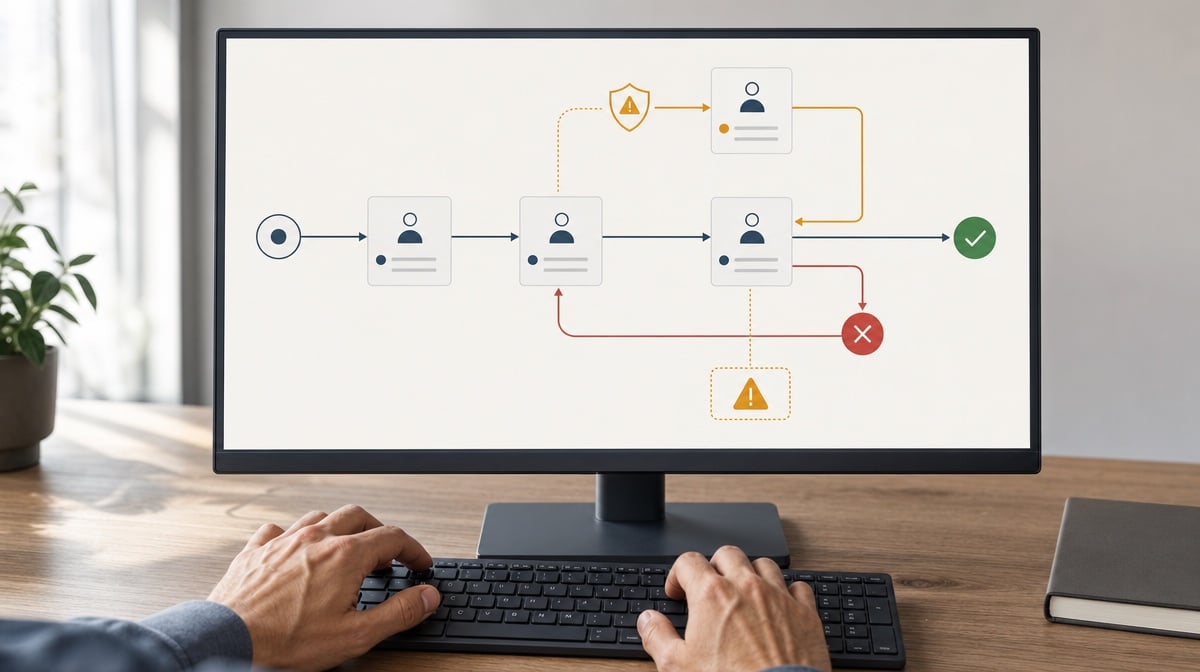
Configurable approvals route decisions according to risk, amount, jurisdiction, business unit, or exception type. The record should preserve the decision, approver, rationale, conditions, delegation, and any return for rework.
Best for: enforcing review gates without treating every case as equally risky.
Best for: enforcing review gates without treating every case as equally risky.
Features
- Conditional, sequential, parallel, and quorum approvals
- Required rationale and evidence for exceptions
- Delegation, out-of-office, escalation, and expiry rules
- Rework loops that preserve prior decisions
Pros
- Applies more scrutiny to higher-risk cases
- Keeps exception logic visible and repeatable
- Reduces approval chasing in email
Cons
- Complex routing becomes brittle without ownership
- Easy delegation can weaken segregation controls
A good approval feature captures judgment, not just a click. Compliance cases often branch because a threshold is exceeded, a conflict appears, supporting evidence is missing, or a jurisdiction imposes a different reviewer. The BPM platform should express those rules clearly enough that a process owner can inspect them and an auditor can understand why a case followed its route.
Demonstrate the normal path and at least three exceptions. Reject a submission, ask for more evidence, delegate an approval, let a deadline expire, and change the risk rating after an initial approval. The system should retain every decision and should not let a later approval overwrite the earlier rejection. Ask how unavailable approvers are handled and whether a substitute inherits only the intended authority.
Our documented workflow layer is useful precisely because it moves approvals out of scattered messages and into the process record. Slack can notify the right person, but the durable decision, supporting evidence, and reason should remain attached to the controlled case.
Demonstrate the normal path and at least three exceptions. Reject a submission, ask for more evidence, delegate an approval, let a deadline expire, and change the risk rating after an initial approval. The system should retain every decision and should not let a later approval overwrite the earlier rejection. Ask how unavailable approvers are handled and whether a substitute inherits only the intended authority.
Our documented workflow layer is useful precisely because it moves approvals out of scattered messages and into the process record. Slack can notify the right person, but the durable decision, supporting evidence, and reason should remain attached to the controlled case.
Choose it if: approval routes respond to risk, preserve rationale, enforce delegation limits, and keep the complete decision history.
Skip it if: every approval is the same generic task or exceptions are resolved outside the process with no attached explanation.
Bottom line: Approval automation is valuable when it records why the decision was valid, not merely that someone clicked approve.
Skip it if: every approval is the same generic task or exceptions are resolved outside the process with no attached explanation.
Bottom line: Approval automation is valuable when it records why the decision was valid, not merely that someone clicked approve.
Evidence capture and control mapping

Evidence capture collects the files, form responses, attestations, signatures, system values, and linked records that prove a control operated. Control mapping connects each item to the obligation or control it supports.
Best for: building complete, reusable evidence packages during process execution.
Best for: building complete, reusable evidence packages during process execution.
Features
- Required forms, uploads, attestations, and signatures
- Source metadata, record IDs, hashes, and timestamps
- Many-to-many mapping between evidence and controls
- Completeness checks before submission or closure
Pros
- Reduces retrospective evidence collection
- Makes missing support visible before closure
- Allows one item to support multiple controls
Cons
- File uploads without metadata create a new evidence dump
- Duplicate evidence becomes hard to govern without reuse rules
Evidence should be captured at the point where the control is performed, while the context is still available. A screenshot added weeks later may show a system state, but it may not prove who generated it, which population it covers, or whether it was altered. Better evidence includes source identifiers, collection time, owner, period, control mapping, and an explanation of what the item proves.
Test more than file upload. Pull a value from a connected system, complete a structured form, attach a document, sign an attestation, map the results to two controls, and try to close the case with one required item missing. Then replace the evidence and inspect whether the earlier item remains in history. Ask how sensitive evidence is encrypted, retained, redacted, and shared with external reviewers.
We run HubSpot and Google Workspace, so we know evidence often begins in a CRM record, email, sheet, or drive file. The BPM tool should link that source to the control record without forcing uncontrolled copies everywhere. For a wider view of the operating system around those records, see what compliance management includes.
Test more than file upload. Pull a value from a connected system, complete a structured form, attach a document, sign an attestation, map the results to two controls, and try to close the case with one required item missing. Then replace the evidence and inspect whether the earlier item remains in history. Ask how sensitive evidence is encrypted, retained, redacted, and shared with external reviewers.
We run HubSpot and Google Workspace, so we know evidence often begins in a CRM record, email, sheet, or drive file. The BPM tool should link that source to the control record without forcing uncontrolled copies everywhere. For a wider view of the operating system around those records, see what compliance management includes.
Choose it if: the platform captures structured evidence with provenance, enforces completeness, and maps one item to every control it supports.
Skip it if: evidence is just an attachment box with no source metadata, access rules, retention, or control relationship.
Bottom line: Evidence capture should explain what the record proves, not simply store another file.
Skip it if: evidence is just an attachment box with no source metadata, access rules, retention, or control relationship.
Bottom line: Evidence capture should explain what the record proves, not simply store another file.
Deadline, exception, and remediation monitoring

Monitoring features detect work that is late, stuck, skipped, rejected, or outside tolerance. They route alerts and remediation before the missed control becomes a finding or an unmanaged risk.
Best for: finding weak signals early and proving that exceptions were owned through closure.
Best for: finding weak signals early and proving that exceptions were owned through closure.
Features
- Due dates, service levels, reminders, and escalations
- Threshold, rule, queue, and integration-failure alerts
- Exception ownership, root cause, action, and verification
- Trend views by control, team, risk, and period
Pros
- Surfaces risk before reporting closes
- Creates ownership for remediation
- Reveals recurring control weaknesses
Cons
- Too many alerts train teams to ignore all of them
- Dashboards without workflow actions become passive reports
Compliance monitoring should focus attention, not generate a wall of red badges. The software needs a hierarchy that distinguishes an approaching deadline from a missed statutory obligation, a routine rejection from a repeated control failure, and a temporary integration delay from missing evidence. Every serious exception needs an owner, due date, status, remediation path, and closure verification.
Create a test population with one late task, one rejected approval, one failed integration, one missing attachment, and one repeated exception. Verify who is notified, what escalates, whether reminders stop after ownership changes, and how the issue appears in reports. Then close the item without remediation evidence. A strong platform should prevent or visibly flag that weak closure.
Our parent company uses Slack plus a stack of Slack apps, which makes it a useful notification surface. We do not treat notification delivery as remediation. The BPM record must still show ownership, action, evidence, verification, and final status after the alert has disappeared from chat.
Create a test population with one late task, one rejected approval, one failed integration, one missing attachment, and one repeated exception. Verify who is notified, what escalates, whether reminders stop after ownership changes, and how the issue appears in reports. Then close the item without remediation evidence. A strong platform should prevent or visibly flag that weak closure.
Our parent company uses Slack plus a stack of Slack apps, which makes it a useful notification surface. We do not treat notification delivery as remediation. The BPM record must still show ownership, action, evidence, verification, and final status after the alert has disappeared from chat.
Choose it if: the platform prioritizes exceptions, routes them to named owners, and connects alerting directly to corrective action and verification.
Skip it if: monitoring is a static dashboard or a flood of reminders with no risk-based escalation and no remediation record.
Bottom line: The best monitoring feature shows what needs action now and preserves how the risk was resolved.
Skip it if: monitoring is a static dashboard or a flood of reminders with no risk-based escalation and no remediation record.
Bottom line: The best monitoring feature shows what needs action now and preserves how the risk was resolved.
Audit-ready reporting, export, and integrations

Audit-ready reporting turns a defined process population into a traceable export, while integrations bring source data in and send approved outcomes out without breaking identity or evidence lineage.
Best for: answering auditor requests quickly and connecting compliance work to the business systems that create the source records.
Best for: answering auditor requests quickly and connecting compliance work to the business systems that create the source records.
Features
- Population, exception, aging, and control-effectiveness reports
- Exports with identifiers, filters, timestamps, and source links
- API, webhook, identity, storage, messaging, and CRM connections
- Integration monitoring, retry, and service-account history
Pros
- Reduces manual sample and evidence preparation
- Keeps process work connected to source systems
- Supports management review and trend analysis
Cons
- Attractive dashboards can hide weak underlying data
- Poorly governed integrations create silent evidence gaps
A report is audit-ready when every row can be traced back to the process instance, evidence, owner, decision, and version that produced it. Compliance teams need both population-level views and record-level drill-down. The export should preserve applied filters and time boundaries so the reviewer can understand what was included and reproduce the request later.
Integrations are part of this feature because a report is only as complete as its source data. Test a real end-to-end route: create a source record, start the BPM process, transfer identity and key fields, approve the outcome, write the approved status back, and trace the transaction. Then break the connection. The system should expose the failure, retry safely, avoid duplicate actions, and preserve which service account acted.
We run HubSpot, Google Workspace, Slack, documented workflows, and an AI multi-agent setup, so integration quality affects our own ability to keep context intact across systems. We would check every connector for identity, failure handling, audit history, and data minimization before trusting it with compliance evidence. For a practical overview of the automation decision, read what a CEO should know about workflow automation tools.
Integrations are part of this feature because a report is only as complete as its source data. Test a real end-to-end route: create a source record, start the BPM process, transfer identity and key fields, approve the outcome, write the approved status back, and trace the transaction. Then break the connection. The system should expose the failure, retry safely, avoid duplicate actions, and preserve which service account acted.
We run HubSpot, Google Workspace, Slack, documented workflows, and an AI multi-agent setup, so integration quality affects our own ability to keep context intact across systems. We would check every connector for identity, failure handling, audit history, and data minimization before trusting it with compliance evidence. For a practical overview of the automation decision, read what a CEO should know about workflow automation tools.
Choose it if: reports remain traceable to source records and integrations preserve identity, failures, retries, and evidence lineage.
Skip it if: exports flatten away context or connector failures can silently omit records without an exception.
Bottom line: Reporting is defensible when every summary can be drilled back to the controlled work that created it.
Skip it if: exports flatten away context or connector failures can silently omit records without an exception.
Bottom line: Reporting is defensible when every summary can be drilled back to the controlled work that created it.
BPM software must-have features
A good selection process tests the seven features as one connected control system. Audit history without access control records bad decisions accurately. Approvals without version control authorize an unstable process. Evidence capture without reporting leaves proof trapped in individual cases. Use the checks below to evaluate the full chain before you commit.
1. Reconstructable event history
Ask the platform to reconstruct one control from beginning to end. You should see the initiator, responsible person, evidence, field changes, approvals, exceptions, automated actions, final status, and governing process version. Export the result and check that identifiers and timestamps remain intact. If a reviewer needs a separate explanation to understand the history, the record is incomplete.
2. Enforceable identity and access
Verify least privilege, segregation of duties, temporary access, identity-provider deprovisioning, and periodic access review. Test conflicting roles rather than accepting a permissions screenshot. The system should prevent an unauthorized act, record failed attempts where appropriate, and preserve attribution after a user leaves. Shared credentials should never be required for normal process execution or integrations.
3. Controlled definitions and releases
Treat workflow definitions like controlled procedures. Require review, approval, effective dates, version comparison, and safe handling of open cases. A completed process must always point to the version that governed it. A strong platform also supports urgent changes through an explicit exception route instead of encouraging administrators to edit production silently.
4. Risk-based decisions
Model different approval routes for ordinary, elevated, and exceptional cases. Require rationale where judgment matters and prevent the requester from approving their own work. Delegation should be limited, visible, and temporary. Rejections, returns for rework, conditions, and later approvals should remain separate events so the decision story cannot be flattened into a single final status.
5. Evidence with provenance
Require the platform to capture more than attachments. Useful evidence carries its source, owner, period, collection time, record identifier, integrity information, and control relationship. Missing evidence should block or visibly qualify closure. Our own documented workflows connect work across systems, so we would also test whether linked evidence remains accessible without creating uncontrolled duplicates.
6. Actionable exception monitoring
Set thresholds that reflect risk and route every meaningful exception to a named owner. The best system distinguishes reminders from escalations and exceptions from findings. It should connect the alert to remediation, supporting evidence, verification, and closure. A colorful dashboard that cannot launch or track corrective action is a reporting surface, not a complete monitoring control.
7. Traceable outputs and resilient connections
Define the reports your auditors and managers actually request, then build them during evaluation. Trace each row back to its source. For integrations, inspect credentials, data scope, retry behavior, duplicate prevention, failure alerts, and service-account history. Our HubSpot, Google Workspace, Slack, and AI-assisted publishing workflows make this practical point clear: automation is useful only when context and accountability survive the handoff.
BPM software for compliance: frequently asked questions
What BPM features do compliance teams need?
Compliance teams need tamper-evident audit trails, role-based access with segregation of duties, controlled process versions, configurable approvals, structured evidence capture, deadline and exception monitoring, and audit-ready reporting with governed integrations. The features must work together so every control is authorized, executed consistently, evidenced, monitored, and retrievable.
What is BPM software for compliance?
BPM software for compliance is a process platform configured to execute regulated or policy-controlled work. It applies roles and rules, routes decisions, collects evidence, monitors exceptions, and preserves the history of each run. Its defining outcome is a defensible record, not merely faster task completion.
Which compliance features in BPM tools matter most for audits?
Audit trails, version linkage, and evidence provenance matter most during an audit because they let a reviewer reconstruct what happened. Access controls, approvals, monitoring, and reporting are equally important because they show the work was authorized, exceptions were managed, and the tested population is complete.
Does BPM software create an audit trail?
Most BPM software records some process history, but not every history is compliance-ready. Confirm that the trail is tamper-evident, field-level, searchable, retained for the required period, and exportable with actor, timestamp, prior value, new value, process version, and source context intact.
Can BPM software enforce segregation of duties?
Yes, capable BPM software can separate requester, performer, reviewer, and approver roles and prevent one user from completing incompatible steps. The honest limitation is that software cannot fix a poor role design. You still need clear ownership, access reviews, exception governance, and reliable identity data.
Is open source BPM software suitable for compliance?
Open source BPM software can support compliance when your team can configure security, logging, retention, version governance, monitoring, backup, and validated changes. It is not automatically cheaper or safer. The operational responsibility shifts toward your team, so support capacity and control ownership matter as much as the license.
Is free BPM software enough for a small compliance team?
A free edition may be enough to prototype a low-risk workflow, but it is often insufficient for controlled production work if audit retention, granular permissions, identity integration, version governance, exports, or support are limited. Test the required evidence and access model before relying on it for a regulated process.
How do you migrate compliance workflows into BPM software?
Start with one bounded, recurring control. Map roles, steps, evidence, decisions, exceptions, deadlines, retention, and reports before automating it. Reconcile open cases, preserve legacy records, validate permissions and outputs, train users, and run the old and new process in a controlled transition until evidence is complete.
Teams comparing BPM controls with a full GRC platform can use this LogicGate alternatives buyer-task scorecard to test procedure execution, evidence, and implementation lift.
Compare more tools on the software alternatives hub, where every Bizmanualz comparison page is grouped by category.




