««Blog Home

Shailesh Panth's Blog Posts

I've been with Bizmanualz since late 2004. Here, I've managed consulting engagements and have been a part of several process improvement projects. Currently, I focus on Internet marketing and work towards continually improving the bizmanualz.com website. Professionally, I've always been involved in marketing and publishing. I love the Internet and have great admiration for the opportunities it has opened and its future potential. So my posts will revolve around the Internet and marketing, but I'll also write about other business topics that I feel will be interesting to our readers.

Hardbound Book Option for Policies and Procedures Manuals

Posted on 01-10-2011

In October, 2009, we discontinued shipment of the 3-ring-bound version of our policy and procedure manuals. It was a relatively easy decision, as more and more of our customers chose the downloadable version of our manuals over the binder. They were pleased to save on shipping and material costs. It also helped that we simplified the download process, thanks to invaluable customer feedback.

Hardbound Books for Policies and Procedures

Prior to October, we began publishing most of our policies and procedures manuals in hardbound form, similar to a textbook, and made them available for sale through online retailers. So when we started receiving enquiries about “hard copy” versions of our manuals in recent weeks, we decided to offer the hardbound procedures books as add-ons.

You can now buy (for an additional $100 per) a hardbound procedure book as an add-on to nine of our policies and procedures manuals and the popular management  procedures bundles. The content of each hardbound book is identical to the MS-Word manual you download when you purchase it in electronic form.

To buy the hardbound books, simply choose the appropriate option (Download Only vs. Download + Hard Cover Book) when you place the product in your shopping cart.

Our goal is to ensure your satisfaction by providing the delivery option you desire. We won’t be selling the hardbound books as stand-alone products on our website, but they will continue to be available from online retailers like Amazon.com.

Safe Online Shopping – Vigilance is the Key!

Posted on 12-10-2010

Recently, I was looking for a new camera. I was researching various models when I came across a few websites that listed them at unbelievable prices! Excited but skeptical, I dug down more and discovered these websites were shady, at best. That is, something gave me the impression they weren’t entirely trustworthy. I settled on a site with an established reputation — Amazon.com — and purchased the model I liked for what I thought was a fair price.

I’ve been buying online for a number of years. And, regardless of the current state of the economy, more and more people are buying online, too. According to one estimate, 60% of consumers shop online at least once quarterly.

As most of us are becoming more familiar, and comfortable, with purchasing from websites — as our numbers continue to grow — questionable or outright illegal selling practices are also on the rise. How do we know that the websites we’re buying from are legitimate?

Here are a few things you can check for before you make the decision to buy from any website.

1. Detailed Information

One of the most obvious signs of a website’s sincerity and competence is easy availability of information. Unless you have something to hide, there’s no reason to skimp on such things as detailed product descriptions, delivery information, pricing, and even company information — the company’s history, physical location, and a variety of ways (names, e-mail addresses, phone numbers, etc.) of contacting someone at the company.

A somewhat important, but often overlooked, detail is a website’s “whois” domain registration information, on registrar sites like Godaddy or Network Solutions. Most of the shady websites I encountered had their domain owner information masked under private registrations.

Always feel free to email or call the company to get an idea about their business practices or customer service standards. See if you get hold of a “real” person or if you’re just sent to voicemail.

2. Recognized Brand

Most big-name, well-known online retailers like “Amazon.com” or “Buy.com” are safe bets, as are websites recommended by people you know or the ones  you have previously bought from (and didn’t have any complaints about). I say “most” because in rare instances, a third-party crook could be enticing you to visit a make-believe website simply to steal (or “phish”) your information.

Make sure that the address bar of your browser always begins with “http://subdomain.name-of-the-retailer.com”, where “subdomain” is “www”, “store”, or something similar. Avoid shopping from websites that have an IP (internet protocol) address — usually four sets of numbers — following the “http://” in the address bar (e.g., “http://123.456.789.012/”).

3. Encrypted Data – Secure Transaction

When you shop from a website, all information you enter (like your contact and credit card information) are transferred from your computer to their web server. You want this transfer to be encrypted and secure. That’s what the SSL (secured socket layer) certificates do, so that a third-party cannot easily “eavesdrop” on your transaction and steal your personal information.

There are two ways to ensure that a website has SSL certificate installed. First, look for “https://” in the address bar, especially when you’re in the area of the website where you’re asked for sensitive information, like the shopping cart checkout.

Second, look for a padlock icon either on the address bar or towards the bottom right of the webpage. Many sites also use logos of SSL providers. Feel free to click on those logos to verify proper encryption.

4. Clean Record – Assurance is the Key

Other things to look for are the company’s record. Check to see if the company is a member of the local Better Business Bureau. If it is, you can check for any complaints against the company and, if there were, how they handled those situations.

Also look for website reviews online. Keep in mind that sometimes these reviews can be skewed by a small number of dissatisfied customers, or jealous competitors, but look for the reviews themselves to see if they’re consistently good or bad. Consistently poor reviews indicate potential problems or a pattern of misbehavior within the company.

5. Customer Satisfaction Is Our Primary Goal

We take your shopping experience very seriouslySafe shopping at Bizmanualz.com

Here at Bizmanualz, we’re mindful of the concerns our customers have about online shopping. We are proud of, and deeply thankful for, the trust thousands of customers have bestowed upon us over the 15-plus years we’ve been in business. We adhere to strict website security standards and take your privacy very seriously. Shoppers recognize this and, as a result, customers from around the world visit our website, view our samples,and buy our products.

We’d love to hear from you about your online shopping experiences, both negative and positive. Also, if you have any questions or comments about our own online security standards, please feel free to call us at 314-863-5079, contact us online, or leave a comment.

Thank you, and happy holidays!

We Are Moving!

Posted on 09-28-2010

After about a decade in Clayton, Missouri (a St. Louis suburb), Bizmanualz is moving today. Moving isn’t an easy project, as many of you (I’m sure) are aware.

Our phone lines and internet connectivity may be intermittent for most of today and tomorrow, September 28 and 29, so bear with us if your phone call goes unanswered or your emails are not returned soon enough. The best way to contact us during the move is through our online contact form. Note, however, that our website servers will be unaffected and online orders will go through as usual.

Our new address will be:

4633 World Parkway Circle, Suite 1
St. Louis, MO, USA 63134

Our phone numbers, etc., will not change.

This move is necessary for various business reasons. The building we’re moving into belongs to the University of Missouri-St. Louis (UMSL) and houses UMSL’s Small Business and Technology Development Center, which is supported by the IT Entrepreneur Network. As we work toward the release of our policy and procedures management software, this support network will be extremely important and beneficial for us and, more importantly, our customers.

We’ll certainly miss the extraordinary view from the 22nd floor of the Sevens Building, but the new building is very near the Lambert-St. Louis International Airport and our fellow tenants are startups or small businesses in the IT, biotech, and consulting sectors.

The sense of camaraderie among the different businesses is strong and the building is ideal for technology infrastructure and collaborative work. All this, we hope, will help our software venture succeed.

We’ll keep you posted as we settle into our new workspace. It’s exciting!

New Website Lets You Buy Individual Policies Procedures Templates

Posted on 09-20-2010

“Can I buy just the one procedure I need right now?”

We’ve been hearing this question quite often and our standard response has been that we don’t sell procedures separately. It seemed to make sense that companies should have a range of policies and procedures on hand. After all, everyone thinks in terms of systems of interconnected policies and procedures, don’t they?

Then we thought, “Why not give our customers what they want!” After all, all our policy and procedure manuals have a collection of Microsoft Word files — procedures, policies, and support documents (forms, checklists, etc.). If our customers want to buy the documents individually, why not make it possible?

That’s how www.policiesprocedures.com was born. We essentially took procedure files from seven of our policies and procedures manuals and made them available for sale individually, so now you can buy and download one or more of these 200+ policy and procedure templates from the new website.

Download Policy and Procedure Templates

If customers could buy individual procedures à la carte, one obvious follow-up question was, “Why would anybody need to buy an entire manual?” Simple — because they get more. Not only more procedures, but supporting content — in short, a system of policies and procedures. In the “real world”, policies and procedures don’t exist in isolation. They interact, as the ISO 9001 points out, simply but eloquently.

Each of our policy and procedure manuals has a section on Manual Preparation, as well as a sample Manager’s Manual (and often a detailed guide or handbook). If you purchase the HR Procedures Manual, for instance, you get 35 HR procedures, a free Employee Handbook, a sample HR Manager’s Manual, links to dozens of Federal HR posters, and more than 50 sample job descriptions!

From a cost-to-value standpoint, once you exceed a handful of procedures (10 or more), it makes sense to purchase the entire manual. However, if you just need a few procedures to fill out your quality system, your accounting system, or any system you have in mind, the new policy and procedure download site may be exactly what you need.

So, visit our new site. Scroll or browse around and buy what you need. If you have any questions or comments, please let us know — we’re more than happy to help!

Green Initiative: A Great Time to Buy Policies & Procedures

Posted on 04-05-2010

What would you say if I told you that by saving time and paper, you can save a bundle of money, too?  Well, that’s exactly what Bizmanualz is offering in the month of April.

Last week, we launched the “Bizmanualz Green Initiative” to encourage you to download our products and save paper and fuel. (Did you know there’s about a ream of paper in each of our printed products? That’s close to six pounds!) By downloading your policies and procedures documents, you save time.  And during April, downloading saves you money, because we’re discounting all download-only policy and procedure manuals. Now that’s a real win-win situation!

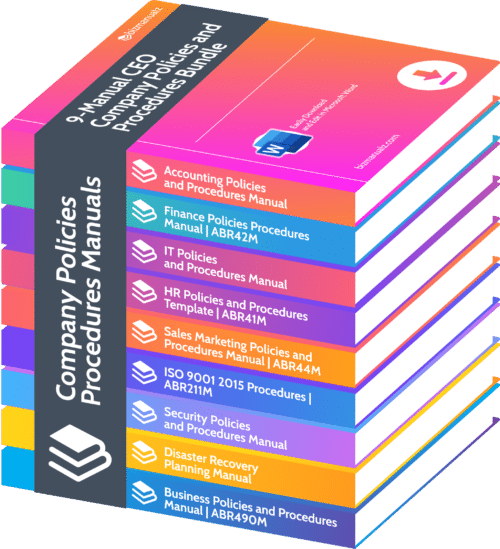
CEO Company Procedures Series

Here’s how the Bizmanualz Green Initiative works: We are offering $100 off any procedures manual you purchase as “download only”. Given that our average manual is over 500 pages long, we’re talking about saving a significant amount of paper! And, since we don’t incur material, processing, and shipping costs when you download, we’ll pass along the savings to you, our customer!

What does this mean? You save on every manual you purchase! In other words, save a bundle when you buy a bundle!

When you purchase the 9-manual CEO Company Procedures Series, you’ll instantly save $900 off an already heavily discounted price. Similarly, when you buy the 5-manual CFO Accounting Procedures Series, you save an additional $500. Even if you’re not ready to buy one of the Procedure Series, you still save $100 for each “download-only” individual procedures manual that you purchase.

Bizmanualz Green Inititative

If you’re thinking about starting your policies and procedures project, this is the best time to do it! The Bizmanualz Green Initiative runs during the month of April only! The incredible savings won’t last long!

Thoroughly researched, complete, and easily editable policies and procedures from Bizmanualz save you countless hours of research and writing time. Why start from scratch when you can get expertly assembled content at your fingertips within minutes?

Like to see what’s in our manuals? Download a free sample. If you have any questions, we’re here to help. Simply call (USA toll free, 1-800-466-9953; outside the USA, 314-863-5079) or contact us online.

Hurry! Buy your policies and procedures manuals from Bizmanualz today!

Top 10 Free Web Resources for Businesses

Posted on 01-15-2010

The Internet is great, isn’t it? You can do so much with it. More importantly, a lot of what you can do is free. Depending on your goals and requirements, some of these tools may require some knowledge of HTML but, for the most part, they do their jobs quite well. Some of the best “freebies”, listed in no particular order, are:

google-docs
1. Google Docs – Online Office Applications (docs.google.com)

Google Docs is Google’s free web-based office application suite. It lets you create, use, and share documents, spreadsheets, presentations, and forms (for surveys and data collections).

2. AVG – Anti-Virus Tool (free.avg.com)

avg

AVG offers a range of anti-virus and internet security software tools and compares favorably with other highly regarded players, like McAfee and Symantec. AVG’s free version is for individual users, which means you can’t technically use it for your business; see AVG’s web site for terms and other details.

3. Mailchimp – Email Marketing (www.mailchimp.com)

mailchimp

You’ve identified potential customers for your business. You also have a number of organizations that you’re doing – or have done – business with. If you need to get in touch with your customers and prospects and track how well your emails are performing, you’ll need email blasting software. Mailchimp does that — and more. An account with up to 500 email addresses is free.

4. WordPress – Blogging (www.wordpress.org)

wordpress1

Social media — in particular, blogging — is the rage not only for individuals, but also for businesses. If you want to blog without going through the hassles of installing software on your own website, go to http://www.wordpress.com. However, if you want to take full charge of the blogging process and make it part of your own website, WordPress, the open source and free blogging tool, is your best friend.

A brief side note about Wordress is warranted  here. Our own Bizmanualz Blog is also powered by WordPress, which is a remarkably easy tool as evidenced by the fact that even my 13 year old son uses it to maintain his Yugioh Cards blog. And he was only 12 when he started.

5. Gmail – (mail.google.com)

gmail

Online email that you can access anywhere, at any time — that’s Gmail. You can’t go wrong with Yahoo! Mail and Hotmail, either, but I like Gmail, primarily because I have a Google account and I’m using it all day, every day. And, as long as I’m logged into Google, it just makes sense for me to use Gmail. Another Gmail plus, in my estimation — the filter setting and labeling features of Gmail are very intuitive and easy to use.

6. Xobni – Outlook Tool (www.xobni.com)

xobni

For those of you drowning in the flood of emails in your Outlook “Inbox”, Xobni works wonders. It not only indexes your emails for really quick searching — it also shows the “conversations” you’ve had with the sender of any email, let’s you view their Facebook or LinkedIn profiles (based on their email addresses), and shows interesting and potentially useful tidbits, like who you respond fastest to, or who sends you the most emails.

7. OpenOffice – Office Productivity Suite (www.openoffice.org)

open-office

Need something that pretty much does everyting that Microsoft Office does, only for free? Well, then check out OpenOffice – your new best friend (but don’t tell WordPress). This Open Source office productivity suite has robust word processing, spreadsheet, database, and presentation tools, without the enormous overhead of MS-Office. It has built-in Adobe PDF file export capability, too.

8. FeedBurner – RSS Feed Management (www.feedburner.com)

feed-burner

FeedBurner is another Google offering — one that makes managing and distributing RSS feeds a breeze! FeedBurner is invaluable for promoting your blogs and podcasts. It lets you see how many people subscribe to your feeds and it has a feature that updates readers via email each time you update your company blog.

9. Joomla! – Content Management System (www.joomla.org)

joomla

A very powerful Open Source content management system (CMS), Joomla! lets you build websites and web applications. It’s designed to help organizations of all sizes, whether they’re building a website, a news portal, or an e-commerce site.

10. Bizmanualz – Policies and Procedures Samples  (www.bizmanualz.com)

free procedure samples

Call it a shameless plug, but the company I work for provides some of the best written — and most complete — policies and procedures manuals, handbooks, and documents. And, we provide free sample procedures from every one of our 12 manuals! If you’re looking to write new – or enhance your existing – policies and procedures, you’ll love what we have to offer.

* * * * * *

In addition to the ten resources listed above, there are many, many more on the web — free and low-cost — that offer tremendous value to businesses of every kind and size. Have you used any of the tools in this list? What’s been your experience – good, bad, or other? What free web tools do you use that aren’t listed here? Which do you find most helpful?

Bringing Home Process Improvement Ideas

Posted on 08-10-2009

At work, we talk a lot about minimizing waste, improving processes, and implementing best practices. Lean and five-S are common words in our collective vocabulary. Everyone at the office is usually on the lookout for improvement opportunities and we document small improvements as Kaizens. There are times when I find myself using lessons from work at home. I’m not really thinking of work, per se, but rather about ways to do things better and make my life easier.

The key is to be prepared and execute your responsibilities with minimal waste and maximum efficiency. That’s precisely what Bizmanualz’s products and services are intended to do to our customers.

I recently moved. In order to upgrade my 13-year-old son’s room, my wife and I bought some new furniture packaged in flat boxes. As the “head of the house,” the bulk of the assembly task fell on my shoulders. It’s not that I haven’t assembled furniture before, but with several different items to make in a short period of time, I started to look for ways to save time and to better prepare to finish a piece of furniture.

I ended up using several learning points from work to do a masterful job at assembling the furniture. The work lessons are in parentheses:

  1. Assemble the furniture as close as possible to where it finally sits. (Don’t deviate from your goals)
    Obvious as it sounds, I have suffered in the past by having to move large pieces of finished furniture from one side of the room to the other.
  2. Make sure you have all the parts BEFORE you begin the assembly. (Plan well before you begin the project)
    What if you are 70% done and realize that you are missing a cam screw or a specialized screw? It’s better to know that in advance so that you’re not waiting for replacements to arrive via mail next week.
  3. If any additional tools will save you time, get them! (Look for tools and methods to increase efficiency)
    Those Allen wrenches work great, but if you have scores of screws to tighten, an electric drill with the appropriate bit will come in very handy.
  4. Read the instructions. Visualize in your mind how the final piece will look like. (Use the procedures in place. Understand your final state).
    Don’t skip steps. That could mean rework, unscrewing, unfastening and lots of wasted time and energy. Understand how these steps will lead to the finished product.
  5. Keep everything close. (Don’t deviate from your plan)
    Arrange your tools, parts, screws, nuts and bolts close so that you are not wasting time running around to get what you need. Also don’t be in a position where you are searching for things that might have gone under the packaging or containers.
  6. Look for ways to improve. (Look for continual improvement opportunities).
    Learn constantly. If you think of a better way to do something, by all means, use that learning.

Granted, some of the things above might be derived from pure common sense, but, as the saying goes, common sense is not always very common. Bringing work home may not be exciting, but bringing ideas from work may not be a bad idea after all!

Do you bring home tips and ideas from work? If so, please share them. We’d love to hear your stories!

Do I Tweet or Do I Twitter?

Posted on 07-31-2009

What are you doing?  That’s what Twitter’s slogan used to be. Until Tuesday, that is, when the mega microblogging site unveiled a new home page that is quite different from the one we’ve all come to expect.

Over the past few weeks and months, there has been a lot of chatter going on about how Twitter might challenge Google for the usefulness of its search function. Unlike the bot- or spider-generated search indexes for the big three search engines (Google, Yahoo, Microsoft), Twitter’s search result is based on human reporting. And, the logic goes, the human touch makes Twitter’s search results more relevant.

Fair logic, but somewhat difficult to embrace. The human brain is (I would hope) far more powerful than a desk calculator. Yet, when it comes to adding or multiplying six-digit numbers, we still use the calculator. Besides, the search engine spiders have become very smart over the years, capable of understanding the nuances of context, relevance and appropriateness.

Which brings us back to the home page change at twitter. Instead of the regular login boxes, you now see a search box. Instead of an explanation of what Twitter is, you now see a short tag line that asks you to “share and discover what’s happening right now, anywhere in the world.” And on the bottom of the cleanly designed page, you see trending topics by the hour, day, and week.

The fact that twitter doesn’t describe what it is, is perhaps testimony to the abundance of press exposure it has received in recent months. The brand identity firmly established, it can now afford to focus on the call to action. Once you sign in, however, it’s no different than what it was before.

It will be interesting to see how Twitter emerges as an alternative search engine. There are certain topics, especially current events, for which it might indeed be a better search platform. With a plethora of new users joining Twitter every day, the information bank will only become bigger. However, I am not willing to abandon Google any time soon. I’ll still tweet, but I may not be ready to Twitter yet.

As for what I am doing, I am going back to Googling this garden tool that I’ve been meaning to buy for some time now.

Person’s Mistake or System’s Fault?

Posted on 07-24-2009

Last week, our Chris Anderson wrote a blog post about the root causes of business problems.  In the post, after he listed ten root causes, Chris went on to write, “People don’t make mistakes. Systems make mistakes.”  One reader (let’s call her Rachael) took exception to that statement.  ”Isn’t it inherent for humans to err?”, Rachael asked.

Rachael is right, of course.  As human beings, we all make mistakes (the statement “to err is human” has more than a grain of truth in it).  The bigger question, however, is this: Does the system have policies, procedures, and processes in place that help minimize the likelihood of mistakes?

The example I provided to Rachael was about writing articles.  In the absence of any policy or process for editing and revising articles, the author might not catch his/her spelling errors or typos (humans err – that’s why newspapers used to have proofreaders).  So when customers read the article — multiply the writer’s two eyes by thousands, maybe millions — the likelihood is great that at least one of them will catch the error.

On the other hand, if there is a process in place where a second set of eyes reads the article and necessary corrections are made (or the central idea is validated) before releasing it, the likelihood of mistakes getting out to the reader are vastly minimized.

That’s exactly the process change we implemented here at Bizmanualz, when we realized that our articles or blog posts were sometimes going live with spelling errors, typos, formatting issues, or a confusing theme.  We installed a WordPress plugin (Peter’s Collaboration E-mails) that lets the author save the post as “pending review”.  Editors get an email alert about the article needing review.  The editor can release the article “as is”, release it with minor corrections, or send it back to the author for more comprehensive changes.

This doesn’t mean that mistakes won’t happen.  (You may recall that Chris’s post states that 20% of all errors can be attributed to an individual).  But here too, the system might have a role to play.  Is the individual in the right place? If writing is a requirement for the job, was the individual properly screened or trained?  Of course, there are situations where the person is clearly not qualified to do the job — here, too, the system comes into play (i.e., is the selection process foolproof?).

Quality standards and tools are there precisely to increase the likelihood of positive outcomes.  You may be surprised at how a simple process change can result in a big drop in error rates.

How to Write Policies and Procedures: A Guide

Posted on 07-20-2009

procedure-writing-guideLast week we launched a new product: a procedure writing guide that helps you become familiar with all stages of the policies and procedures writing process. Generally, when you write policies and procedures for your organization, you go through these five stages:

  • Plan
  • Write/Format
  • Implement
  • Communicate/distribute
  • Revise

Our guide, entitled “How to Write Policies and Procedures”, gives you a general overview of policies and procedures development.  It covers topics like purpose, content, organization and revision.  In addition, the guide includes useful discussions and tips, like avoiding procedure writing errors, encouraging the use of policies and procedures, and the importance of management commitment.

At $12.99, this 34-page policies and procedures guide is an excellent value.  Prepared for electronic distribution only, it’s available for instant download as a PDF file.  So, whether you’re thinking about writing procedures or you’re in the middle of a policies and procedures project, we think you’ll find this guide an invaluable resource.

Best Deal: 9-manual CEO Series!
Contact Us